Skip to content

Category: Search and Discovery

Seeing Search Boxes

We’ve all heard that single search boxes are the only way to go when it comes to building search interfaces. We’ve probably also seen students who will bypass all relevant information or links on a page and zero in on whatever looks like a search box. But I never put these two pieces of knowledge together before. Not, that is, until just this morning as I was driving in to work. This morning I had a revelation:

Every page with a search box is a “single search box” page.

We may gripe about clutter. We may grouse about having not enough guidance surrounding our search boxes. It doesn’t matter. For people who are primed to search, they will only see the search box anyway. The other stuff may as well not be there. (For those of you getting hot under the collar like I would be if I were reading this right now? Hang on, I’ve got something for you in a minute.)

Here’s my Parable With Two Screenshots. We have several lists of electronic resources on our library’s website, each of which has a “Search” and “Browse” function at the top.

We’ve gently corrected students who started entering their topic keywords into the “search” box, but haven’t been able to get rid of the box entirely. “Oh those kids,” we thought. “Desperately seeking search boxes again.”

Then last week I had a professor call me in consternation that the library systems were telling her there was nothing on her topic. Turns out… she had entered her topic terms into that search box.

Ok, ok, so that one’s legitimately confusing. We’ve realized that while the existence of the box is out of our control, the wording next to it isn’t. Soon it’ll say something more like “find a database.” Still, this is only the first half of the parable, and probably not the most relevant half at that. It’s mostly relevant in that its proximity to the second half made everything come together in my head. And so, on to the second half…

For the past two weeks, I’ve also had students from a lit class coming to see me, all of whom want “something, anything from the last ten years written about [insert famous theme] and [insert famous piece of literature here].” Granted, searching for themes is hard. Even something standard like “performative identity” requires thinking up all kinds of synonyms (body, fashion, display, etc). But what struck me is that as soon as I set the date limiter on MLA International Bibliography, each student gasped in shock and surprise. This limiter is not hidden. It is three lines, or 1 inch, below the search boxes. And yet it had been totally invisible to my students as they focused all their energies on those tantalizing search boxes.
So now back to my revelation (and those of you who’ve been thinking “But we simply can’t do away with advanced search pages! Single search boxes aren’t always the way to go!!” can tune back in now). Here’s what I now think: We can feel free to have advanced search pages on any interface that we think functions better with all of those options laid out. It doesn’t matter. People who only want a single search box will only see that search box anyway. People who want the options will see and appreciate the options. Everybody happy.

7 Comments

Report from SirsiDynix on Open Source ILS Platforms Leaked… Oops

Stephen Abram has lived a bit of a charmed life. He’s somehow managed to be the Vendor That Everyone Kind Of Thinks Has Our Best Interests At Heart Even If He Is A Vendor. Meanwhile, he’s also headed up the Special Library Association. Meanwhile, he’s also been a sought-after voice in the library community. And did I mention he’s done all this while being a vendor? No small feat.

There’ve been some bumps along the way, to be sure (I’m lookin’ at you, SLA realignment name change drama), but for the most part he’s managed to keep people from looking too closely at his vendor status.

And then he authored a report on open source ILS platforms.

From WikiLeaks:

This document was released only to a select number of existing customers of the company SirsiDynix, a proprietary library automation software vendor. According to our source it has not been released more broadly specifically because of the misinformation about open source software and possible libel per se against certain competitors contained therein.

SirsiDynix is currently embroiled in a lawsuit with one of the largest public libraries in the U.S. (Queens Borough, NY) and this document does illustrate the less-than-ethical nature of this company.

The source states that the document should be leaked so that everyone can see to what extent SirsiDynix will attempt to spread falsehoods and smear open source and the proponents of open source.

I’m sure that others far better versed in these matters will write cogent and thoughtful responses to the document itself. I know of an effort underway to mark up the report and respond with some actual research to back up the counter-claims. With all of this serious thinking going on, I think I’ll just play court jester and point out my four favorite bits of the report.

  1. The ubiquitous Asian woman who appears on every page and on the cover sheet, and always next to Abram’s name, making it seem like maybe that’s what he looks like.
  2. The totally information-less charts that appear on page 4 straight out of the “If there’s a chart for it that makes it fact” school of rhetoric.
  3. “Proprietary software has more features. Period. Proprietary software is much more user-friendly” (p. 6).
  4. “Rogue programming teams may decide to create a better version, while exclaiming ‘Damn the torpedoes'” (p. 6). (I just love the “damn the torpedoes” phrase.)

Dear Stephen, we’ve seen your infomercial colors now. Next time you write such a report, please cite some sources. What you have here wouldn’t last 5 minutes on Wikipedia.

2 Comments

Crazy Thought

Thinking about the things that I like about Google or about library databases in comparison with each other after my last post, I realized that library databases need crazy-easy URLs. I don’t click through 2 or 3 layers of a website to get to Google. I type “goo” into my address bar, which fills in the rest, which takes me to Google. If I could type “MLA” into the address bar and get to even something as complicated as “MLAbib.csa.com,” life would be easier. Sure beats my current option:
http://www.csa.com.ezproxy.carleton.edu/htbin/dbrng.cgi?username=carl&access=[gobbledygook]&db=mla-set-c&adv=1

If I could also set a cookie that would authenticate me from my own home computer, life would be even easier.

Still need to work on the seamless access to full text part of the equation, though.

2 Comments

I Really Wish It Were Easier

Tipping point: reached.

Up until maybe the middle of last year, it was pretty easy not to worry too much about the problems of doing “real” library research on the free web. “The kids are doing it” was a phrase that simultaneously helped us to worry about the state of information literacy in this web-ified era and to dismiss the problem as one that “the kids” would outgrow, like braces or a lisp or chicken pox, as they became better versed in scholarly research practices.

Well, it’s not just the kids any more, folks. Enough journal publishers have opened up their indexing and abstracts to the free web that it’s now possible (especially in some fields) to actually do “real” library research on the web. And so people are doing just that. This year, our new faculty orientation session brought questions about Google-friendly access right to our door-step in a big way, and part of this rather disorganized thread on FriendFeed brought it up again.

And yes, ideally everyone could use one nice, big, easy search mechanism to do everything from the most broad to the most narrow topic and then get instant access to the full text of whatever they find. Too bad that’s impossible.

Google is more familiar and forgiving, it’s faster, and there’s a lot of good stuff in it (particularly if you’re searching for something that hasn’t had any controlled vocabulary assigned to it, yet). But currently, disciplinary databases do a better job of collocating like items based on something more robust than the author’s choice in vocabulary and PageRank. Currently, disciplinary databases do a better job of allowing scholars to leverage their disciplinary vocabulary and a better job of helping novices stumble upon key vocabulary terms. Currently, disciplinary databases are the only things that can offer relief to my students who say that there are just too many false hits in everything from Google to JSTOR (free text search may be what they’re used to, but they’re often relieved to leave it behind as soon as they’re shown controlled vocabulary).

But all that aside, neither option does the “access to full text” piece of the equation very well. Unless your library subscribes to the publisher versions of pretty much every eJournal out there (an expensive proposition) Google can’t actually help you get to whole swaths of full text, and even then you’d have to be on campus or logged in to your library’s proxy server or something. And even if researchers are in a disciplinary database, they’ll still often have to step outside of that database to get the full text, and while a link resolver is a wonderful thing, it’s still a long way from being a perfect solution to this problem. Either way this lands you at the A-Z list figuring out if we have access to the particular issue of the particular journal you want.

I wish it were easier. I wish access issues didn’t make researchers jump to the conclusion that we’re “hiding” stuff from Google, or that we’re being unnecessarily silo-ish, or that indexing is over-rated, or that you have to do “complex” searches in library databases. I also wish that we could bringing together disciplinary databases in ways that allow easy cross-searching without giving up the time-saving specificity of disciplinary focus and vocabulary.

Right now it feels like we’re balanced precariously on that tipping point with a precipice on each side.

7 Comments

The New New OCLC

Just when you thought you’d gotten to know the new OCLC, it shakes things up again. OCLC is now in the ILS business and WorldCat Local is now free to FirstSearch subscribers.

My first thought on reading about all of this yesterday was that all those pilot WorldCat Local schools must be steamed that this is now free.

My second thought was almost equal parts pleased and worried. I’m pleased that this is yet another competitor against the current lumbering giants in the ILS market, and I like the idea that (if I understand correctly) this will add a hosted option to the ILS market. (Hosted options aren’t always the best, but I like the idea of having it available as a choice for people.) On the other hand, this means that that pesky new policy on the transfer and use of OCLC records really wasn’t just about protecting a bunch of member-produced data after all. There were bigger plans afoot, and these plans involved leaning even farther toward the vendor model rather than the service model. And if OCLC is a vendor rather than a service, that new policy feels even more like a land-grab rather than an effort to protect member investments.

My third thought, on further reflection, will hopefully be less nebulous and conflicted and more grounded in fact and reasoning.

Leave a Comment

Anti-Choice (or Pro-Simplicity) is Nice When You Can Get It

We’re knee-deep in our MetaLib implementation project, and as we do our best to make decisions about our interface, we keep removing all the extra links and options and tabs that clutter up the default interface. Do we really need two different ways to get to the database list? Do we really need both Simple and Advanced Search options when the Advanced search only adds one search box to the already existing search box? Do we really need a button to switch languages when we only have an English interface? Little by little we try to strike a balance between simplicity and function. One by one, buttons and options and tabs disappear and the interface starts to make a little more sense.

Then, today, I watched a TED talk in which Barry Schwartz talks about his theories about how increased choice does not, in fact, make for better decision-making outcomes. Apparently greater choice means (unsurprisingly) more brain time spent making decisions, but even beyond that it raises our expectations that the outcomes will be wonderful. When the outcome is just good and not absolutely amazing, we’re more easily disappointed now that our expectations have been raised. So while our decisions may actually be better, we’re less happy. If you want the long version of these theories, he has a whole book out: The Paradox of Choice. (Also, if you watch the TED talk you’ll notice at about minute 6:10 that even TED people don’t get wifi at their conference hotel. This makes me feel just a teensy bit better about every conference I’ve ever been to. But I digress.)

Being a librarian with search interfaces on the brain, I couldn’t help but think about all those calls for beautiful, simple, Google-like, single search boxes. It’s not a perfect analogy, but in both cases people hope that by reducing options, the experience will be improved. With the single search box, there’s never any doubt what you’re supposed to do or how to do it at least minimally effectively. It’s such a wonderful goal.

But there’s a catch. The simpler the interface is, the more powerful the behind-the-scenes mechanisms have to be. They have to do more interpretation of search terms, smarter retrieval, more robust relevance ranking. If I can’t specify how things should look when I’m done searching, then things had better be done in a way I would have anticipated to begin with or I’ll get frustrated with the lack of options to “fix” my results. Google didn’t get famous because it had a single search box. It got famous because that single search box yields consistent results based on an algorithm that’s incredibly complex and equally secret.

So while I’d love to be able to reduce our interface down to just a couple of well-chosen elements, we still have to compensate for the fact that the behind-the-scenes mechanisms just aren’t up to that kind of challenge. And so we’re left doing our balancing act: how much can we strip away in the interests of removing excess choice, and how much do we have to leave so that people can manipulate the system enough to get it to spit back results they can use.

5 Comments

The OCLC Kerfuffle: In which I write much but come to few conclusions

I’ve been watching the OCLC policy change discussion unfold slowly over the last few weeks, and I’ve got to say, I’m flummoxed. On the one hand, I don’t like the new license. I agree with most of what’s been written about the potential dangers it poses to innovation and the odd irony that member institutions will pay large sums of money to hand over their data to OCLC so that OCLC can lock it down for them. (I’ve included links to key posts and documents down at the bottom of this post, for those who’d like to catch up.) On the other hand, who am I to claim that OCLC has no right to try to sustain itself financially?

For me, the topic hinges on three main questions:

  • Is this really a change, and if so, how significant of a change is it?
  • What do they really mean by “Reasonable Use”?
  • And what does this mean for those of us that aren’t in the business of creating and maintaining bibliographic systems?

So first of all, is this really a change?

Karen Calhoun of OCLC has written more than once that the new license is just a clarification of the old license and that it serves to protect the community’s investment in the WorldCat records. She commented on Aaron Swartz’s blog post that “the policy carries forward the principles, if not the wording of the current Guidelines, which have been in place since 1987.” Later she wrote on her own blog at length and again asserted:

The difference is not in the principles, then, but the environment in which the principles are applied. The Guidelines [meaning the old policy] came from the limited data sharing environment of the 1980s. The updated policy’s landscape is the Web and the incredibly dynamic data sharing environment it represents. (cite)

In other words, the old policy protected community investment in the cooperative at a time when mass data sharing was not the norm, and the new policy protects that same community investment in the current environment where the default assumption on the web is that if there’s a big pile of data out there, anyone who wants to can play with it and make it work for them.

I have no idea whether the old policy felt restrictive 21 years ago, but I know that the new one feels restrictive now. It seems to me that the paradigm shifted right out from under OCLC and that reinforcing the principles of information sharing from 21 years ago is akin to re-inventing the information searching environment of 10-20 years ago.

It also seems to me that if libraries invest time, effort, and money into building a massive dataset, the best return on that investment would be to have people (OCLC or anyone else) take that data and make it work for us and for our patrons. This is what we do when we invest in the stock market, or even put money into savings accounts. We effectively sign it over to whomever can take it and make it work for us. The way this new policy reads, it feels more like protecting our treasures by tucking them into a safe deposit box. We rent the space and gain no interest, causing our “investment” to depreciate over time.

So maybe we’re just protecting OCLC’s investment in our data. Personally, I’d feel better about the whole thing if they just came out and said that.

What about this “Reasonable Use“ clause?

There’s also one clause in the policy that I find disturbingly vague. It’s the clause that defines “reasonable use,” and serves a very similar function in this license as the Fair Use clause serves in copyright law. Here it is:

13. “Reasonable Use” means Use of WorldCat Records that is reasonable for the intended Non-Commercial Use and consistent with the intent of this Policy. Without limiting the foregoing, the term “Reasonable Use” does not include any Use of WorldCat Records that:

a. discourages the contribution of bibliographic and holdings data to WorldCat, thus damaging OCLC Members’ investment in WorldCat, and/or
b. substantially replicates the function, purpose, and/or size of WorldCat. Please see the FAQ for a discussion of Z39.50 for cataloging using WorldCat-derived bibliographic records.

As Greg Schwartz noted on this week’s Uncontrolled Vocabulary, there are a lot of weasel words here. How big, how related in function, and how related in purpose does a system have to be before it violates this clause? And then there are the conspicuous “and/or” weasel words that leave OCLC room to claim license violation if any part of this clause begins to make them uneasy.

Seems to me that the biggest violator of section 13.b in existence right now is the Library of Congress, and that makes no sense at all. But if you think about it, its catalog is massive and exactly duplicates most of the functions of WorldCat. LibraryThing is also massive, but serves such a completely different purpose that I can’t see how it harms the “investment” of the cooperative. If anything, its giving the cooperative ideas about what might be possible in our own catalogs given the data they produce.

Just as a side note, I wonder if they have to grant Google and other search engines the right to crawl WorldCat.org.

Implications for those us in the public services world?

So what. Why do I care? In my day-to-day work, I search WorldCat when I need it, and I’ll continue to do so. I don’t do cataloging work. I won’t be the one deciding whether or not to put the new field that links to OCLC’s license in our records. And I certainly don’t build discovery systems that would make use of WorldCat records.

Well, I worry about two things. First, that this will stall efforts to invent a discovery system that actually works, and works well — one that patrons are happy to use, and one that puts to good use all of the metadata that catalogers put so much time and effort into creating.

I also worry that this move might implode OCLC. It has the chance to take a hard look at its “principles” and come up with creative ways to position itself as the nexis of all bibliographic data on the web, or it could spark its potential user community to rebell and rebuild elsewhere. My favorite analogy for this comes from Steve Lawson’s blog where he writes:

Coincidentally, I was reading Matthew Battles’ Library: An Unquiet History today and came across this interesting tidbit on page 29 about the Library of Alexandria:

In an effort to stop the growth of the libraries at Rhodes and Pergamum, both of which threatened Alexandria’s preeminence, the city’s rulers banned the export of papyrus. The move backfired, however, spurring the Pergamenes to invent parchment (charta pergamenum), which for its strength and reusability would prove to be the preferred writing medium in Europe for more than a thousand years.

WorldCat has been making great strides forward recently, and I would hate to see it shoot itself in the foot over a piece of papyrus. It also has an incredible treasure trove of information, one that would be a shame to have to duplicate, and one that could yield huge dividends if invested wisely rather than stuffed into a safe deposit box.

Or is this the push we all needed?

For further reading:

3 Comments

Drooling over SOPAC – Wondering about Its Inner Pig

I was going to write about scratch paper today (really, I was), but that can wait for another day. Today I’m thinking about Darien Library, Drupal, and John Blyberg’s SOPAC (Social OPAC).

A year and a half ago, when he released the first version of the SOPAC for the Ann Arbor District Library (here’s his blog post), Blyberg’s extensive customizations were definitely cool, definitely innovative, and definitely had potential. He was working hard to put lipstick, a wig, and a dress on his pig. Well, now he’s covered the pig altogether. I won’t get into details (mostly because I only barely understand them myself), but he has coaxed his Drupal-based web site to pull information from their ILS rather than pushing the searcher into the ILS’s environment.

Other people have tried to insert new interfaces between their ILS and their patrons with more or less success, but I think Blyberg has just shown us an example of this type of project that not only works well (drawing on information from the ILS, from a local database of user-generated content, and potentially from a much larger database of user-generated content from other libraries), and is ILS-agnostic, butthat also looks good.

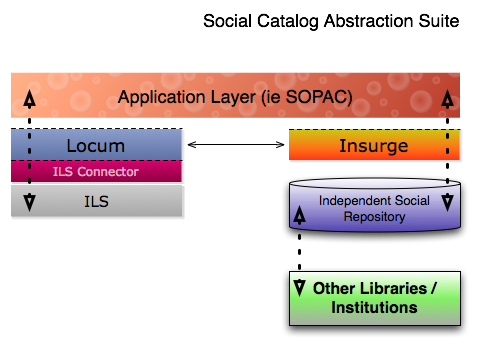
Here’s the diagram he uses to explain where all the information comes from:

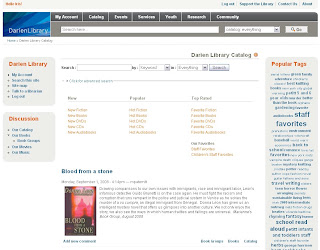
And here’s what the catalog looks like (notice the juicy tags on the left):
When you do a search, results appear in the main content area of this same screen, fully themed to match the site. So beautiful!

To say I’m jealous is an understatement. If we can’t bring ourselves to migrate ILSs, I want something like this. But I do have two reservations: this still requires the discovery layer to harvest and store information from the ILS, and that pig is still under there somewhere. As far as I can tell, the ILS is still locking down untold treasures in the form of data that catalogers have worked so hard to include in our records and it’s preventing us from exploiting that data fully. An actual relational database as the foundation for bibliographic information would make me so very happy. Still, this is really really exciting. I can’t wait to see if other libraries pick up this open source software and continue to develop it further.

Leave a Comment

Linking to WorldCat in Reference Emails.


So here’s the thing. Like many reference librarians, I use WorldCat all the time. And like many reference librarians, I use the FirstSearch version a lot for advanced features and more seamless integration with our local collections than WorldCat.org can offer. For instance, I love the “Advanced Options” under “More Like This” that lets me pick and choose which parts of the metadata were relevant to me and do a more advanced search on just those elements. And sure, the FirstSearch display is a little overwhelming, but part of what makes FirstSearch good for professionals is the huge amount of information displayed for each record. We’re used to the display, so it’s not a problem for us, and often I skim through all that information and learn a whole lot about an item in a very short amount of time. Besides, my eyes are trained to take in what I want from that interface and leave the rest. I know where on the page the OCLC number lives, for example, so I only look at it if I want to.

One thing it doesn’t do well, though, is let me link to a specific record. I can’t send a link to a student and say “Here, this is the journal I was telling you about.” I can do this at WorldCat.org, though, and that’s a much better interface for students and faculty anyway. I wish there were a “link to this record” in FirstSearch, or at least a “View this record at WorldCat.org,” but since there isn’t, here’s what I do.

  1. Do all my behind-the-scenes advanced searching in FirstSearch (when appropriate).
  2. Find what I’m looking for.
  3. Do a little happy dance in my chair.
  4. Copy the OCLC number.
  5. Open a new tab and click the bookmark I’ve names “WorldCat Link Base.” This contains the base of WorldCat.org’s permanent URL. http://www.worldcat.org/oclc/
  6. Paste the OCLC number onto the end of that URL and hit enter.
  7. Et Voila! Stable URL to the bibliographic record of whatever-it-is I wanted to send to somebody, complete with a friendly interface.

The trick comes when they’re off campus and don’t have pre-loaded links to our Interlibrary Loan system. I wonder if it’d be possible to go through our proxy server for that. If so, I’ll have to change my link base… Hmm…. things to ponder. And wouldn’t it be nice if I knew javascript and could make a bookmarklet that would do that to OCLC numbers for me, and maybe copy the full stable URL to my clipboard?

6 Comments

These are a few of my favorite things

I found myself listing my three favorite e-resources today. Usually I have trouble coming up with my favorite of anything, but these three popped into my head with little effort.

Ulrich’s
I hate trying to figure out where an obscure serial has been indexed, but Ulrich’s makes this easy (most of the time). But even beyond that, I absolutely love it for solving a major problem for my students. For the last two years, I’ve taught this as a cheat sheet of “print sources.” I had the hardest time coming up with an easy way to explain how to tell if what you’ve found online (on the free web or through our bibliographic databases) counts as a “print source” when print vs online is becoming a more and more murky distinction every year, and really makes no sense at all to students (or librarians, really). Students were paralyzed thinking they couldn’t use eJournals because their professors had banned “web sources,” and professors wondered why their students were using out-of-date and only-barely-relevant journal sources in their papers. It was because their poor students had been confining themselves to our print journal collection, which is only a fraction of our total journal collection. So now I get up in front of a class and show them the cheat sheet. If you can find a publication name (and I show them how to hunt one down), look it up in Ulrich’s. If it is listed, it counts as a “print source.” Problem solved.

OED
I love word histories, and this is the most comprehensive dictionary of word histories. Ever. I don’t often have much call to use it in my day-to-day work, but I love it for all those late-night “I wonder when we started using ‘research’ as an intransitive verb” moments I have. It has also solved many a word squabble in my family (which has at least 4 discussions about word usage, etymology, or relationship over the dinner table each week).

MLA International Bibliography
I love this because it’s such a treasure-trove of articles, and (please don’t laugh) because it’s incredibly quirky. I know that we’re supposed to love it when students can use resources on their own. You know… usability and stuff. But this thing is a bear to use well, and I’m pretty comfortable with it, which makes me feel useful. And I love feeling useful.

3 Comments
css.php