Skip to content

Category: Search and Discovery

Updating URLs after transitioning to the new Primo interface

If you work at a library that has or soon will be transitioning to the new Primo interface, and if you have research guides or other web pages that link into content from the old interface, read on because you may want to consider doing a URL updating project even though there’s an automatic redirect.

First of all, if you link to searches done in regular Primo (not the journals a-z list), those apparently don’t redirect. If you link to items from regular Primo or to Journals list items or searches, there’s a redirect but it takes a long time to resolve — about 25 seconds in my library’s configurations. Long enough for me to click a link, get a drink of water from the fountain outside my office, come back, and still wait a bit for the screen to load. (Plus it flashes through a couple of weird pages including a “zero results” page that just isn’t true.) And finally, the old Journals list didn’t have an option to search by ISSN, so many results (like if you’re looking for the journal Science) were pretty messy. The new platform does have an ISSN search, which is far more accurate for direct linking.

Given all of this, I’m updating every URL from our libguides to our catalog, both to make it resolve directly to the new interface and to have journals resolve to an ISSN search whenever possible. If you want to do something similar you can follow (or improve upon) my process.

Learn how to distinguish between old an new URLs.

The main distinguishing features of my campus’ configuration is that the old URLs contain /primo_library/ and the new URLs contain /primo-explore/ instead. In addition, there are three sub-types of URLs that might be useful to know:

  1. Primo Query URLs (the ones that probably won’t redirect)
    1. Old: [your institution].com/primo_library/libweb/action/search.do?…
    2. New: [your institution].com/primo-explore/search?…
  2. Primo single record permalinks
    1. Old: [your institution].com/primo-explore/fulldisplay?…
    2. New: [your institution].com/primo_library/libweb/action/display.do?…
  3. Primo Journals A-Z list
    1. Old: [your institution].com/primo_library/libweb/action/dlSearch.do?…
    2. New: [your institution].com/primo-explore/jsearch?…
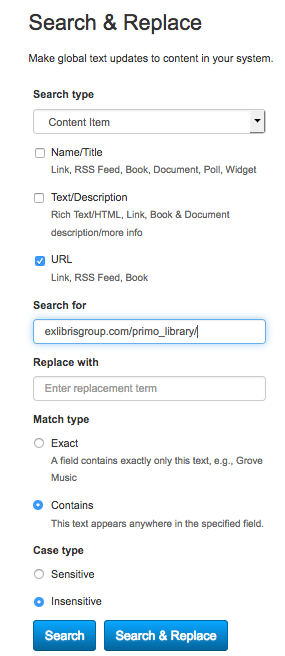
Pull your list of old URLs

So now you can go into the Search/Replace feature of Libguides and do a search for all content items containing the URL snippet either for all of the old versions, or for each of the three sub-types of the old version, depending on your workflow.

NOTE: You cannot use the Replace feature built into Libguides because the old URLs put search terms at the end of the URL, but the new URLs put the search terms both into the middle and at the end.

So, do your search, and then select all the records Libguides pulls back for your search, and paste them into a spreadsheet. I then delete the messier/unnecessary columns so that I end up with a first column to indicate whether I’ve fixed that URL or not followed by three of the columns that Libguides generated: Asset ID, Asset Type, and Asset Title. (I used Google Sheets for this.)

If you’re like us, you’ll have several hundred links to update, all told. And obviously this will be a lot less painful if you do a project BEFORE starting this project to go through and consolidate multiple copies of links. And unfortunately there’s no automated option to do that consolidation project, either.

Updating Libguides assets

Now the fun part ends and the tedious part begins. Here’s a little screen cast of how I change each link. And if you prefer words, here’s the process:

  1. Have two tabs open: your new Journals A-Z search and the spreadsheet from Libguides.
  2. Click on the link to the Asset ID to open the Libguides record for that asset
  3. Open the asset for editing
  4. Collect the URL and open it in a new tab – you now have two tabs that are “temporary,” the Asset and the Redirected-and-Resolved Primo tab
  5. For journal records, open a record for the correct journal and collect its ISSN
  6. Back in the tab for the Journals search on the new platform, search for that ISSN
  7. Collect the URL from the new platform’s ISSN search and paste it into the Libguides asset’s URL field.
  8. Click “Save” and close the two “temporary” tabs.
  9. Mark the column in your spreadsheet so that you know that this asset has been updated.

For URLs that don’t need any special investigating (figuring out exactly which journal was intended or if there are special limiters invoked in the original Primo search that you need to recreate in the new search, etc) it takes nearly a minute per asset, so it’s definitely a good idea to listen to podcasts or audio books or something while you work your way through the spreadsheet.

Leave a Comment

How vegging out in front of the boob tube improved my professional skills

I’ve been going for the most passive of all passive entertainment the last couple of weeks while my health has been on the fritz. The hard part of my super-passive entertainment regimen is right at the beginning, where you choose a series on Netflix, preferably one with many episodes since the initial choice is the brunt of the work. Man, I wish I liked Mad Men… Anyway, after that initial hard work Netflix does the rest for you — all you have to do is wait for the next episode to cue up for you, and the next, and the next.

So there I was, catatonic in front of the screen on Sunday evening. There may or may not have been drool. I probably hadn’t showered recently. There were probably orange peels scattered around my coffee table (I’ve been on a bit of an orange binge lately). Netflix was serving up endless episodes of one of my favorite genres: BBC mysteries. You know the ones. They have an interesting, complex character for the main detective, and then far more murders than any one tiny country town in the British Isles could possibly sustain without completely depopulating. I love them. Anyway, this particular detective (Inspector George Gently) has an annoying, immature jerk of a second in command (Sergeant Bacchus), Gently has to spend some considerable time explaining to Bacchus just how prejudiced and immature he really is. In this particular episode, Bacchus’ primary vice was “racialism.”

Hold on! Racialism? You mean, in the UK people are Racialists rather than Racists? Or at least it’s a totally accepted term for that form of prejudice?

So, being the librarian that I am, I told my coworkers the next morning about my startling discovery, and we started searching Google Scholar, as one does. Turns out, you get two pretty distinct sets of results if you search for racialism vs racism. So bear that in mind next time you’re searching a free-text database.

Next weekend I intend to continue my vegging… er… RESEARCH. For science.

[UPDATE: My friends in the UK say that “racialism” is an old fashioned term for the concept. It still yields interesting and useful Google Scholar results, should be in a dwindling minority for contemporary scholarship.]

Leave a Comment

Good searching really isn’t about searching

I’m a librarian. My brand is Search. And I do a lot of searching every day, and I know a lot of fancy ways of making that search go well for me (much of the time). But today a chance comment underscored something I think I’ve always known: good searching really isn’t about Search, or at least not in the way that people think of Search.

Here’s what happened this morning. I’m part of a grant-funded “iPad Learning Community” on campus. We get iPads (woo!) and we commit to attending learning community sessions several times during fall term to build a better understanding of how iPads work with higher education. So I’ve been doing a lot of experimenting with iPads lately, and one of my favorite things to do on an iPad is read and annotate PDFs (I’ve been using iAnnotate, though I just got Good Reader to play with, too). The thing is, it gets very tiring to write without letting your palm hit the iPad surface, and if your palm hits the iPad surface it can suddenly not tell where the tip of your finger or stylus is and so annotation goes all wonky.

So I fired up my trusty Google, and typed in iPad stylus wrist guard thinking that these were probably terrible search terms but thinking that any page that used all of those terms would probably talk about the problem I was having. Even if all I found was someone else talking about the problem, I might learn better ways to ask the question, or see someone’s answer to the question. Meanwhile, Google suggested as I typed, and thought maybe I should search for iPad stylus wrist protection, which seemed reasonable to me, so I hit “search.”

I don’t remember the next steps very clearly because this was yesterday, and yesterday is a long time ago, and I did it all really fast and without thinking too hard because this is what I do for a living — find stuff when I don’t really know what I’m looking for or how to ask the question. But eventually I learned that there’s a useful term, “palm rejection,” which is the name of a feature that people aim for in tablet applications. So I searched for iPad palm rejection and came up with some pretty useful results, including a site recommending a glove that I’m going to try out.

When I got to the learning community thing this morning, I said I’d found this glove and one of the technologists asked “how did you figure out that it was called palm rejection?” (None of us had heard the term before.) I said, kind of flippantly, “I’m a librarian!”

But then I realized that yes, it was because I had a different goal in mind for searching in the first place. I was first searching for terminology that would help me do a good search. And that’s what I do with students all the time — work with them to figure out what some key terminology might be so that they can make those search boxes work for them.

So I guess good searching, at least in the case of novices looking for information, is often more about learning to look for clues than it is about fancy search strings.

3 Comments

Breaking up with best practices; Hooking up with learning goals

Last weekend* I heard two sentences that sparked one of those great “ah hah!” moments. A writing center director said, “We’ve moved away from best practices and toward learning goals. This helps us prioritize and it helps us evaluate whether we’re accomplishing what we wanted to accomplish.”

I’ve talked before about how learning goals keep me focused and keep me from burning out on instruction, but it occurred to me in what felt like new says how the framework of learning goals could solve a lot of problems for me in ways that their less actionable cousins (like “best practices” or “standards” or even phrases like “user centered”) couldn’t.

Here’s what I mean in three examples:

  • In my own teaching, there are usually 15 or 20 Very Important things that I wish I could teach my students in any given session. Using learning goals helps me prioritize from among the very important things, feel less guilty about letting some very important things fall by the wayside, remember to think about what they’re learning rather than what I’m teaching, and feel connected to the broader, more interesting issues of information literacy.
  • In selecting a discovery tool, there are long, long lists of features and functions that user-centered design relies on. No interface has each specific feature, so how do we choose? How do we prioritize the list of very important features? What if we developed learning goals for our discovery system? What if these goals were something like being able to learn the differences between kinds of sources, be able to pick out important terms for the topic and field, and see where to go from here (different searches, different databases, different people). Maybe one system doesn’t have faceting but does have something else that reveals terms and directions. Maybe our usability tests could be more a long the lines of assessment of what the students learned by interacting with the system. Maybe this would all help us prioritize from the long list of important things to choose a system that functions in service of the mission of our library.
  • In first year seminars (the context in which the original phrase came up), focusing on programmatic learning goals could help prioritize from the long list of things it’d be nice if all first year students knew. Maybe it would help guard against creating impossibly long check lists of things students should be exposed to, and therefore guard against treating first year seminars as massive inoculations that transform high school students into college students. Maybe it would also grant the teaching faculty the freedom to explore interesting topics in interesting ways while having similar learning outcomes.

Or maybe I’m just creating my own buzz phrase. Or maybe everyone else already knew this.

But for me, at my institution, expanding this framework beyond my direct teaching or my department’s strategic planning is helping me make those hard decisions that crop up all over the place and to make them with more confidence.

* Last weekend I attended a workshop called Teaching and Maintaining Mulitdisciplinary First-Year Seminar Programs hosted at the gorgeous Pomona College campus. This is the second blog post drawing on my experiences there.

2 Comments

Heads they win, tails we lose: Discovery tools will never deliver on their promise

A couple of years ago, discovery tools landed on the scene promising technological and pedagogical advances beyond federated search’s wildest dreams. Libraries naturally thought the evolution of these products would take place at least partially in library territory. “Locate, collocate, and advise,” we thought, “We’re all over that game.“1

What we didn’t realize is that we’re not players in the discovery game — we’re pawns. The players strategizing and moving the chess pieces are the EBSCOs and ProQuests of the world, and sometimes sacrificing a pawn or three is the only way to win that game. It’s not personal.

Here’s how the game, the real game, is played.

A couple of weeks ago a ripple of outrage spread around the library community when Ex Libris sent out a letter explaining that EBSCO had removed its content from Primo’s central database.2 Did EBSCO realize that they’d be hurting their click-through rates with this move, we asked. How could they be so selfish, we wondered. Don’t they realize they need us, we raged.

These were the questions of people who thought they were players in the game. In reality, though, EBSCO needs us like a chess master needs pawns. Which is to say, they need us quite a bit, but not that much and not as full partners. What they really need is to act on opportunities to profit and to ward off their opponent’s attempts to profit more.

Matt Andros, Vice President of Field Sales at EBSCO, was kind enough to help me understand things from EBSCO’s point of view, first through an email3 and then through a phone conversation (1/19/2011). The email was helpful; the phone conversation was enlightening. Apparently, participating in 3rd party discovery tools is not an opportunity for them to gain market share, and since the other big players aren’t participating either it could even open EBSCO up to loss. He told me in our phone conversation that 90% of academic libraries already have the major aggregator databases (like Academic Search Premier), so their goal is not primarily to increase the number of subscriptions there. And the metadata associated with their more specialized databases, the databases holding those exclusively licensed journals, isn’t itself exclusively licensed, so it could land in the discovery tool from any other company without harming EBSCO’s market. After all, what we’re after is the full text, and we can get to that easily via a link resolver. It’s just not in their interest to share metadata unless they’ll be getting something in return.

On the other hand, they do have to play the discovery game. “Discovery is hot,” Matt said to me yesterday. All the big players are playing it, so it’s not very strategic to fall behind in this market while ProQuest cashes the discovery checks. It is much more strategic to beat the competition at its own game by doing the same thing, only with (hopefully) better content.

As strange as it may sound, the future is not in unified databases powering discovery tools, Matt told me yesterday. He can’t foresee a time when the major database vendors will find it profitable to combine their metadata for our benefit. Instead, the future is in hybrid systems that combine discovery and federation. As I see it, libraries will have to decide if they care whether their EBSCO products or their ProQuest products are seamlessly integrated, choose the discovery layer that matches the company of their choice, and then federate in the content from the other database providers. Federated search is dead; long live federated search. And I’m sure the thinking at EBSCO is that we’ll be paying someone for a discovery tool, and that someone should be them.

So where’s our leverage in all of this? Competition in the free market is the force looking out for library interests, Matt said, and laughed with me as I pointed out that this was hollow comfort given the shrinking number of competitors out there.

After we hung up, I wondered if this whole game was short-sighted or the best long-range plan I’d ever heard. What happens when they drain us dry and their beautifully cultivated market withers on the vine? If we were their only revenue source, this might be a point of leverage, but we aren’t. They also own companies that deal in office supplies and companies that manufacture outdoor goods like fishing lures and hunting decoys.4 EBSCO is “one of the largest private companies in the US” according to Datamonitor’s company profile, so even if they are a little worried about library budget cuts, they can also move with confidence through the strategies that matter to them — the strategies that focus on their true competition.5

And that, my friends, is how the real game is played. Focus clearly on your opponent’s king and position yourself so that you don’t have to worry too much about your pawns, however useful and important those pawns may be to your strategy.

(Many thanks to Steve Lawson for helping me think through these and many related issues as I prepared this post. And many thanks to Matt Andros for his generosity in helping me rethink my assumptions.)

1 Charles Ammi Cutter’s succinct description of a library catalog’s function.

[back to post]

—–

2 Ex Libris Letter, via a 1/3/2011 FriendFeed post:

As you may know, for the past eighteen months, we have been indexing in Primo Central a number of the EBSCO databases. EBSCO has now changed their strategy and will no longer permit third-party discovery services to load and index their content. Therefore, starting 1st January 2011 we will cease hosting of the EBSCO content in the Primo Central Index. EBSCO will, however, permit our use of a specialized API to search the EBSCO content ‘just-in-time’.

Since our initial agreement with EBSCO in June 2009, we have made significant progress in working directly with many publishers and other aggregators to dramatically increase the content in the Primo Central Index. In addition we recently reached agreement with Gale whereby their databases in Primo Central will now be available to all, regardless of subscription. Since there is a considerable overlap between some of Gale’s and EBSCO’s collections, EBSCO subscribers will benefit considerably from Gale’s consent to open up their data. Furthermore, Gale’s move indicates the general trend of information providers of enabling their data through multiple distribution channels and we are delighted to witness this change.

Based on a recent analysis of the Primo Central content, we cover, through other channels, over 90% of the data provided by the current EBSCO content loaded in the Primo Central Index. Furthermore, of the small number of titles exclusively available from EBSCO, none of these appears on the list of the 5,000 most used journals, based on SFX logs, and only three appear on the list of the 10,000 most used journals.

We are currently finalizing the details of the new arrangement with EBSCO for ‘just-in-time’ search and will update you as we progress on this. However, we believe that EBSCO’s decision to withdraw their content from the Primo Central Index does not best serve your user’s interests. We therefore strongly encourage you to add your voices directly to those of the ELUNA and IGELU steering committees in requesting that EBSCO reverse their decision and enable their data for indexing.

[back to post]

—–

3 email, reproduced with permission
From: Matt Andros
To: Iris Jastram
Sent: Saturday, January 8, 2011 11:50:11 AM
Subject: Re: Questions regarding EBSCO’s non-participation in 3rd party discovery layers

Hi Iris,

I wanted to give you a response even though there isn’t an official response yet from EBSCO.  These are the facts as I know them, but please know they are my thoughts and not official remarks from EBSCO.

Of the three major full-text database aggregators, only one provides metadata to ExLibris and that vendor does not have many strong academic journal databases.  The others (EBSCO and ProQuest) do not provide any metadata to ExLibris.  In addition, EBSCO is also a major provider of subject indexes, and of the top twenty providers of subject indexes, only one provides metadata to ExLibris and that organization provides its metadata to all discovery services, which is actually very unusual for a subject index provider.

In ExLibris’ misleading letter, which shifts focus onto EBSCO, rather than onto the harsh realities outlined above that leave their service with very little coverage from any full-text database aggregator or subject index provider, they stated incorrectly that EBSCO does not work with other discovery services.  While our participation in other discovery services is very limited, if the other discovery service provider is willing to trade metadata, we are always open to some form of partnership.

For example, we do provide a small amount of metadata to OCLC for their WorldCat Local product, so it is inaccurate to say that EBSCO is not participating at all in 3rd party discovery layers.  As far as we know, we are doing more than, for example, ProQuest (who, as far as we know, hasn’t sent their metadata to third parties, and like EBSCO, is a provider of their own discovery service).  So why do we provide OCLC with any metadata at all when we don’t do so for ExLibris?  There is a trade of metadata.  OCLC provides OAIster metadata (as well as other metadata) to EBSCO Discovery Service, and in return, EBSCO provides OCLC with TOC & author keywords (no subject indexing from controlled vocabularies, no abstracts, and no full text) for approximately 20 of the databases available via EBSCOhost for their use in WorldCat Local.

Some of the blog postings from librarians made comments such as: “Does this mean EBSCO is pulling out of Summon?”.  Given those questions, it is worth clarifying that EBSCO has never participated in Summon and any such claims have always been false.

As far as we know, no other discovery service provider is providing the content they own to ExLibris.  Further, as outlined in the first paragraph above, even if we did not offer a discovery service, it would be very unusual for EBSCO to provide ExLibris with metadata for either its full-text databases or its subject indexes, since this is very rarely done by other similar organizations.

Matt Andros
Vice President Field Sales

[back to post]

—–

4 Datamonitor. EBSCO Company Profile. 2010. (Available through Business Source Premier’s Company Profiles tab)

Outdoor products (page 12):

  • Decoys
  • Feeders
  • Game calls and accessories
  • Game cameras and accessories
  • Other fishing products
  • Plastic fishing lures
  • Spreaders
  • Television production services
  • Tree stands
  • Wildlife management equipment

Manufacturing (page 13):

  • Cameras and accessories
  • Commercial printing services
  • Information packaging and binders
  • Point-of-purchase merchandising displays
  • Promotional products
  • Sign sales and manufacturing services
  • Steel joist manufacturing services

[back to post]

—–

5 Datamonitor. EBSCO Company Profile. 2010. (Available through Business Source Premier’s Company Profiles tab)

Threats (page 15):

  • Direct sales efforts by publishers
  • Low priced competitors
  • Cutbacks by libraries and legislatures

Strengths (page 15):

  • “The company is one of the largest private companies in the US. EBSCO Publishing is the world’s largest provider of online full-text magazine and journal databases for libraries, and EBSCO Subscription Services is the world’s largest distributor of magazines and journals to libraries.”

[back to post]

16 Comments

Why Would Undergraduates Need Those Clunky Databases Anyway?

Google Scholar has made great strides in the 6 years I’ve been a librarian. It’s great. I use it all the time. And now interesting new research by Xiaotian Chen shows that Google Scholar contains nearly all of the articles held in several standard library databases, which is also great. Chen’s article finishes with a flourish, declaring, “The conclusion cannot be clearer: libraries can seriously consider cancelling a large number of subscription-based abstracts and indexes since their unique contents and value are rapidly evaporating” (Chen 226).

This would probably be true if the unique content and value of subscription databases were housed solely in the citation, abstract, and potential for full text access, but in fact it misses the point for many researchers. And it misses the point particularly for undergraduates.

Search is all about term matching, and terms are often the hardest thing for undergraduates to harness. So one key value of a database or search engine is the way that it introduces students to helpful information such as terms that might be important to their topics, genres of publication that are relevant to the scholars in the field that study the topic, and ways of judging the source’s relative weight by providing clues about other things the author has written or about how often the source is cited by other sources. These are not things that undergraduates are able to do just by looking at a citation and abstract.

Google Scholar is very forgiving of bad searching. It will nearly always give you something, even if you enter “impact of cell phones on globalization” into the search box. (Two of my big goals for this last term were to get students to stop searching for “impact on” and “globalization.” I was only minimally successful.) Because it’s so forgiving, it can be a great place to start. However, it’s pretty bad at leading you to new search strategies once you’ve found the one article where the author uses your phrase in her abstract.

Disciplinary databases are not nearly as forgiving of bad searching, so they may be pretty intimidating places to start. Where they excel, however, is in foregrounding those elusive, mysterious, and powerful terms that students need so badly if they’re going to revise their searches and gather more disciplinarily relevant material. The vocabulary, controlled and otherwise, is one of the two key advantages of disciplinary databases. These databases also help students make decisions about the relative worth of a source by (usually) giving links to other things by that author, other things published in that journal, citation counts, bibliographies, indications about peer review, and so on. And sure, these aren’t things that students are used to looking at when they enter college. But in my experience, these are tools that students very quickly come to rely on.

For the totally at-sea undergraduate, the most powerful research process will probably look something like this: take a citation found using a messy search in Google Scholar, plunk that citation into a library database, mine the resulting record for terms and other useful information, read a couple of articles “instrumentally,” and then repeat the process as needed with better and better terms each time.

So is Google Scholar a database killer? Like Steve, I think not. I think it’s a great tool that complements our other tools. And hey! It’s free!

Chen, Xiaotian. “Google Scholar’s Dramatic Coverage Improvement Fiver Years after Debut.” Serials Review 36, no. 4 (2010): 221-26. [Available via ScienceDirect]

4 Comments

Reading Instrumentally

A few years ago at a kind of instruction in-service we held in my department, my coworker Kristin talked about a way of reading that she was beginning to teach in her classes. She called it “reading instrumentally” and talked about how she was trying to get her students to read articles for more than subject comprehension — to read them in order to use them as springboards for finding new material. Since then, I’ve started teaching this, or bits and pieces of it, in more and more of my classes. For me, it’s the best answer I can come up with so far to the problem of the Term Economy.

The idea is that reading for comprehension is good and important and all that, but that the point of the article is only one of many things you can learn by engaging with it. Just reading the first few paragraphs of a work slowly and carefully, you can glean a whole host of names and terms that you can then use when crafting further searches or deciding where to search next. For example, you can note down concept names, other vocabulary, researcher’s names,  relevant institutions that might produce or publish information for the topic, or types of evidence used in this kind of argument. After reading the first few paragraphs of a few likely articles, you can go back and start using these new concepts and terms and research/institution names to craft more focused searches. At this point, you’re more likely to be using vocabulary that a more expert person would have used in the first place.

Here’s one concrete example.

Cooks, Bridget. “Fixing Race: Visual Representations of African Americans at the World’s Columbian Exposition, Chicago, 1893.” Patterns of Prejudice, 41.5 (2007): 435-565.
ABSTRACT Cooks examines the Johnson family cartoon series published in Harper’s Weekly during the World’s Columbian Exposition in Chicago in 1893. Her analysis addresses the series’ caricatures of African-American fairgoers in the context of the landmark exposition, a national celebration of America’s cultural leadership and accomplishment since its ‘discovery’ by Christopher Columbus in 1492. The Johnson family cartoons are remarkable because they are the only racist images in the issues of Harper’s Weekly in which they appear, highlighting the importance of their message that African Americans were an unwanted presence at an event that served to solidify America’s national identity. The series provides insight into some of the social anxieties of white Americans regarding the presence of African Americans at the exposition. It also explores white American discomfort with racial and economic diversity through the antics of the imaginary yet symbolically representative Johnson family. Cooks’s discussion includes a visual analysis of the cartoons and comparisons of the Johnson family images with photographs and illustrations of African-American labourers at the fair and with depictions of proper behaviour by white American fairgoers. This examination of the cartoon series questions the roles of race, class and social hierarchy in turn-of-the-century America, and illustrates that acceptable mainstream attitudes clung to ideas of racial prejudice.

Just from this I get a whole bunch of clues about how and where to look for evidence that might reveal attitudes about race in the late 19th century. I might not have thought to page through Harper’s and other magazines at the time. How would I find out which other magazines to look at? I could look at caricatures in general, cartoons (oh, and I bet there were caricatures and cartoons in newspapers at the time, too, so I could look there), advertisements, and anything else that exaggerates normality or abnormality. I could do more research into the World’s Exposition, since it’s positioned as being a representation of America. Terms like “national identity” and “social anxiety” might be useful. The abstract also makes it clear that one great way to build an argument about difference is to make an argument about what the ideal sameness might be. It also compares caricatures to photographs, which is kind of a similar rhetorical move — making arguments about exaggeration by comparing it to its opposite: realism.

If I read a few paragraphs of the article itself, I’m sure there will be useful citations to follow, possibly some argument about why Harper’s is a good source (which might hopefully mention some similar periodicals as part of this argument), certainly other historians who are interested in race in America, possibly some theorists (which would be a jackpot, particularly if this were a literary article, since searching for theorists is one of the hardest things to do), possibly some other types of scholars who might have an interest in this kind of topic, and hopefully some clues about where to go looking for photographs, either from citations for the photographs used or from other context.

Once I realized that this is how I approach most of the searching I do (since I’m almost never searching for topics in fields in which I’m an expert), I decided to back up and start teaching this as a way to read result lists and abstracts, too (part of my exploding the article idea). So now I often have students help me pick relevant terms out of both controlled vocabulary and abstracts, or point out clues hidden in article records that might point us to related genres or topics or avenues into the literature. Then we search again, and then again, usually (hopefully) finding whole pockets of literature that we’d never have stumbled on otherwise.

8 Comments

Investments in the Term Economy

Search is all about term matching, and several times in the last couple of weeks I’ve had students think there was nothing on their topics simply because we hadn’t found the right terms yet. Once we’d dug enough to find some useful search terms, we uncovered previously hidden worlds of scholarship which could in turn point us toward related works as we ruthlessly mined them for even more terms, their bibliographies, and their “cited by” works.

Finding the right terms is hard. It takes empathy with the author, it takes some knowledge of the field, it takes some knowledge of related fields (particularly if you’re in an interdisciplinary database and can’t figure out why you’re getting chemistry results in your humanities search), and it usually just plain takes reading. Reading carefully and with an eye toward learning vocabulary. Reading lots. And there are very few shortcuts.

And then comes full text searching of historical documents (something I’m going to be teaching tomorrow). That’s another whole layer of complexity, and I really love what Timothy Burke had to say about that recently. He makes it clear that you really have to read, and read a lot, before you can start searching through historical texts, and he makes it clear that developing a familiarity with other rhetorics is vital to scholarship.

Searching sometimes feels like the modern way and browsing like the legacy way of doing research. But in some sense, search is impossible without a hefty dose of browsing.

6 Comments

Search Empathy

I was just talking with an English professor about his upcoming Argument & Inquiry seminar on the Gothic story. I’ve really be so heartened by these early-stages planning meetings we’ve had so far. The combination of having really engaged faculty, really new syllabi, and a requirement that the courses should “clarify how scholars ask questions, and teach students how to find and evaluate information in reading and research and to use it effectively and ethically in constructing arguments” means that we’re getting the chance to do some really creative thinking about how to foster intellectual independence in first year students.

Anyway, my Ah Hah moment of the day was when this professor said that searching is a fundamentally empathetic tasks. That crystallized for me a lot of my thinking about searching — how you have to not ask a search interface a question (usually) but instead think of terms that your ideal article would have in it or associated with it. So, not my terms for a concept, but my ideal article’s terms for the concept. When I can get my students to make that leap, their results usually get much better.

I don’t know how useful it will be to use “empathetic” as a term when I teach (it’ll depend on the class), but it sure does help me think about the process.

Leave a Comment

OAIster

For those of you who don’t know OAIster, if you have any reason to search for digitized primary sources, you should check it out. It’s a union catalog of digital library holdings. It’s chief asset is wonderfully descriptive metadata. And like with other collections of collections, I recommend searching OAIster to find which digital collections contain the kinds of things you’re interested in, and then searching or browsing those collections individually.

For those of you who know OAIster, you know that it recently stopped being its own unique entity and started being an OCLC-hosted entity. It’s now available on the FirstSearch interface and the WorldCat.org interface. (Here’s more on the history of the catalog.)

Enter the oddness. My co-worker ran some identical searches on both interfaces and came up with startlingly different numbers of results for most of her searches. Confused, I contacted OAIster and have just heard back from them why this is so. Apparently, the “keyword” search in the FirstSearch interface searches through the Source, Subject, Title, and Notes indexes. The keyword search on the WorldCat.org interface searches all available fields and all indexes.

So now we know.

Leave a Comment
css.php