Skip to content

Category: Tools and Technology

Welcome!

Welcome to the new version of my blog. If you’re seeing this in your feed reader, woohoo! You’re all set. If not, I know one of two things about you. You either a) landed on this page in its native habitat and should really subscribe to my new feed, or b) REALLY aren’t seeing this post at all, and there’s not much I can do about that. Most people in the world will fall into Category B.

While you’re here, let me know if there’s something that’s not working the way you think it should (internal permalinks are definitely one of those things, I know — I’m investigating my options there). Perpetual Beta, Baby!

6 Comments

Firefox Search Bar Frustrations

It’s a tiny thing, but I use it about a million times a day. It’s the FireFox Search Bar — it’s my supplier for all that Googly goodness I need in a pretty much constant stream throughout my day. I’ll probably get some sort of repetitive stress injury from the specific action of hitting ctrl-k. In fact, I sometimes even use this search bar to open a new tab since hitting ctrl-k and then enter (I have the box set to open searches in a new tab) can be easier on the hands than hitting ctrl-t sometimes.

But my search bar isn’t working, and hasn’t been for about a week now. I can ctrl-k myself there, type in my search terms, and hit enter, but where I’d expect to see a Google result list, I see a pristine Google home page. No search terms. Nothing. What’s more? I can change that Search Bar so that it says it’s searching Amazon, or IMDB, or anything, and when I type in search terms and hit enter… I get a pristine Google home page.

For a completely unrelated problem, I ended up uninstalling Firefox and and installing the new beta version, but the search bar problem didn’t go away when I did that. I poked at the internet for a couple of days trying to see if anyone had come up with a fix, but didn’t find anything. I searched through the Firefox support forum and knowledge base and found people having similar (though not necessarily the same) problems, being told to follow the directions in the knowledge base. Then the thread would be closed as “solved” before anyone could say “but I tried that already.”

Knowing a little bit about how these support forums work, I search hard before posting my own question. I know there’s no patience for people posting questions that have already been answered a million times. But I finally did, and I included in the post that I’d already tried those other directions with no success, and I’d already uninstalled/reinstalled, etc. And now I can’t find my forum post anywhere, so I’m turning to you. What do I try next? I’d really like this search bar to work. Really really really.

4 Comments

The Ebb and Flow of My Online Communities

Online communities, like those in the face-to-face world, are fascinating to watch. They coalesce, wrap in on themselves, fray around the edges, unwrap a little, shift, possibly acquire new members or even glom onto a new core group of members, coalesce, wrap in on themselves, fray around the edges… and on and on.

Take my own history as an example. I started this blog and started reading other people’s blogs, and in the space of a few months found myself squarely in the middle of a vibrant community of librarian bloggers. A year or so later, Twitter and the LSW Meebo room started up. Conversations started in any of those places and bled over into our blogs, but there were also new people in the group — people who didn’t have blogs at all, or didn’t blog about libraries. And slowly the LSW Meebo room group became my center. A year or so later, the librarian Twitterati started shifting to FriendFeed, so I followed them (kicking and screaming, I might add — I had a bunch of problems with FriendFeed, some of which still bother me even though that’s become my social network of choice now). FriendFeed is slightly different in that conversations can happen within or across several “rooms,” and I’ve seen communities coalesce, wrap in on themselves, and then fray about the edges in several of these spaces within FriendFeed. Meanwhile, the blogging community had frayed about the edges (Meredith also just wrote about this).

Each time I’ve found myself in the midst of a new coalescing community I’ve met new people who inspire me, question me, encourage me, and generally be good friends to me. But each time it’s meant that people who used to represent the core of my network have shifted to peripheral status. Not unimportant, just less present.

And now I find myself on the fraying edges again. Almost certainly, this means that I’m about to find a new home, or re-find an old home, but at the moment things feel a little foundationless for me. Luckily, I have a couple of really interesting projects I’m working on (which I’ll probably write about soon-ish), so that should sustain me until my new center coalesces for me.

7 Comments

Citation Visualizations

A couple of people here on campus asked if there were any tools out there that would allow them to visualize the relationships between citations that they gathered over time in the course of a research project. Turns out, the options are limited and not at all user friendly. Here they are (thanks to Christina!):

  • There is CiteSpace. The demo video that you get when you click “webstart” and then go to “help” and “demo video” makes the whole thing look rather intimidating. It seems to run off of the same exports that we’d use to get information out of databases and into EndNote. The trick is, it appears to only work if you import stuff from ISI. I don’t see any way to manually enter a citation, though I’m certainly no expert on the software yet, so it may be there, just hidden. Here’s the User Guide (you may have to click through some server security stuff to see it).
  • The other option is Sitkis. This involves downloading ISI citations (again) and importing them into MS Access. I’m on a Mac at work, so I’ll have to see how this works when I get home to a PC with Access on it. Anyway, here’s Christina’s blog post about it.

Pretty limited options, eh? I sure hope there are more out there, but the People Who Should Know generally agree that there aren’t, at least, not yet. You know what I’d really love? If Zotero would take this project on.

3 Comments

Clinical Reader Train Wreck Just Keeps Going

Some day I’ll get bored of watching this train wreck in progress. But not yet. If you are, you can skip right over this post and rest in the knowledge that you’re more mature than I am.

Remember last week when Clinical Reader had only threatened a blogger, been exposed as having made up endorsements, started making up bogus Retweets, deleted incriminating tweets from their account, fired the pesky Canadians, and generally convinced thousands of people that they weren’t trustworthy? Since then, thing haven’t improved. Since then:

  • Whoever is trying to sanitize Clinical Reader’s online reputation (I assume it’s co-founder Allan Marks, but who knows) has been switching the original twitter account’s name at the speed of light. This breaks links that people had used in blog posts, but it unfortunately doesn’t erase the history from the deep dark recesses of the Internet, or delete people’s screenshots from their hard drives. Most of the good stuff is still live on the links in my previous post, and even more lives in this post on the Disruptive Library Technology Jester. (Moral of the story: Don’t be stupid online because the stupid never dies.) As of this writing the account has moved from @clinicalreader to @clinical_tweets to @amarks7 to @amarks14 to @amarks_ to @a_marks1 to @allan_marks (See below for explanation of the change in the first two names. And don’t expect @allan_marks to be valid for more than, say, an hour. As of 7pm, the name has changed 4 times since 9am today.)

  • Somebody took over the name @clinicalreader and posted a brief history of the debacle there.

  • Somebody else took over @clinical_tweets (they claim to be the fired Canadians) and started cockily claiming that they’d done the job they were hired to do because just look at how many people now know about Clinical Reader. Their claim in a nutshell: “You’ve All Been Used. Bwahahahah.” They’ve now killed the account.

  • A new twitter account went live: @clinical_reader. This had all sorts of tweets about how the real Clinical Reader wasn’t yet “officially” on Twitter but will let us all know when they are (this screencast from the Google Cache shows that if you hovered over an older version of the Clinical Reader site, it clearly linked to the original @clinicalreader twitter account). Then tweeted several rather official looking tweets about what a great service they are. Then denounced the other now-bogus accounts. And all of this while not officially tweeting! This morning, all their tweets had disappeared except for the ones saying that the tweets from @cliniclareader are not coming from the Clinical Reader service (which even whoever-it-is at @clinicalreader says, quite plainly).

  • Another new twitter account went live: @clinical_tweet. This seems to be the new, new, new official twitter account. Or something. We’ll see how long it lasts.

  • And now, the sockpuppetry really gets started. “Sally Jones” started a twitter account as @kensingtonlib in order to alternately level accusations at @lukelibrarian and laud Clinical Reader. I wonder who could possibly be using the name Sally Jones??

This is just too much fun. I’ll update this post if necessary (and add screenshots that I have on a different computer, later).

[Edit: 7pm on July 20th. I think I’m done now. If you haven’t had enough, search FriendFeed for “Clinical Reader” and see if more drama has surfaced. I’ll just add that I’ve been almost equally fascinated by the complexity of piecing together a coherent story when that story is playing out in so many social networks, by the flailing about of Clinical Reader, by the lessons this teaches about marketing online, and by the implications of this story in my own teaching. I think I’ll have to work some discussion of this parable into sessions I teach about evaluating web content.]

9 Comments

Best Bad Marketing EVER

I thought I could resist jumping into the fray on this one, but this story just keeps getting better and better.

Have you ever heard of the service called Clinical Reader? Apparently it’s a new service that acts kind of like a feed reader, only they decide which feeds you read, and it’s aimed at the medical community. The salient facts here being: 1) it’s new, and 2) nobody had heard of it. Until this week.

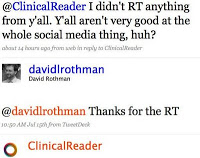
This week they used twitter to threaten legal action against a blogger, explain that they’d overstepped and let some unknown junior colleague too close to the keyboard, argue with the blogger and her ever-growing posse, apologize to the blogger, and now send out bogus retweets.* (See the chronology below for the gory details.)

What fascinates me is how quickly (in the space of four days) hundreds of people have gone from knowing nothing about this service to being pretty sure that everyone at Clinical Reader is completely insane. The social web can be an incredibly rich marketing arena, but it has zero patience for companies that get stuff wrong, and it rather delights in calling out this kind of behavior. This is the flip-side of crowd-sourcing, and companies and libraries hoping to harness online social networks would do well to watch this real-life parable unfold.

Chronology:

The story is way more interesting if you see it unfolding, so here are the best places to get it in kind of chronological order. This blog-version of the summary is necessary because Twitter itself is kind of difficult to reconfigure in a way that makes sense after the fact, and because Clinical Reader has started deleting tweets. Oops.

  1. Nikki noticed some less than ethical aspects of Clinical Reader’s site (which now includes edits linking to the apology she received)
  2. Steve summarized day one of the saga
  3. Nikki gathered together links to a bunch of stuff that happened after Steve’s post.
  4. The RT shenanigans begin, but these need more space, and screenshots, so here we go…

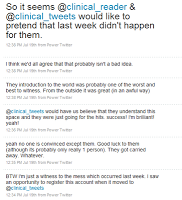
Clinical Reader went wrong in two completely wrong ways with the retweeting. (By the way, read each of the screenshots from the bottom up, because I forgot I should reverse the order and don’t feel like fixing it now.)


First, they thanked people for retweets even if the people had never retweeted them.


Then they seem to have completely made up tweets to retweet.

Amazing. Pardon me while I go pop some popcorn and settle in for the amusing ride. You can follow along on FriendFeed if you want.

P.S. The founder of Clinical Reader now says: “I have taken control of this account & parted company with former acquaintances in Canada whose behaviour I can only describe as schoolboy” (cite), and he is now apologizing to people. [The following sentence is apparently no longer true… which is ironic, since I was poking fun at Clinical Reader for misunderstanding how it works: “The problem is, he doesn’t realize that if he starts with one person’s name, there’s no guarantee that everyone else will be able to see what he writes, since Twitter only lets you see messages directed at mutual friends.” Further testing reveals that the other people would be able to see this message if they clicked on their @[username] page but not in their main Twitter feed. So, still weird, but not as egregious.]
* For those who don’t use Twitter, RT means “retweet” and is a way to redistribute something somebody else said, complete with attribution. It’s very much like a cited quote in a paper, only with links. So if I say “Something Clever” on Twitter, somebody else could say “RT @ijastram – Something Clever” which means “retweeting Iris Jastram who said ‘Something Clever,'” and the “@ijastram” part automatically turns into a link to my tweets. Quotation and citation in 140 characters or less. Pretty slick.

14 Comments

Making FriendFeed Look the Way I Want It To

[Updated with a more modular version of the steps below. First, install Stylish. Then create the following three new blank styles, and populate them with the code here:

Now you can toggle things on and off at will depending on your minute-by-minute needs.]

——————–

I interrupt your regularly scheduled library-related thinking to bring you a brief note about FriendFeed. It recently changed its look rather significantly, and a few of us felt a little claustrophobic every time we looked at it. Luckily, if you’re running Firefox you can install Stylish, which lets you modify a site’s CSS. Once you install that, you need one or more of the following:

  1. Enough knowledge of CSS to modify the site as you wish
  2. Friends who know enough CSS to do that for you
  3. The Internet, where you can find ready-made styles like this one

I know enough CSS to break things or tinker mildly with things that already exist, and I have friends who put up with my requests for help and whose code I steal mercilessly (hi Steve), and I have the Internet. So I started with this style, modified it to make it look more the way I wanted, begged for help making it look even more the way I wanted, and now have a small suite of style options (which you can copy and paste into new Stylish styles):

  1. For when I’m in friend mode, at home: this cleaned up version. (last updated 5/29/2009)
  2. For when I’m in work mode and really just want text to skim: this stripped down version that gets rid of user icons. (last updated 5/29/2009)
  3. And since I’m not a very picture-oriented person, it seems: a style that makes all posted images into teensy thumbnails that I can click on to view in their larger sizes when I want to.

I have (1) and (3) running together at home, and I have (2) and (3) running at work.

Lest you think I’m at all good at this, I should point out that my tweaks were incredibly minor. Steve Lawson did the big stuff (by which I mean shrinking images to thumbnails, highlighting direct messages, and removing user icons). You’ll also notice, if you look carefully at the code, that I just commented out portions of the original code, so you can restore that stuff and tweak it if you want.

A couple of other people really liked seeing which services were responsible for individual FriendFeed posts (like Twitter, Facebook, Flickr, etc). If you’re like them, try this Greasemonky script (after installing Greasemonkey, of course).

2 Comments

Crazy Thought

Thinking about the things that I like about Google or about library databases in comparison with each other after my last post, I realized that library databases need crazy-easy URLs. I don’t click through 2 or 3 layers of a website to get to Google. I type “goo” into my address bar, which fills in the rest, which takes me to Google. If I could type “MLA” into the address bar and get to even something as complicated as “MLAbib.csa.com,” life would be easier. Sure beats my current option:
http://www.csa.com.ezproxy.carleton.edu/htbin/dbrng.cgi?username=carl&access=[gobbledygook]&db=mla-set-c&adv=1

If I could also set a cookie that would authenticate me from my own home computer, life would be even easier.

Still need to work on the seamless access to full text part of the equation, though.

2 Comments

I Really Wish It Were Easier

Tipping point: reached.

Up until maybe the middle of last year, it was pretty easy not to worry too much about the problems of doing “real” library research on the free web. “The kids are doing it” was a phrase that simultaneously helped us to worry about the state of information literacy in this web-ified era and to dismiss the problem as one that “the kids” would outgrow, like braces or a lisp or chicken pox, as they became better versed in scholarly research practices.

Well, it’s not just the kids any more, folks. Enough journal publishers have opened up their indexing and abstracts to the free web that it’s now possible (especially in some fields) to actually do “real” library research on the web. And so people are doing just that. This year, our new faculty orientation session brought questions about Google-friendly access right to our door-step in a big way, and part of this rather disorganized thread on FriendFeed brought it up again.

And yes, ideally everyone could use one nice, big, easy search mechanism to do everything from the most broad to the most narrow topic and then get instant access to the full text of whatever they find. Too bad that’s impossible.

Google is more familiar and forgiving, it’s faster, and there’s a lot of good stuff in it (particularly if you’re searching for something that hasn’t had any controlled vocabulary assigned to it, yet). But currently, disciplinary databases do a better job of collocating like items based on something more robust than the author’s choice in vocabulary and PageRank. Currently, disciplinary databases do a better job of allowing scholars to leverage their disciplinary vocabulary and a better job of helping novices stumble upon key vocabulary terms. Currently, disciplinary databases are the only things that can offer relief to my students who say that there are just too many false hits in everything from Google to JSTOR (free text search may be what they’re used to, but they’re often relieved to leave it behind as soon as they’re shown controlled vocabulary).

But all that aside, neither option does the “access to full text” piece of the equation very well. Unless your library subscribes to the publisher versions of pretty much every eJournal out there (an expensive proposition) Google can’t actually help you get to whole swaths of full text, and even then you’d have to be on campus or logged in to your library’s proxy server or something. And even if researchers are in a disciplinary database, they’ll still often have to step outside of that database to get the full text, and while a link resolver is a wonderful thing, it’s still a long way from being a perfect solution to this problem. Either way this lands you at the A-Z list figuring out if we have access to the particular issue of the particular journal you want.

I wish it were easier. I wish access issues didn’t make researchers jump to the conclusion that we’re “hiding” stuff from Google, or that we’re being unnecessarily silo-ish, or that indexing is over-rated, or that you have to do “complex” searches in library databases. I also wish that we could bringing together disciplinary databases in ways that allow easy cross-searching without giving up the time-saving specificity of disciplinary focus and vocabulary.

Right now it feels like we’re balanced precariously on that tipping point with a precipice on each side.

7 Comments

The New New OCLC

Just when you thought you’d gotten to know the new OCLC, it shakes things up again. OCLC is now in the ILS business and WorldCat Local is now free to FirstSearch subscribers.

My first thought on reading about all of this yesterday was that all those pilot WorldCat Local schools must be steamed that this is now free.

My second thought was almost equal parts pleased and worried. I’m pleased that this is yet another competitor against the current lumbering giants in the ILS market, and I like the idea that (if I understand correctly) this will add a hosted option to the ILS market. (Hosted options aren’t always the best, but I like the idea of having it available as a choice for people.) On the other hand, this means that that pesky new policy on the transfer and use of OCLC records really wasn’t just about protecting a bunch of member-produced data after all. There were bigger plans afoot, and these plans involved leaning even farther toward the vendor model rather than the service model. And if OCLC is a vendor rather than a service, that new policy feels even more like a land-grab rather than an effort to protect member investments.

My third thought, on further reflection, will hopefully be less nebulous and conflicted and more grounded in fact and reasoning.

Leave a Comment
css.php