Skip to content

Category: Carleton

New Email/Calendar System: Week Three

The new email system is all-around ok, but it’s by no means been a seamless transition for my department. My new mantra (and I swear I’m going to stick a little card on my computer monitor that says this) is:

Even this is worth it if the whole campus is on one system.

For one thing, it’s thrown a little monkey wrench into my department’s system of publishing our availability to our students. Last year we came up with a pretty slick plan of using Google Calendar, sharing our calendars with each other (to facilitate making meetings), and publishing separate “Available Time” calendars for everyone else to see (example). It worked very nicely.

Well now we’ve got our Zimbra calendars, which are really only useful if everyone uses them. These are very much like Outlook calendars, or Groupwise calendars. You know the drill: email and calendar all in one place, people can see when you’re busy when they schedule meetings… the whole nine yards. Except that in our case, we’re only up to about 4 yards because of two significant kinks.

First, even if we use Google Calendars to subscribe to our Zimbra calendar’s iCal feed, we cannot make Google Calendar understand that this is ok to publish this on our HTML web pages. We’re now in the process of searching for another 3rd party program that we could use to mimic this functionality, but currently we’re stuck updating two calendars. Why? Because even though students could propose a meeting time and see if we’re free, we don’t know how many students will be using the calendar function this first year, and we do know that sometimes it’s much easier just to glance at a calendar a week at a time to get a feel for free time. With all the appointments we do, we need an easy way for students to see when they can come see us that doesn’t require any training. So that knocks about two and a half yards off the “whole” right there.

Second, not everyone is going to use this new calendaring system. I know of one whole department in the library that’s said it’s going to stick with a Google Calendar system that’s working well. And I know full well that many professors and students won’t bother. This means that even within the library we won’t be able to use the new system to it’s full potential, let alone with the wider campus. So that knocks at least another yard off, if not two, and my optimistic nature has to work even harder to sprinkle it’s habitual pixie dust over the situation and keep me mellow in the belief that this will be wonderful.

A third kink doesn’t come nearly to the level of the first two, which is why I didn’t include it above. But for now it’s a pain. For now, we can’t sync with our palm pilots, so that means maintaining yet a third calendar for all those times when you’re in meetings trying to schedule new meetings and really need a portable calendar. (And no, we don’t have cool data-enabled phones, more’s the pity.) But hopefully this kink will disappear very soon, which is why I choose not to be annoyed by it for now.

Still, my optimistic self keeps thinking that there is still value in having a campus-wide system, and that there’s enough value that even this is worth it.

3 Comments
Online Research Guides

As part of my liaison duties, I create and maintain the “subject” and “course” research guides designed for the departments I serve. Subject research guides are meant to give students a grasp of the resources available that most researchers in a given major or concentration will probably need at some point in their research. Course research guides are designed for specific courses that I’m supporting each term.

And really, the course research guides are pretty simple to come up with. They usually either replace or complement any handouts that are appropriate for a class, and they’re almost always tied to a specific assignment or set of assignments, so I generally have a fairly good idea of what those students will need.

Subject research guides are another matter entirely. I have no idea what I’m doing, really. Do I gather things by resource type (e.g. “Finding books,” “Finding articles,” “Useful web sites,” etc.), or do I gather things by topic? (Here’s an example of a page that’s organized by resource-type, and here’s one that’s organized by topic.) Either way, they’re long lists of stuff, and not very interesting, but with our current tools I’m tied to a heavily text-based, straight HTML page.

When you think about it, the idea of breaking things up by resource type vs. topic really comes down to your choice of audience. Am I creating these primarily for inexperienced researchers who need help getting started? If so, topical organization seems to make sense. It pulls together fewer things and makes it so students don’t have to jump around to see if other resource-types will be useful to their topics. But if I’m primarily making these things for more intermediate-level researchers who already know that all they want is the MLA International Bibliography, for example, a page full of topics (where the MLA-IB could appear in any one of the topics, or all of them) would probably drive them batty! If I were using these pages, I’d want to click “articles” and see a short list of the databases and indexes that are relevant to an area of study.

So who is my audience? I don’t really know. But I’ve finally realized that answering this question could make the creation of these subject pages so much easier.

3 Comments

Fall Publicity

I hadn’t really realized before coming here how important publicity is on a campus. Students aren’t naturally equipped with a gene that tells them to visit the library when they have one type of question, the writing center when they have another type of question, the IT help desk when they have yet another type of question, and so on. Neither are faculty, for that matter. So getting ready for fall means thinking up how to explain to new students precisely what we do, and how to encourage returning students to remember us without boring them to death with the same old news. Similarly, new faculty need to know both what we can do for them, and what we can do for their students. And the faculty who’ve always been here still need reminders, preferably packaged in such a way that they think of new and creative uses for us. That’s a pretty tall order for a department without its own publicist! That’d be a tall order for a publicist, I imagine, though I’d really like to find out (hint, hint).

On our task list for this fall we have:

  • New quiet level posters outfitted to represent our new and more realistic food and beverage policy (and with new level names for the 3rd and 4th floors… to be unveiled shortly)
  • New “Survival Guide” for the freshmen (quick overview of services and resources, plus a humorous “Top 10 Reasons to Visit the Libe”
  • Update the New Faculty Guide
  • New poster to hang at various points around the library to advertise the Research/IT service
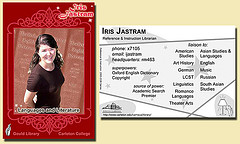
  • New trading cards (being worked on in the next room at this very moment)
  • New portable maps of the library to reflect updated equipment and such
  • Planning for the beginning of the year picnic for faculty and academic staff (includes designing and making the invitational postcards)
  • Planning for the international student orientation
  • Planning for the new faculty orientation
  • Planning for the new student Academic Fair
  • Participating in the training of new writing tutors
  • Plan for and train student workers who are going to staff the IT side of the Research/IT desk.
  • Update our liaison pages to reflect tweaked liaison areas and new trading cards
  • Update the poster by the Research/IT desk that lists our liaison areas
  • Draft a beginning-of-the-year informational and (hopefully) inspirational email to send to each of our faculty members
  • Read the college Common Reading book so that we can participate in that whole experience
  • … and probably a whole host of things I’ve forgotten about…

Luckily most of these activities are interesting, and some are even really fun.

Leave a Comment

New Email/Calendar System: Day One

This morning when I arrived at work, only one email appeared in my inbox. The long-anticipated day had come. All my email had been migrated from our imap server to our bran’-spankin’ new Zimbra system.

Until today, members of our campus have used not one but several email systems. Faculty and academic staff were on one (but could use one of at least three supported access methods, including webmail and two desktop clients). Administrative and other staff were on a completely separate system (GroupWise). I’m not sure what students were on (though I know it wasn’t GroupWise). So as much as we’ve all been dreading the migration headache, clearly we needed a change.

So today I became one of the first groups of people on campus to migrate over to Zimbra, but most of my day was spent in meetings, so I didn’t have a whole lot of time to tinker, play, and futz. So the impressions I have are just that: impressions. And I’m not sure if it’s wishful thinking, the “oooh, shiny” factor, or something more substantial that makes me generally want to like it. But I generally want to like it, and I certainly do anticipate the joys of being able to search for common free time when setting up meetings (this will be the first time our whole campus has had a single calendaring system, too). I also like the tagging and message search functions.

But there are a couple of strangenesses, too. For example, there’s no way to copy a message to a folder; you have to just flat out move it. I can’t customize my view quite the way I’d like. Things seem to take several clicks rather than one or two. I don’t think there are any notifications for new messages, or any indication if you’re in the calendar view that there may be new messages waiting for you if you click over to mail view. But most puzzling (though not Zimbra’s fault), is that I now have three complete calendars, each of which need updating. My palm needs all my information so that it can go with me to meetings. My google calendar needs at least some of my information, but exactly how much will depend on departmental decisions that haven’t yet been made. And I’m strangely fond of my published availability calendar, which wouldn’t be possible if I dropped my google calendar. Then there’s the zimbra calendar, which must be used if people are to be able to easily schedule meetings with me via the new all-campus system. Something’s gotta give, but I have to keep them all up until I figure out what I can drop without hampering my work and that of my colleagues.

Leave a Comment

Planning for New Trading Cards

Today was the first of three solid days of meetings for me. We’ve blocked off these three days for my department to work on the collaborative summer projects that have been stacking up and not getting done. And today, we didn’t do so badly. We learned to use the “Create Lists” function in III’s Millennium interface, saw our departmental profile in Blackwell’s online collection development interface, developed our departmental goals for the coming school year, and took care of several other conversations that needed to happen but haven’t really had a proper venue. What’s more, that’s exactly what we said we’d accomplish today, so that felt good.

Tomorrow we’re going to talk about citation management software, make decisions about databases we have and want, and train each other on some of our new databases or on databases that have changed platform (so, for instance, the social sciences librarian will introduce us to a couple of new social sciences databases that might be useful to us and that we might want to know about as we work at the reference desk).

And then on Wednesday we’ll talk about our new trading cards. This meeting always makes me uncomfortable.


The first year I was here it was uncomfortable because I was afraid it’d be hokey. Well… it kind of was, but in the best possible way. I absolutely loved my first trading card. I didn’t know how we could top it. So last year I was worried we’d change to a new design or color scheme or… whatever, that’d ruin it. I’d grown really fond of my card. But last year’s card turned out even better than the year before, so that fear was averted.


This next year, there’s talk of changing our theme. So this year I’ve started mourning my current card again. I really love my current card. I’ve grown used to it. I feel like it fits me well… like a well-worn pair of jeans. Only way cooler. How could a new design possibly be better, I wonder?

Leave a Comment

Introducing High School Students to a College Library

Every summer a group of high school students, gleaned from high schools all over the United States, comes to campus for a week-long program called CLAE (the Carleton Liberal Arts Experience). There are various courses they can take (everything from “how to apply to college” to “the Harlem Renaissance”) with the dual purpose of introducing them to the idea of a liberal arts college and giving them a little bit of experience living and studying on a college campus. The emphasis is really on empowering them to think that college is possible, doable, interesting, intense, and fun.

And every year, one of the classes brings all the kids to the library. For the past three summers I’ve worked with the history librarian to prepare the students to engage in a modernized Washington/Du Bois debate. But this year the class and professor changed, so the history librarian and I started from scratch to build a class for students studying the Harlem Renaissance.

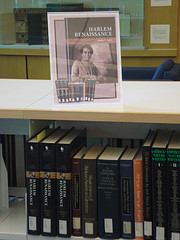
My part of the class preparations was to develop an exercise that would introduce the students to the 5 reference sets they’d need to navigate as they prepared for their final presentations. But the big question was how to make it easy for them to pick their sets out from the shelves and shelves of unfamiliar reference books, while still letting them see the sets in context rather than pulled out and put on a cart just for this assignment. Well, to ease this particular rub, I made signs for each set that had a full scan of the cover of the one of the set’s volumes, and then a cut-out image of the set’s place on the shelf.

Then I put these signs up on the shelves above each reference set.

That way, when the students came back to do their research after all of the librarians had gone home for the night, they’d be able to go back to the sets we’d shown them in class. I hope it worked for them.

Oh, and the exercise itself sounded great on paper, but would need more clarification next year. I still like the idea of it, but there were some recurring questions I should have anticipated.

Leave a Comment

Firefox Search Plugins for All

One of my co-workers has started experimenting with custom search plugins for Firefox. So far she has several ready to go, and they’re listed on her site. Searching our catalog and A to Z list right from the browser are my two favorites.

She made these using SearchPlugins.net, which apparently makes creation, editing, and other maintenance of plugins pretty easy.

Leave a Comment

Appreciation

Every year, the Dean of the College sends a small note of appreciation to each academic staff member on the anniversary of the day they started working here. It’s a sentence or two on letter-head note paper, signed by the Dean, and expressing appreciation for that staff member’s work over the past year.

And by all reasonable standards, this shouldn’t be something to get so excited about. And yet, as my anniversary approached I found myself looking forward to getting that note. It’s funny how such a small thing can be so heartwarming.

Of course, it helps that I really like our Dean. He interviewed me before I came and has always done and said those small things that make me feel he actually knows and cares that I exist. But beyond that, I enjoy being part of an organization that takes even a small amount of time to pat people on the back and thank them for working hard. It really is the small things that make a difference.

Leave a Comment

Reunion Weekend

Over 2000 alums are here this weekend for the annual reunion festivities. 2000 may not sound like a lot to some people, but when you consider that it’s just over the number of students we support each year, you can get a sense of how full the campus seems at the moment.

Here in the library (one of the few air conditioned buildings on campus on this very hot day, by the way) it’s been fun to see people’s reactions to the various renovations that have occurred over the past 15 or so years. And there’s been a pretty steady stream of alums into my office asking everything from “where’s the bathroom” to “where’s such and such a collection that was donated 18 years ago.”

Now, it should be noted that I’m not the librarian on call for questions today, but I am the only one here who’s door is open and who’s door is near the reference desk, the stairs, and the elevator. Next to mine is the office of a librarian who’s on vacation today, and next to hers is the office of a co-worker who’s also an alumna and who’s doing the whole reunion thing this year. Next year, I should just take today as my day on call.

But I’m not actually complaining. I love reunion weekend. Every year I think I won’t (don’t know quite why), and every year I end up having a blast.

Meanwhile, the college archivist has set up shop in the Athenaeum (our gathering/presentation space here in the library, and also the room that houses works written by Carleton people). He’s collecting oral histories today and generally having a grand old time. Every year at this time he becomes one of the most valuable employees here. He’s pretty much the only one who can talk to the two or three people from the class of ’37 as if he’d been there. He teaches people about their time here, and he soaks in the experiences and memories of generations of alums. I keep seeing him walk past my office toward the elevator carrying boxes of photos and letters and other memorabilia to be added to his collection. What fun.

2 Comments

Breathe In… Breathe out

Classes are done. Now we’re in the “lull” period of reading days (i.e. students doing the research they should have been doing for weeks, panicking a little, and not having time for interlibrary loan… Meanwhile we stay open until 3am and have added reference hours). Finals run Saturday through Monday. And then we’re DONE.

To celebrate that we’ve made it this far, we set up an ice cream sundae bar outside the library last night from 9 to 10 and served gallons and gallons of ice cream (I believe 7 gallons? maybe 8?) to crowds of students. And I have to say, it was the best thing we could have done, both for the students and for ourselves. Students got ice cream (what’s bad about that?) and we got to do something really fun after a long and very stressful day. I started the night grumpy and over-tired, but when I went home I’d almost completely decompressed and could go to bed without dwelling and stewing about the horrible day we’d had. (We even ended up doing a few impromptu research consultations over ice cream, which was interesting and rather unexpected.)

So this weekend will be busy, filled with extra reference shifts and polishing off a manuscript that’s due. But then I hope to figure out what “normal” life looks like, again (and maybe get to some of the blog posts I’ve been meaning to write over the course of the last month and a half).

1 Comment
css.php