Skip to content

Category: Tools and Technology

Morning of Nerddom: appointment schedulers and feedback forms

First of all, I’m back! I’ve been devoting any writing energy to some article revisions, but now those are all submitted and I don’t have to feel guilty about cheating on my article with my blog. What a relief.

Anyway, this morning I spent nearly all of my time shirking other responsibilities in order to set up an appointment scheduler and some feedback forms. A couple of my colleagues use and love schedulers, so I thought I’d give it a try, and I’ve been hearing non-stop lately about the value of very very brief assessment, so I thought I’d try that in a more formalized way, too.
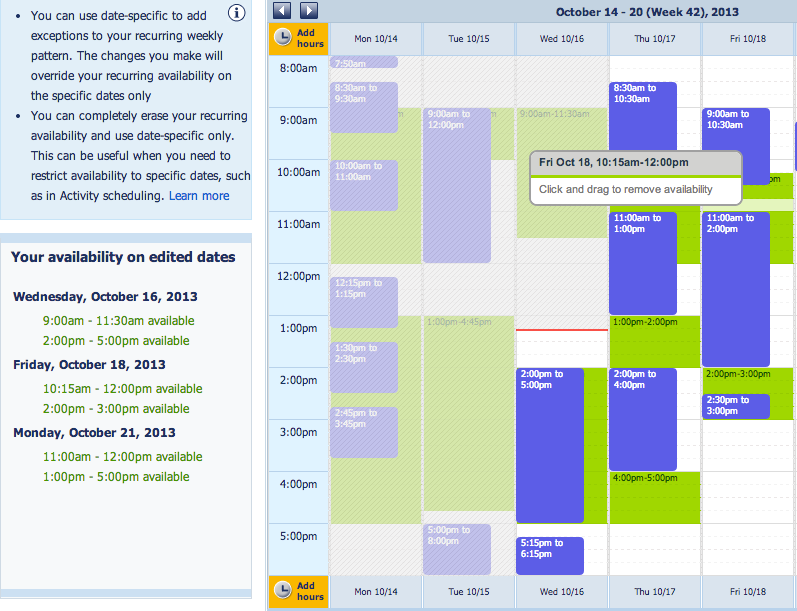
How my calendar looks to the scheduler
How my calendar looks to the scheduler. Blue is “busy” time from Zimbra via Gcal (this trumps available time). Green is available time that I can add to or erase by clicking and dragging.

I heard about ScheduleOnce on a recent friendfeed thread and made an account almost on a whim. “I’ll poke around and maybe set it up later.” Famous last words. It’s pretty nifty and lets me do pretty much all of the things I want, and some things I didn’t know I wanted. For example, I could set it up to send a reminder email to the student (maybe fewer no-shows?), and tell it how soon before the desired appointment time a student can book me. The one catch is that it’s made to work with Google Calendar, and my school uses Zimbra, so I had to import my Zimbra calendar into a google calendar (there are some limitations with this, but it’s better than nothing) and then tell ScheduleOne to look at the imported calendar for busy times (which required an upgrade to the $5/month plan). But if it works, it’s totally worth it to me.
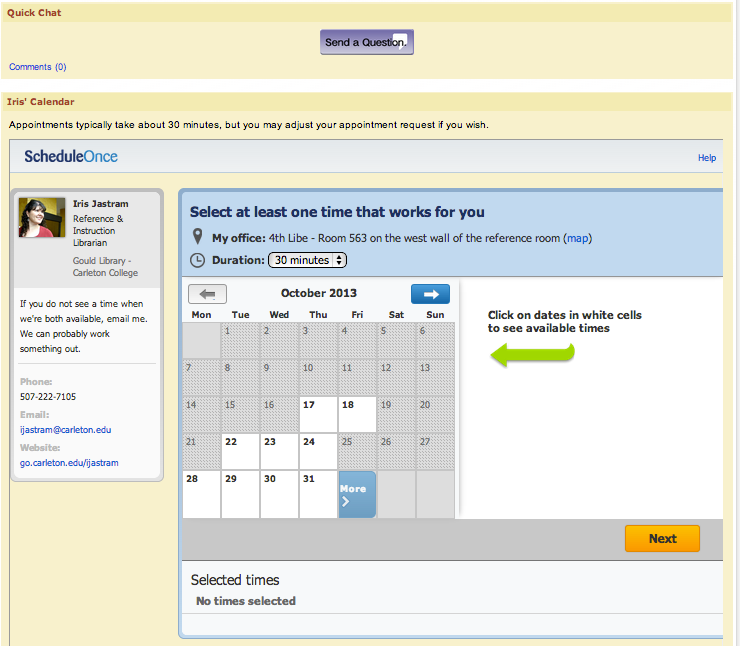
What my students see

After a couple hours of tinkering and testing and tinkering and importing and syncing and cursing Zimbra/Gcal quite contentedly, I embedded the scheduler page in my liaison page and thought I was done.

Then I remembered the “follow-up email” option in the scheduler that I had turned off. Who needs more email, right? Well, maybe people will give me some basic feedback if I ask nicely. So I hopped over to Google Docs and made a feedback form that basically asks two questions: “how satisfied are you” and “do you have follow up questions” (if yes, email me, because this form doesn’t collect any identifying information. Then I leave the traditional optional space to tell me more. Done. I added the link to a follow-up email thanking the student for the research meeting and telling them to email me if they have further questions, and I figured I was done.

But no. This made me think of the people talking about having students fill out forms embedded in libguides at the end of instruction sessions. I’ve done the “on the front of the notecard write something that was new and/or helpful; on the back write something that is still confusing or you’d like to know more about” kinds of exercises on occasion, and I’d love to do more of them, but I often don’t have notecards at the last minute. So I basically made that into a Google Form, embedded it in a page on libguides, and now I’m set to copy that page to any other guides I make. Tada!

And thus ends my morning of nerddom.

Update: 10/31/2013

This is going exceptionally well so far. I’ve done a few user error things along the way, but over all it has been such a help. Almost no futzing with calendars every day, and almost no back-and-forth emails with students about meeting times. I’m in love!

3 Comments

How vegging out in front of the boob tube improved my professional skills

I’ve been going for the most passive of all passive entertainment the last couple of weeks while my health has been on the fritz. The hard part of my super-passive entertainment regimen is right at the beginning, where you choose a series on Netflix, preferably one with many episodes since the initial choice is the brunt of the work. Man, I wish I liked Mad Men… Anyway, after that initial hard work Netflix does the rest for you — all you have to do is wait for the next episode to cue up for you, and the next, and the next.

So there I was, catatonic in front of the screen on Sunday evening. There may or may not have been drool. I probably hadn’t showered recently. There were probably orange peels scattered around my coffee table (I’ve been on a bit of an orange binge lately). Netflix was serving up endless episodes of one of my favorite genres: BBC mysteries. You know the ones. They have an interesting, complex character for the main detective, and then far more murders than any one tiny country town in the British Isles could possibly sustain without completely depopulating. I love them. Anyway, this particular detective (Inspector George Gently) has an annoying, immature jerk of a second in command (Sergeant Bacchus), Gently has to spend some considerable time explaining to Bacchus just how prejudiced and immature he really is. In this particular episode, Bacchus’ primary vice was “racialism.”

Hold on! Racialism? You mean, in the UK people are Racialists rather than Racists? Or at least it’s a totally accepted term for that form of prejudice?

So, being the librarian that I am, I told my coworkers the next morning about my startling discovery, and we started searching Google Scholar, as one does. Turns out, you get two pretty distinct sets of results if you search for racialism vs racism. So bear that in mind next time you’re searching a free-text database.

Next weekend I intend to continue my vegging… er… RESEARCH. For science.

[UPDATE: My friends in the UK say that “racialism” is an old fashioned term for the concept. It still yields interesting and useful Google Scholar results, should be in a dwindling minority for contemporary scholarship.]

Leave a Comment

Good searching really isn’t about searching

I’m a librarian. My brand is Search. And I do a lot of searching every day, and I know a lot of fancy ways of making that search go well for me (much of the time). But today a chance comment underscored something I think I’ve always known: good searching really isn’t about Search, or at least not in the way that people think of Search.

Here’s what happened this morning. I’m part of a grant-funded “iPad Learning Community” on campus. We get iPads (woo!) and we commit to attending learning community sessions several times during fall term to build a better understanding of how iPads work with higher education. So I’ve been doing a lot of experimenting with iPads lately, and one of my favorite things to do on an iPad is read and annotate PDFs (I’ve been using iAnnotate, though I just got Good Reader to play with, too). The thing is, it gets very tiring to write without letting your palm hit the iPad surface, and if your palm hits the iPad surface it can suddenly not tell where the tip of your finger or stylus is and so annotation goes all wonky.

So I fired up my trusty Google, and typed in iPad stylus wrist guard thinking that these were probably terrible search terms but thinking that any page that used all of those terms would probably talk about the problem I was having. Even if all I found was someone else talking about the problem, I might learn better ways to ask the question, or see someone’s answer to the question. Meanwhile, Google suggested as I typed, and thought maybe I should search for iPad stylus wrist protection, which seemed reasonable to me, so I hit “search.”

I don’t remember the next steps very clearly because this was yesterday, and yesterday is a long time ago, and I did it all really fast and without thinking too hard because this is what I do for a living — find stuff when I don’t really know what I’m looking for or how to ask the question. But eventually I learned that there’s a useful term, “palm rejection,” which is the name of a feature that people aim for in tablet applications. So I searched for iPad palm rejection and came up with some pretty useful results, including a site recommending a glove that I’m going to try out.

When I got to the learning community thing this morning, I said I’d found this glove and one of the technologists asked “how did you figure out that it was called palm rejection?” (None of us had heard the term before.) I said, kind of flippantly, “I’m a librarian!”

But then I realized that yes, it was because I had a different goal in mind for searching in the first place. I was first searching for terminology that would help me do a good search. And that’s what I do with students all the time — work with them to figure out what some key terminology might be so that they can make those search boxes work for them.

So I guess good searching, at least in the case of novices looking for information, is often more about learning to look for clues than it is about fancy search strings.

3 Comments

Libraries, IT departments, and complex relationships

We have what I consider to be a really good working relationship with our IT department. When I talk to other people on campus I come away thinking of it as shockingly good, but most of the time I forget what it could be like and just go about the daily business of being in a good working relationship with another department. Their head of public services sits on our Public Services committee. I sit on their Service Points Steering Committee. Their director and ours meet regularly. Their director participates in our leadership team meetings. The people who run their main help desk and I talk nearly daily as we coordinate the running of the public labs (of which the library has 3) and the supervision of the IT student workers who, as a pool, staff both their main help desk and our Research/IT desk.

What’s more, we’re also friends. Most of us, anyway. There are a few people I don’t really know or understand over there and I’m sure the same is true when they think of us. But really, I’m going to movie night at one of their houses tonight and another one and I have swapped books and another and I meet to knit together nearly every Saturday morning. We confide in each other. We’re friends.

So yes, things are good. But as with any relationship, things are also complex.

We had a joint retreat recently, and one of the questions several of us raised in our breakout groups — the question that’s kicked around in my head since then — is how to have a truly collaborative relationship when the library is about 90% customer of IT and 10% collaborator with IT. We have complex systems that they support. We have weird old fashioned printers (i.e. label printers) that we really need but that don’t work most of the time. Our web presence is complicated. Our need for public technology infrastructure (and bandwidth) just keeps increasing. Some of us want to tinker with all kinds of geeky stuff, and some of us need help copying and pasting. I don’t know if we’re their most complicated customers on campus, but we’re probably right up there.

So there’s a weird power dynamic there, and potential for either side to get resentful: us if we think they’re not helping us enough and them if they think we’re demanding too much time or resources. And we wondered how to even out that power differential a bit in hopes of keeping a good thing going and making it even better and more sustainable. What is it that we offer them?

Currently, we’re one of the best places on campus to test equipment and software. We’re a high traffic building and one of the few on campus that’s frequented by faculty, staff, and students. And we’re also pretty good at soliciting and communicating feedback. So when the college was deciding on a campus-wide printer/scanner/copier model, we were the main test site. When they institute new software or interfaces, we can usually tell them how it’s being received by our students.

We also offer a space where IT can have direct contact with students who are in the midst of doing their work. The main lab in the library is the reference room, with the joint Research/IT service desk and the two busiest printers on campus. One thing that our IT department doesn’t have much of right now is very direct connections to the curriculum and student engagement with their academic work on campus, and since that’s really the core of the campus’ mission and ethos, figuring out how to engage with that enterprise would be a great step. (There is a group of academic technologists that consults with faculty and students about curricular matters, but for the most part they are separate from the main help desk.)

Right now, they’ve come through several years of several iterations of major reorganizations, so I suppose we can offer a sense of stability if we’re in collaborations with them and other departments or individuals.

But what else? Surely there are ways to offer more tangible support for colleagues that we value and that make our work possible. What are some of the things that you offer your IT departments?

7 Comments

The evolving face of shelves and desks

Harvard Library Reading Room

Libraries have always been many things, but one thing they’ve generally focused on is providing materials and places to read and engage with those materials. Shelves and desks.

With more and more of our collections moving online, an internet connection is now the equivalent of a shelf for our electronic collections, browsers and computer desktops are now the places to read and engage with those materials.

This hit home for us in a big way when our wifi infrastructure crumbled under the ever-increasing demands on its resources (thank heavens for smart and dedicated IT folks!) and when “use one of the library computers” wasn’t an alternative any more because they were all in use. All three labs of them.

I used to think of wifi and computer access in libraries more as amenities. People come here to do their academic work, so isn’t it great that they can stay here and actually do their work. But over the last few years I’ve decided that our collections and the assignments that our faculty require have evolved such that it’s no longer useful to think of these and things like them as “extras.” These are our shelves. These are our desks. These are part of our core mission. We provide materials and ways of engaging with those materials, just as we have always done.

Leave a Comment

Last Week in OSes Connecting to our Campus Network

Here is a list of OSes that connected to the campus wireless network last week, and the number of each of those OSes that connected. Dorm rooms don’t have wireless, only wired, so they don’t show up here, and lab machines are all wired, so they don’t show up here. Also, we don’t currently have guest access to the wireless network, so this is Carleton folks connecting.

  • 944 Mac OS X
  • 915 Apple iPod, iPhone or iPad
  • 640 Microsoft Windows Vista/7 or Server 2008
  • 340 Mac OS X Lion
  • 133 Generic Android
  • 69 Microsoft Windows XP
  • 26 OEMed Wireless Router
  • 11 Slingbox
  • 11 DD-WRT Router
  • 9 Ubuntu 11.04
  • 9 HP Printer
  • 8 LaCie NAS
  • 7 Samsung Android
  • 7 Playstation 2
  • 5 Nokia Internet Tablet (udhcpc client)
  • 5 Android Tablet
  • 3 Ubuntu/Debian 5/Knoppix 6
  • 3 Motorola Android
  • 3 Debian-based Linux
  • 2 Xbox 360
  • 2 OS/2 Warp (actually BlackBerry, I think)
  • 2 Microsoft Windows 8
  • 2 Gentoo Linux
  • 2 Epson Projectors
  • 1 Symbian OS
  • 1 Fedora 15 or 16 based distro
  • 1 Chrome OS
  • 1 Brother Printer

Coming after the recent Chronicle of Higher Ed article on how Tablet Ownership Triples Among College Students (apologies for the pay wall), it’s very interesting to see iOS connections outnumber all Windows connections.

Leave a Comment

I will manage these passwords if it’s the last thing I do

With passwords proliferating like tribbles, I’ve had to upgrade from my two previous methods of managing my accounts.

The first method was the easiest: I had two passwords, an easy one and a complicated one. If the site was important I used the complicated one. If the site wasn’t important I used the easy one. Well… that started to seem like less and less of a good idea pretty much as soon as I started online banking and getting work passwords that mattered and stuff. So.

The second method worked for a long time: I had several passwords written down in a fairly secure online place that was itself password protected, and then I had an easy password that I used for all my “I wonder what del.icio.us is” experimentation online. That started seeming less and less good after several of the sites with the easy password got hacked multiple times and the hackers stole their databases of user passwords. Multiple times. And then I’d have to go through these millions of little sites changing a bunch of passwords all day. That got to be a less and less appealing way of spending a few hours. So.

Now I’m using an encrypted password manager. Here’s the setup. KeePassX (the Mac version of KeePass) on each of my computers and KyPass installed on my iPod Touch, each of these is directed to look at the KeePass database that’s stored in Dropbox (and the file made available offline on my iPod Touch).

Hopefully this solution lasts me for a while.

5 Comments

Leaving this mortal coil

Google has been rolling out redesigns of its major web services, like Gmail and Google Reader, and like a docile citizen of the Internet, I’ve been waiting for my eyes to adjust and for my hands to quit directing the mouse to places where buttons used to be. It’ll happen. Sooner or later.

What I find fascinating is that the design changes that keep catching my eyes off guard seem to be more than updates to look and feel. They seem to embody a shifting focus or philosophy on Google’s part.

The new designs seem just enough divorced from any 3D metaphors to leave me feeling unanchored. I no longer look through digital windows or at pages on a digital desk. There aren’t enough edges for those things to exist any more, and what edges there are on the page are flat and insubstantial enough that my eye can’t interpret them as edges. They’re just lines. Even suggestions of the existence of friction (like the bumpy edges of messages that you could “grab” to drag) are gone.

What’s left is a denial of the physical. We’re not in Kansas any more. We’re not even “navigating” the digital world any more. Little by little, Google has stopped shipping information down to our world. Little by little, Google has started asking us to give up on gravity and friction and join it in the ever-shifting, edgeless, 2D existence of the digital cloud.

Leave a Comment

Using Naxos on iThings

Those of you who have Naxos Music Library know that iPods and iPads and iPhones don’t work well natively with Naxos stuff because Naxos is pretty heavily dependent on Flash. Our music department’s librarian just sent information around about how to make things function, though, so I thought I’d share. As it turns out, there’s an app for that!

  1. Access NML through your library’s subscription on a desktop/laptop computer
  2. Select the playlists tab near the top of the page
  3. Select “sign up” near the upper right corner and follow the sign-up directions
  4. A confirmation email will be sent, with a link to activate the account.
  5. Log in to the desktop interface and create playlists
  6. Download the NML for iPhone App and log in using the same account information.
  7. Accessed your playlists via the app.

Basically, the music you want to hear on an iThing will have to be put into a playlist first, and the playlist is what’s available via the app.

Leave a Comment

Anatomy of a Mass Internet Argument (aka “Blog Drama”)

Every so often, people in online communities turn their attention toward one thing and argue heatedly. Here’s how it generally goes.

  1. Initial controversial statement (This is usually something that can be interpreted as “You and everything you value? It all sucks.”)
  2. Initial “Hey, who do you think you are anyway? And by the way, you suck” response.
  3. Mass internet pile on
  4. Later, in no particular order
    • Sporadic “That controversial statement wasn’t controversial. It’s been said/done/thought since the beginning of time” interjections
    • Sporadic “That initial statement was spot on” interjections (mostly ignored or decried)
    • Summary blog posts for newcomers to the argument
    • Meta blog posts talking about the experience of the argument (ahem, You Are Here)
  5. Argument is named something catchy (usually a catchy acronym or some reference to Watergate)
  6. People wax nostalgic about the argument, getting all heated up about it in short bursts
  7. Argument becomes point of comparison in the next mass internet argument
8 Comments
css.php