Skip to content

Category: Tools and Technology

Downloadable EndNote Output Styles for MLA 8th Edition

Last time MLA changed its citation style, it took EndNote several years to update its built in MLA style. So if you’re looking for an Output Style to use with EndNote that conforms (as much as possible) to the new MLA Handbook, 8th Edition, I’ve created files you can download and install.

  1. Drag the two style files that you find in this folder into the Styles folder that EndNote looks at (you can see where your own installation is looking by going to Preferences > Folder Locations).
  2. Set MLA 8th as your output style by opening EndNote, clicking the “Edit” menu and then “Output Styles.” You may need to click on “Open Style Manager” the first time, at which point it might be useful to check the box next to the new MLA styles so that they’re listed with your other “favorites.”
  3. Download and read this ReadMe file that includes special instructions on using EndNote with this Output Style. (For the sake of convenience, I will also put the ReadMe information here in this blog post.)

If you run into problems or come up with improvements, please let me know!

Using the Style

To make sure that EndNote generates good citations, here are some important things to know:

  • URLs for web sources other than library databases should be included, but do not include the “http://“ or “https://“ part. You will have to make this edit individually in the records for your items as there is no way that I know of to programmatically take those prefixes out of the URL in EndNote.
  • Fill in the “Date” field with the day and month, but not year, like so: “21 Jan.”
  • If your work has no listed author, be sure to include a “short title” in your record because this is what will show up in your in-text citations.
  • If your work’s author is also the publisher, leave the Author field blank.
  • If you are focusing on an aspect of the work done by a person who is not the creator of the main content, put that person’s name in the “Author” field. Then put a descriptive label (editor, performer, translator, etc.) in the “Label” field.
  • If you are looking at an “unexpected type of work” (a transcript of a broadcast, a manuscript of a published work, etc), put a descriptive word into the “Type of work” field (such as “Transcript” or “Manuscript”).

Special Instructions by Reference Type

Web Page:

  • Add the name of the web page within a site to the “Title” field, and the name of the full web site to “Series Title” field.
  • Do not include the year of the “Last updated date” as that will be duplicated from the “year” field. Instead enter the date in the this way: “26 Jan.”
  • Add the name of the organization that sponsored or published the web site to the “Publisher” field.

Film or Broadcast:

  • If you are treating the director as an author, put the name into the “Director” field. If you are treating the director as an Other Contributor, put the name into the “Credits” field.

Map:

  • If your map is part of a collection that has a title (such as “Google Maps”) put that title into the “Series Title” field.

Artwork

  • If you experienced a work first hand, put the location name (museum name, city name, etc) in the “Place Published” field.
  • If you found the work reproduced online, use the “Artwork” reference type and put the online database name in the “Database Name” field.
  • If you found the work reproduced in a book, magazine, etc., use the reference type that matches the thing where you found the reproduced artwork (“Book Section,” “Newspaper,” etc.)

Manuscript:

  • Put the word “Manuscript” in the “Type of Material” field. If you are using the Manuscript field for something other than a manuscript, then put a similarly descriptive word in the “Type of Material” field.

Caveats

The new MLA style gives people many, many options. Sadly, none of the reference managers that I know of are currently that flexible, so there are some things that are options in the style that people will not be able to do automatically using EndNote or any other software in their current states. Most notably, there is no good way, currently, to do the following:

  • Use a description (without quotation marks or italics) in place of a title for untitled works
  • Add the optional place of publication to citations
  • Add the optional access date to citations

To do these things and the other optional descriptive work allowed in the 8th edition, you’ll want to finish your final draft, save a new copy of your document, use the “Convert to plain text” option under “Tools” on your EndNote toolbar to break the connection with the EndNote program, and then do any final edits that the program cannot do for you.

Leave a Comment


Building a LibX Edition for Primo

As of yesterday, we’re a Primo library. So for the last couple of days we’ve been working to change all the things that need changing after you get a new catalog. One librarian is doing most of the work to change all of our links to our old catalog or items in the catalog in all of our LibGuides. Meanwhile, I took on trying to get LibX to recognize our new catalog.

The LibX thing turned out not to be the least bit straightforward, so I thought I’d post what I did in case a) you want to try this and can benefit from my hours of fumbling, or b) you are good at this and can help me make what I did better. I was helped to get this far by a librarian from the LSW.

Start an Edition

In the Edition Builder, it might be a good idea to first search for the Carleton College edition and copy that to use as a base, or you can click “Build a New Edition” on the right of the page.

From here, there’s one confusing thing that will help for the rest of the time. To find your edition and edit and test it, you’ll click on the “my editions” tab. Then click on the edition name on the lower left side. THEN click on the revision you want to work on in the list of revisions that shows up to the right of the “Select an Edition” box. THEN, if you don’t see a “Revision x is being worked on” notification, you’ll have to either click “Open Revision x (modify)” or, if you have a live revision that you want to modify you’ll have to click “Copy Revision x Forward.” At this point you’ll end up with tabs across the top to configure the various different functions of the LibX extension.

Configuring your Primo instance with LibX

You’ll need the Web Developer extension (chrome or firefox) to find the variable names LibX asks for. Once you’re armed with that, click on the “Catalogs & Databases” tab in the LibX Edition Builder for your new Edition.

LibX catalog

I tried to get LibX to auto-detect my catalog’s settings, but it kept saying that it couldn’t do it, so I had to resort to manual set-up. So under “Manual Configuration” I chose ExLibris Primo and then clicked “Add Catalog.” After this you’ll need to add information to both the “Required Settings” and the “Optional Settings” for the catalog (my edition didn’t work at all until I added some things to the “optional” settings… so apparently they aren’t terribly optional).

The URL you need is JUST the base URL up to the .com. All the other parameters that ExLibris puts into Primo URLs have to be added in other spots.

Then you’ll need to find things that LibX calls “Advanced Search Choice Variable 1,” “Advanced Search Mode Variable 1,” etc. Fire up the Web Developer “Inspector” tool and point it to the boxes I’ve labeled here:

advanced search variables

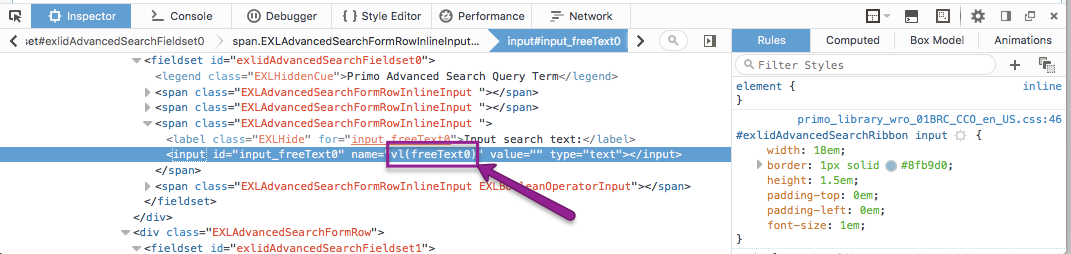
When you click the Inspector tool on the Advanced Search Choice Variable 1 (the first search box), you’ll find the variable name in the Web Developer browser pane:

variable name

Put that value into the corresponding field in LibX, finding and entering each of the variable names in the required fields in LibX.

You’ll find your VID in the standard URL for your catalog. I’ve bolded our VID in our URL here: http://carleton-primo.hosted.exlibrisgroup.com/primo_library/libweb/action/search.do?vid=01BRC_CCO

In the Optional settings, you’ll need to fill in 5 of the fields, as far as I can tell:

  1. In “Path” put “/primo_library/libweb”
  2. In “Search Function” put “search”
  3. In “Basic Mode Variable” try putting in “vl(1UIStartWith0)” — you may have to adjust this, but it’s worth a try.
  4. In “Tab Variable” put “default_tab”
  5. And in Title Search Mode put “contains”

Beyond the Catalog

The thing I use LibX most for is the added right-click context menu in my browser that allows me to reload the page through my library’s off-campus access, so I highly recommend putting your proxy information into the “Proxy Access” tab on the LibX Edition Builder.

You can also add your Open URL base url to the OpenURL Resolvers tab. If you do this and select a logo, then that logo will appear next to citations online, allowing you to click on the logo and check for library access. (You can add your own logo in the “File Management” tab.)

Testing your Edition

Back in the “My Editions” page, click on the Revision you’ve been working on and then click the link that appears below it called “revision test page.” If you can search your catalog through the test page, congratulations! If not, I don’t have a lot of advice beyond asking around and maybe trying to have the LibX folks help you out (you can click “help me with x edition” in the “Select an Edition” box to the left of the list of revisions).

Go Live

Once things are ready, click on the revision you’ve been perfecting and then click “Make Revision x Live.”  Now people will be able to download the LibX extension for Chrome or Firefox, tell it which library they want, and start using it.


3 Comments

Adventures in CSS: Changing the way LibGuides gallery boxes display

We weren’t happy with the default way that LibGuides displayed labels and captions on the images in Gallery boxes, so I started tinkering with the CSS. We didn’t want the labels and captions to be white, and we didn’t want them to be on top of the images in the gallery. And we didn’t like the font sizes. So I fired up the Web Developer extension and started poking away, figuring out how the original CSS worked and what I could over-write to make some changes.

I don’t know that I would have made it too far without help from people who responded to my plea for help from the Library Society of the World, but in the end a few lines of CSS shifted the label and caption fields down below the images, and shifted the navigation buttons up above the images where they could be in a consistent spot no matter what size the image.

If you’d like to do something similar, go into the Custom CSS area of LibGuides and add the following:

<style>

.carousel-caption {position: relative; text-align: left; left: 2%; color: #5C5757 !important; text-shadow: 0 0px 0px rgba(0,0,0,.6); padding-top: 20px; padding-bottom: 0px;}
.carousel-caption h4 {font-size:16px;}
.carousel-caption p {font-size:12px; margin-bottom: 1px;}

.carousel-indicators {position:relative; margin-top: 20px; margin-bottom: -10px;}
.carousel-indicators .active {background-color: #5C5757;border: 1px solid #fff;}
.carousel-indicators li {background-color:#fff; border: 1px solid  #5C5757;}

.carousel-control.right {background-image: none;}
.carousel-control.left {background-image: none;}
.carousel-control {color: #000; margin-top: -25px;}

</style>

And if you come up with great ideas for tweaks beyond this, I’m all ears!

2 Comments

RIP FriendFeed, 2007-2015

friendfeedYou’d think I’d have a lot to say about the shuttering of FriendFeed, my online community, the place where I lived day in and day out for nearly 8 years (which matches the longest span of time I’ve lived in any physical neighborhood in my life). I’ve made and lost friends, mourned death, celebrated birth and marriage, learned to engage with opposing and complementary views, and generally grown up as a person and as a librarian on FriendFeed.

But I find I don’t have much to say as Facebook turns out the lights on us today and does whatever Facebook does with servers it no longer supports. What could anyone possibly say?

1 Comment

Improving WiFi, the shelves of our electronic collections

via TechNews
via TechNews

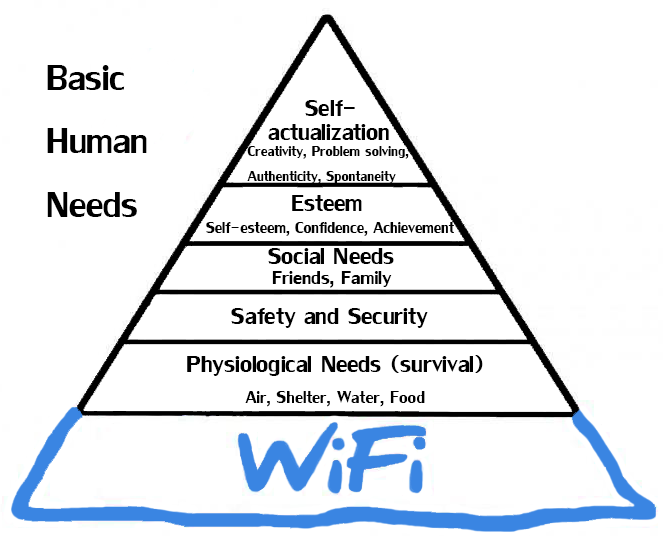
Wifi is like oxygen for so many of us these days. I expect to be able to hop on the internet in public spaces even though I don’t have a smartphone. If I’m in a library, coffee shop, conference hall, hotel, or my house and there’s no wifi, I can hardly concentrate on anything else even if I really wasn’t doing anything on the wifi anyway. And for libraries, as we move more and more of our collections towards e-content, having robust wifi is like having robust shelving for our physical collections — it’s absolutely essential.

But here’s the thing. Robust wifi for people wandering around with laptops in large spaces is technologically really really hard to accomplish, especially given the history and assumptions behind current wifi protocols. Carleton’s network architect (a networking genius and also amazing at explaining things in words I understand), recently attended a conference where he learned the very latest in how to set up more robust wifi networks, and he invited me to attend the debrief presentation he then gave to his IT colleagues. This presentation went over the main points from a talk by Peter Thornycroft of Aruba Networks, apparently one of the great thinkers on this topic.*Here are some of the salient points that you might want to know when talking to your IT folks about wifi in your libraries.

—

Philosophically, network architects have so far been far more concerned about coverage than about speed. When push comes to shove, they say, “Well, nobody will be working at their very fastest, but there’s plenty of wifi for all.” As it turns out, this has been the wrong decision. The nature of network communication is very “bursty.” Each device gets a time slice out of the access point’s attention and then waits while the attention turns to other devices or to the routine housekeeping it has to get done. If the network optimizes for speed, then more happens in each time-slice — more bursty bits of communication or housekeeping happen each cycle — and therefore more devices get along merrily while sharing the access point. The fast devices will get their work done and out of the way faster and leave some time and attention for the slower devices that would otherwise get crowded out.

On the device side, all the decisions are made by the manufacturers, and faster wifi rarely makes it on the priority list. Apple, cell phone companies, etc prefer to put their money into other parts of their products to keep the over all device price point lower. What’s more, when they list their device specs, they list the results of tests that were done in ideal environments (no other devices in range, access point ideally placed, etc). In the real world, devices almost never operate in such a clean network environment. The result: optimizing the network for speed will help get signal to all of these slow devices, and there will never be enough incentive for the solution to come from the device side of the market.

A word about institution- and library-type networks. They are very different from home wifi setups. Your access point at home is made for a stable environment in which it either can or can’t reach your device. It doesn’t know anything about other access points and it doesn’t communicate much about the environment with your client devices. On the other hand, WLANs (wireless local area networks, like those at most of our institutions) are made up of many access points that talk to each other, adjust themselves to maximize their signals as the environment changes, and communicate a lot with the various devices in the area. We’re talking about WLANs here.

When a device moves, a new access point takes over where the old access point’s signal peters out. However, this process is plagued by three issues.

  1. Device manufacturers market their products based on battery life. It costs (slightly) less battery power to lock onto a single wifi signal. Therefore the devices are made to prefer staying in contact with a favorite access point rather than move from access point to access point throughout the day.
  2. Networking, in bygone times, was assumed to be useful in an environment where things didn’t move around. Hence the “sticky client” issue I wrote about previously.
  3. Early on, it was assumed that the client device would be the smartest about its network needs, so the device should choose a favorite access point rather than have the access points choose devices.

How do these issues play out in a WLAN environment?

  1. The 2.4GHz signal carries farther than the 5GHz signal, so as you approach a building your device may glom onto a far-away 2.4GHz signal. Meanwhile, in all but the fanciest access points, having a device access at 2.4GHz will slow down the entire access point for everyone else.
  2. Your computer may not want to let go of a particularly satisfying relationship with an old access point that is no longer in range. This means that you may enter a room and find that you have no signal even though other people there are internetting along quite happily. Your device is refusing to try out a new relationship in hopes of remaining faithful to its lost love.
  3. A well-behaved device would take the access point’s report “you’re getting a little far away from me, so please transfer to this other access point over here” and would do exactly that. What usually happens, though, is that the device hangs on until things get dire and then probes every access point in the area (a lot of wasted time slices and energy) and then chooses a new access point often based on previous familiarity rather than optimal signal. Meanwhile this whole process bogs down the entire network.
Peter Thornycroft, "Gigabit Wi-Fi, 802.11ac in depth," Presented at AirHeads, 2013.
Peter Thornycroft, “Gigabit Wi-Fi, 802.11ac in depth,” Presented at AirHeads, 2013.

How to improve performance given all these issues?

  1. One solution is denser signals (visualized to the right, where each dot is the number of ones and zeros the network can process at a time). If we do the exponential bump-up from a 4×4 network to an awesome 8×8 network more things can happen at once. If Jack has a 3×3 laptop and Jill has both a 1×1 smartphone and a 2×2 tablet, our awesome 8×8 access point could serve both of them in a single time-slice rather than cycling through them one by one. The problem here is that you need more and more signal strength to decode the denser signals, so we’ll need more access points with higher signals strength and greater speed. The problem, of course, is that more access points means that each access point has more neighbors, and neighbors interfere with each others’ signal. So this will be a delicate balancing game.
  2. Another solution is to use software to force clingy devices to allow a handoff to a new access point. In this scenario the network tells a device “Look, you should really move to that access point over there for best results.” If the device doesn’t do as it’s told, the current access point will actually shut off communication, forcing the device to choose a new access point. Carleton’s network has been running this upgrade for a few months now and all indications are that it has helped with performance.
  3. A third solution is to upgrade access points. Older ones simply don’t have the memory or CPU power to handle all the stuff they need to do these days. Also, older access points are only able to handle 1/3 to 1/2 the number of connected devices as newer ones, and people come into our areas these days with a laptop and a phone and maybe a tablet… That’s a lot of devices for a single person. Also newer access points can emit both fast and slow signals so that the entire area doesn’t slow down when one slow device connects.

So those are the main points that I understood from the presentation. There is clearly not enough here for you or me to start improving our WLANs, but hopefully there is enough here that if you’re in conversations with your network folks you may have some context and even some concrete suggestions to offer.

—

*You can find a lot of useful videos of Peter Thornycrof presenting online. Many of them will be more useful to you if you speak network, but even I was able to get a lot out of the clips Carleton’s network guy showed us. One of the ones we watched some of was about Beamforming.

Leave a Comment

DASHcamp: Digital Arts, Sciences, & Humanities camp 2014

Two weeks ago, I was able to attend DASHcamp at the University of Minnesota. It was such a rich and useful day, both in terms of what I learned and also in terms of the people I met. None of us wants me to write down all the things I learned and thought about that day, so here are the highlights.

Data Management and Curation Profiles for the rest of us

Data management is an increasingly important (and often required) step in research. The idea is to describe your data, any decisions you made while collecting and using your data, and any tools needed if others are going to use your data. Two tools are:

  • DMP Tool
    A tool provided by the California Digital Library that helps researchers develop a data management plan.
  • The DCP Toolkit — Summary of Interview Elements
    Summary by Kristin Partlo of the “DCP Interviewer’s Manual” of the Data Curation Profiles Toolkit, developed by Scott Brandt and Jake Carlson of Purdue University Libraries, the Institute of Museum and Library Services and the Distributed Data Curation Center. http://datacurationprofiles.org/

We started trying to think through the elements in these tools from the perspective of humanities data. The group I was in discussed textual data (other groups discussed video, images, sound, etc). It turns out, this is a complicated discussion! We decided that we would need some description of the level at which the primary source material is encoded (did you code down to the paragraph level? the word level? the chapter level?). We got so stuck on describing our data that we didn’t get much beyond that in my group, but the discussion was fascinating nevertheless.

One important point that came out of this conversation was that we don’t have to start from scratch as we think about data management for humanities. We can draw from at least two bodies of knowledge: scientists and social scientists who have thought through so many aspects of data management already, and archivists who are trained in managing and describing the “data” of humanities.

One real Ah-Hah moment for me was when we talked about how to start the culture shift that would result in people documenting their processes and decisions as they do their research in the humanities. Someone mentioned that teaching bibliographic and file management is an important step in the process. I do that already! I talk with students about how to make their raw material (PDFs, citations, research note) retrievable and sortable, and all I have to do is mention casually that this is a humanist’s data management.

Conversation about the term “Digital Humanities.”

One interesting conversation during the day involved when it is and isn’t important to claim the term “digital humanities” for your work or outreach. One person remembered back when there was e-Science and wondered when Digital Humanities would just be “humanities” again. Most of us were only interested in using the term when it’s needed to claim resources. You’ll need it for many of today’s grants, for example, or to get some kinds of support from a campus.

Tools:

  • VideoAnt
    The University of Minnesota developed this simple video annotating tool, and it’s free and open for all to use. It was originally used to help professors respond to video assignments, but now it’s also used for collaborative work or whenever people want to have text associated with specific points in a video.
  • Git and GitHub
    I’d heard a few people talk about using one or the other of these tools as document drafting tools, so I was interested to see how to use them and what the appeal might be. The room was full of academic technologists, instructional designers, and librarians, and it was interesting to hear the various ways they knew to use the tools. Some create HTML-based tutorials and use this as their editing and publishing platform. People who work with data librarianship can apparently search for shared and useable data there. For me, I think it looks pretty overpowered for most document drafting, and it’s full of unfamiliar terminology for most humanists (pull requests, branches, forks, etc). I think the version controls in something like Google Docs is more accessible to most of the folks I work with, but it was great to get an inside view into a new-to-me tool.

So that was fun

I really hope they hold this camp again next year. And if they do I’ll make sure to register before I share the information, because I want a spot!

Leave a Comment

ArtStudio for iPad: or, PhotoShop for 5 Bucks

Over the Christmas break, someone in my Facebook feed shared a YouTube video of artist Seikou Yamaoka recreating “The Girl With A Pearl Earring” using an iPad. Before I go on, you should watch it too, just for the sheer beauty of it.

Amazing, isn’t it?

So I went to the App Store and searched for ArtStudio and was astounded to find essentially a $5 version of Photoshop. Seriously, layers, dodge, burn, color picker, export in .psd format, all the “Adjust” menus you can think of, filters… everything I ever used back when I had Photoshop, plus a bit more.

I spent most of a day playing with different paint brushes, specifying just exactly how wet they were, or how much lead and follow opacity I wanted. My little nephew spent long stretches of time on it and even learned to change colors on his own.

Mr 2 using "special pen on iPad"
Mr 2 using “special pen on iPad”

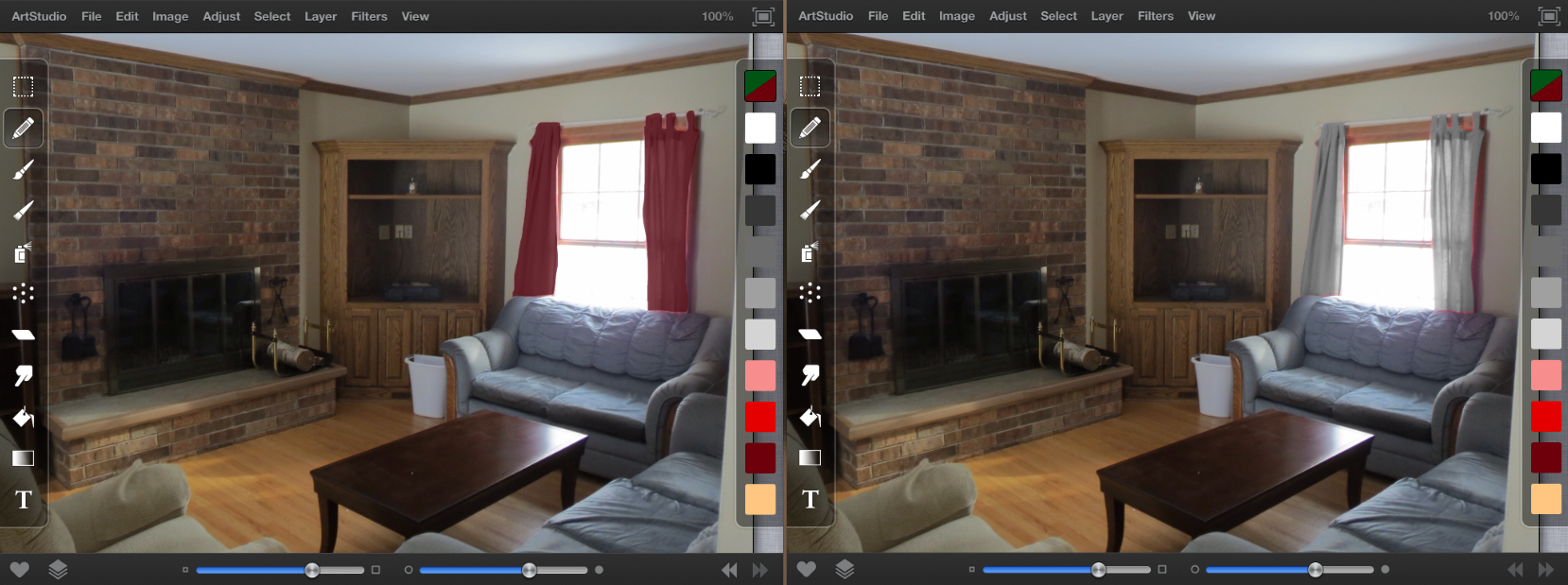
I used a photo of my sister’s new family room to help choose new curtain colors for them. (The original curtains are pink, which, no.)

Red? Grey? Definitely red.

I used a photograph of my parents’ church to design a logo for them.

Building a logo from a picture.

I’m certainly no Seikou Yamaoka, but it’s wonderful to have such a powerful and intuitive art app.

Now, if only GIMP could figure out how to make itself as intuitive, I’d have a desktop image making/manipulation application… Sigh.

Leave a Comment

FriendFeed Resurrected: the Afterstory

As with most stories involving hacktivism, major corporations, insanity, and backwater social media platforms, we will probably never know exactly what happened this past weekend when FriendFeed went down for a day and a half.

Theory One

yayfriendfeed
Exhibit A

One perfectly plausible theory is that someone accidentally tripped over the FF server’s power cord down in Facebook Headquarters and nobody noticed until Sunday. Meanwhile an Anon thought this would be a good time to protest censorship, little realizing that this would make Anonymous a bit of a laughing stock.


anon
Exhibit B

Evidence for this theory includes: A) the fact that someone at FB HQ could “push the button” that made FF go again, and B) the complete laughability of any Anon thinking FF was one of the biggest social networks in the world.


Theory Two

A snippet of Exhibit A (click to see the full crazy)

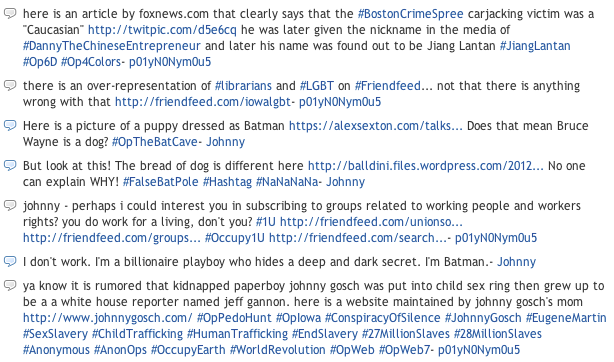
The other theory is that this misguided Anon really did throw an epic tantrum thinking that account deletion (and therefore content deletion) combined with buggy search equals censorship. Evidence for this theory include A) the continuing tantrum that this Anon is throwing over in FF over having had his account deleted as spam and having seen other content disappear and, somehow, images of the Boston Marathon Bombing and an over-representation of librarians on FF… (I believe the technical term is “batshit”)…


help
Exhibit B


…and B) the complete laughability of thinking “here’s a cause that nobody at FB HQ will care about — let’s claim responsibility because then they will PHEER US” when really, nobody at FB noticed until we told them.

Either way, Anonymous (or at least this Anon) didn’t do itself any favors. … And now I’ll probably be DoSed. Sigh.

Anyway…

Whatever the truth, we’ve learned a few things:

  1. Back when FF was still its own thing and they were still developing and improving its code, the data that the search function used was all housed on one machine. Since then, we’ve generated a LOT of data, so essentially old stuff isn’t indexed any more. Probably some new stuff isn’t either. There just isn’t space. So that’s good to know for all of us.
  2. Facebook let us live! And even revived us!
  3. Anonymous, or at least this Anon, doesn’t seem to understand some fundamental things about life, the universe, and everything.
  4. There is apparently an over-representation of librarians on FriendFeed.
  5. It’s a good thing Iain Baker (of Jesus Jones) has an extensive social network. We owe him and his network a whole lot of thanks.

UPDATE for the lulz: The worst insult known to humankind.

lolanon


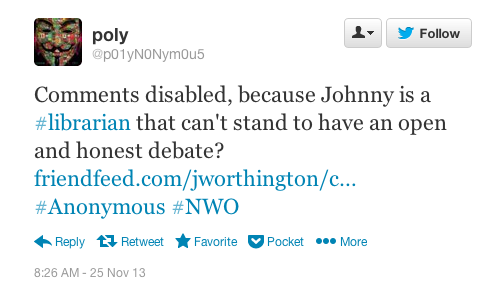
Johnny is not a librarian. It’s just that Exhibit A for Theory Two started with this post:

Johnny_-_FriendFeed

1 Comment

The day Anonymous took down … FriendFeed?


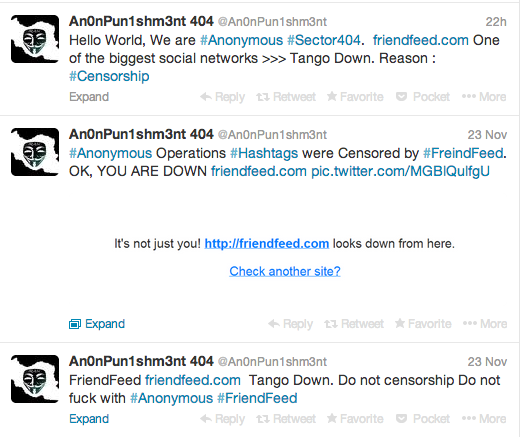
friendfeedhacker

Apparently, Anonymous has mistaken FriendFeed for “One of the biggest social networks” and is therefore venting spleen in the form of a DDoS attack. Why? Because hashtag searching for something Anonymous was interested in didn’t work and therefore must have been censored. Must have! It couldn’t possibly be that FriendFeed is actually the forgotten stepchild of Facebook and the search function hasn’t worked consistently in years for any of us…

Now, for those of us active on FriendFeed, it’s a huge part of our lives and relationships. But none of us kid ourselves that we’re operating on “one of the biggest social networks.” In fact, most of us are simultaneously pleased and baffled that Facebook has let us limp along for 4 years on our preferred platform even after the whole FriendFeed team went to work for Facebook instead. TechCrunch can’t figure out why FriendFeed even still exists to be attacked. I’m mostly worried that this whole attack will remind Facebook that they forgot to pull the plug on us years ago.

So while we wait for Anonymous to realize what a backwater they’ve chosen on which to take their anti-nonexistent-censorship stand, we can speculate about a) how little they actually know about the internet, b) how bored/drunk/high they were when they launched this attack, and c) what they’ll take down next.

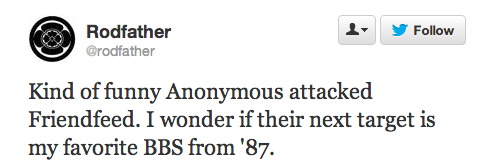
Rodfather has a guess about question C.

twitter-rodfather

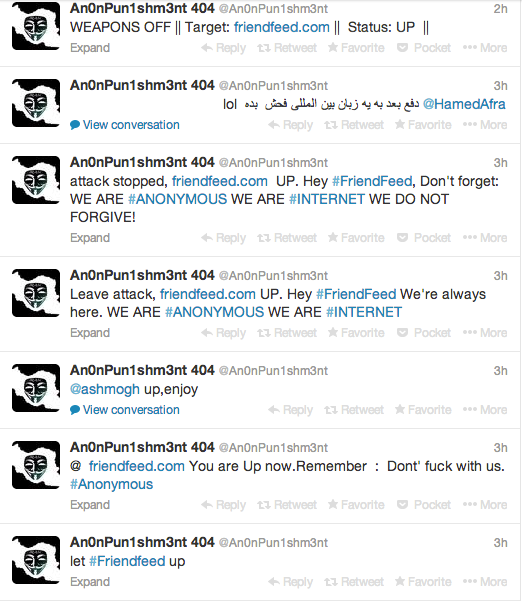
UPDATE: After almost 2 full days of downtime, Facebook got FriendFeed back up and running at 2:30 this afternoon. Rejoice!!!

help

yayfriendfeed

friendfeedup

The story continues in my next post.

9 Comments

Sprucing up the place

I realized it’s been at least 6 years since I last changed the look around here. Websites probably shouldn’t go that long between updates, so take a moment to remember the old, lush Pegasus while you explore the new site.
a screenshot of Pegasus2013

Leave a Comment
css.php