
Skip to content

Category: Tools and Technology

Moodle, One Year Later

Tomorrow I’m joining a panel made up of me, our resident web-app coder guru, a faculty member, and academic technologist, and a student to talk about how things have changed one year into our adoption of Moodle as our campus’ course management system. We’re presenting this as the first of the term’s LTC lunches (generally a weekly gathering at which someone or some group presents on a topic relevant to learning and teaching while the audience munches away). I’ve only presented at two other LTC events, so I’m a little nervous, but apparently not nervous enough to have carved time out of the last week to actually prepare. I mean, I’ve thought about it a little bit, but not actually prepared.

And now, tonight, I find myself a little on the burned out side. Fall term is just not a good time for sustained or creative thinking. Fall term is a time to put out fires as quickly as possible and not look back. So, sitting here, thinking to myself how much I’d prefer reading or writing blog posts to planning this 8 minute spiel, it suddenly occurred to me that I could con myself into preparing for tomorrow if I wrote it up as a blog post!

So, here are my thoughts about how Moodle has affected the library, one year into implementation:

Moodle and Teaching

  • Preparing for classes: For those classes where the instructor makes use of Moodle, we librarians can now supplement the information the professor gives us about the class with direct observation of the readings students have been assigned, the context into which our sessions fall, and even the over-arching themes and questions that are important to the class. There are a lot of ways to tie our sessions to the course content, with the goal that they will interrupt the flow of the course content as little as possible. Everything from the examples we pick to the discussions we lead to the actual content of our sessions can be tailored to fit into the themes and goals of the course. When this happens, library sessions can actually augment rather than simply supplement course content.
  • Class logistics: Moodle makes it easy to find the exact course title, the number of students enrolled, and what students have been told about where to meet us, and other such useful information. I’ve also been able to compare lists of registered students to see if any in next week’s class already heard me speak last week. And if so, I work extra hard to make sure they’ll get as much out of the second session as they did out of the first.
  • Interacting with Students: Including contact information on a course’s sidebar (now made easier due to some custom coding which allows professors to simply turn on their librarian’s contact information), setting up shop in a class’ forum, or (though this hasn’t been tried) joining the class’ skype buddy list are all good ways of meeting our students where they are when they’re doing their assignments. Now, if I could just get my MeeboMe widget in there… but that’s probably asking a lot.

Moodle and My Other Work

  • Hey look, it’s an easy intranet! Whether it’s collecting useful information and links or hosting departmental discussions and schedules, Moodle has offered an easy way to set up quick and dirty intranets. The liaisons have one, the Library Leadership Group has one, the SCIC workers have one… and that means that we can manage our work easily. It’s made the biggest difference in the case of the SCIC site because now the SCIC students and the librarians they work with all have a common place to communicate, norm our expectations, and gather information.
  • Working with librarians at St. Olaf: Since we share a catalog but do not share network space, we and the St. Olaf librarians really benefit from an online space where we can house our meeting minutes, operational records, and other such useful stuff.
  • Project Management: We’re using our Moodle spaces to manage fairly complex projects. Not only are all the standard features (forums, places to keep documents, wikis, calendars, etc) important, but a couple of less standard features have come in very useful. One example is our newly formed eResources group. They’ve realized that very few people in the library operate with the same terminology when they’re thinking and talking about eResources, so one of their first projects this year is to create and define a uniform eResources vocabulary. To do this, they’re using Moodle’s glossary feature. They’ve divided the key terms among themselves, assigning themselves those terms in the glossary by categorizing the glossary entries according to their initials. And once the terms are defined, anywhere they’re used in that Moodle site they’ll appear highlighted with available definitions if you hover over the word.

So I think that’s what I’m going to talk about tomorrow, unless inspiration hits at the 11th hour. It seems like a representative sampling of the key ways that Moodle has impacted our librarian-ish existences in the past year.

2 Comments
Managing My Bookmark Toolbar

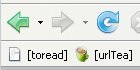
Like most people, I keep a variety of bookmarks and bookmarklets on my browser’s bookmarks toolbar. But ever since sites started associating cute little icons with their URLs, I’ve developed a kind of complicated method of managing this toolbar. You see, I’m an icon kind of a gal. My eye gravitates towards the cute picture rather than the words describing it.

The problem? Most bookmarklets don’t come with an icon. So you just get the little blank piece of paper and some practically useless words (like the “toread” bookmarklet in this image).

So here’s my multi-step process. Bookmark the website associated with the bookmarklet (in the case of my urlTea bookmarklet I bookmarked urltea.com). Then click on your new bookmark so that it gathers the proper icon from the site and looks all pretty. Meanwhile, drag the bookmarklet to the toolbar. (Ok, I know you can’t do this “meanwhile,” but it sounded good.) Now view the properties of the bookmarklet, copy the javascript in the “location” box, and then paste it into the “location” box of the now-former bookmark to the site. Now you can delete the un-beautiful bookmarklet because, well, you don’t need two bookmarklets, do you?

My last step is to enclose the names of my bookmarklets in square brackets. This way I can tell at a glance which buttons do something and which are simply bookmarks.

Leave a Comment

The Problem of Literary Research

Two years into being a lit librarian (as well as 6 years of studying literature and writing literary criticism of various sorts and levels), I finally realized what makes literary research so hard. All these poor students are looking for research about their literary works, and they want examples of criticism that approach those works from particular theoretical frameworks. But the MLA International Bibliography and other databases for literary research don’t index by theoretical perspective. I can’t ask it for New Historicist readings of Daisy Miller, for example. And because of this I can’t easily figure out quite what New Historicism is, or who the key scholars were/are, or flesh out a “history of criticism on this piece” kind of literature review.

And I can understand why this is the case. I mean, can you imagine the overhead involved in making decisions about what theory/theories are represented in an article, applying this to a databases as massive as the MLA International Bibliography, or updating the constantly changing terminology associated with literary theory? And yet, this is one of the three primary query-types I’m asked to help with (the other two being “things interpreting this work” and “things characterizing this author.”)

It strikes me that this could be one of those perfect uses for social tagging in research databases. But until then, these poor students are in for a long and frustrating stint of following up on citations, using Web of Knowledge to develop a better feel for the network of scholars writing from a particular theoretical framework, and generally having to move beyond the now-normal task of picking articles with interesting titles from result lists.

In other words, I think that in many ways, the skills required for good literary research are still some of the least translatable into the electronic world. And these skills will probably continue to be much more based on building up vast internal schemata of authors and publishers then on boolean searching until a) databases add indexing about theoretical frameworks or b) MLA (and others) goes social and let us help them describe these works of criticism in ways that are useful to literary critics.

Leave a Comment

Google Calendar Soups Up It’s Calendar Publishing Function

A co-worker pointed out this morning that Google Calendar has added some interesting functions to its calendar-publishing functionality. I used to have a choice of making “Month View” or “Agenda View” available to anyone who happens onto my public schedule. At first, these were frustrating views for me. Month View is pretty unworkable unless you only have 2 or 3 things happening in a given day, and unless nobody cares when your events end. So I used Agenda view, and just made sure to write that I was “Available between 2:30 and 4:15,” for example. Well, now I’m allowed to have “Week View,” which is much easier to take in at a glance since it’s got the familiar bubbles of filled-in time.

So when my co-worker pointed out that this was now possible, I jumped on the opportunity to make my schedule even easier to understand quickly. Not only that, but since I’m now allowed to include multiple calendars in my publicly viewed page, I could add in the times when I’m at the desk so that my students would know where to come look for me if they wanted quick help or to negotiate a better meeting time.

But now I’ve realized that my system may not work as wonderfully as I had thought it would. Now my available time shows up looking like an appointment rather than like a space between appointments.

Ok, I thought. Why not just change the whole thing into a “times when I’m busy” calendar rather than a “times when I’m available” calendar. But I’m strangely reluctant to do that. I liked having something analogous to office hours, even if my office hours were intended to be by appointment, weren’t consistent day to day or week to week, and changed minute by minute as I agreed to meetings and was no longer “available.” I also liked the straightforward message: “I am available for you now.” It’s just more welcoming and encouraging than the implied message of a “busy times” calendar, which says in effect, “I’m not scheduled during these times, but that doesn’t mean that they’re inherently good times for me to meet with you.”

Then the practical side of me gets up and laughs heartily at this musing side of me. Does it really matter that much? I know full well that of the students who come see me, only a fraction of them depend on that calendar when making their appointments. It gets used more often by librarians at the reference desk who want to refer a student to me for private consultation, by faculty, and by librarians at other schools who want to set up meetings with me. And all of these groups of people should be able to navigate the system even if it’s not absolutely perfectly designed.

And yet I want to get it right. So I guess I’ll do what I always do: try out various ideas until I either decide it’s right or I decide it’s impossible to make right.

Leave a Comment

Feeling My Way

Warning. Extreme navel gazing is about to ensue.

This week has been one of those hard weeks. I’m not prone to annoyance, and I generally face life with an optimism that borders on the pathological. But what with one thing and another my personal bubble of good will and sanguinity weakened and finally burst into a shower of self-pity last night. This is probably my least favorite emotion. Not only is it distinctly on the “not happy” side of the happiness continuum, but it’s also just about as embarrassing and unhelpful as a state of mind can be. It’s the kind of emotion that makes strangers edge away to find somebody else to meet and causes friends to wonder how best to change the subject or, better yet, excuse themselves and go home.

Thankfully, in the rare cases when I plunge into intense self-doubt and questioning, I can rarely sustain it for long. But last night the question was to blog or not to blog, or perhaps to change the kinds of things I blog about. And I think this question bears thinking about even now that I’m not “in the pit of dispair” (as one albino once said, horsely).

I’ve always just been feeling my way here. There’s no plan, just a general sense that I want to explore these topics in public. At one point this blog was mostly a space for me to remember what I’d seen or learned as I finished my first year as a librarian. Then I thought for a while that it should be more “libraryland news”-ish (and I discovered two things pretty quickly: I’m not interested in writing that way, and almost nobody is interested in reading the “news” I write). More recently I’ve been writing a combination of “things I’m thinking about” and “things that are happening to me,” with the balance starting to lean toward the latter in recent months.

And I think it’s this most recent shift that I’m questioning now not only because it’s potentially not as interesting but also because it may make my task of balancing the personal and the professional even more difficult than it would be otherwise. For one thing, if I focus too closely on what happens at work, people at work (by which I mean people on campus, not just in the library) may get nervous, especially now that I have more than 3 or 4 readers. In fact, just about the only editorial criterion I use before publishing a post is one of fairness: is what I’ve written fair to the people I work with and respect. I take this criterion very seriously both because it’s, well, fair and because I really do respect and enjoy working with 99% of the people on my campus. I can honestly say I’d never worked in a place with such a large proportion of wonderful people prior to coming here. The last thing I want is for these people to get nervous.

I’m also on a campus where blogging is not the norm. Its conventions and implications haven’t been explored before. What does it mean to explore topics in public? Who is the audience? What happens when I first say Twitter seems ridiculous and then end up completely addicted, all within a few months and all in public? Is it appropriate to publicly explore work-related issues in the same way that I publicly explore social networking tools? More importantly, how far do you trust somebody who could, if she wanted, publish the goings on at private meetings? How comfortable are we, as a library and as a campus community, with the idea of letting others in on our half-formed ideas? What happens if our half-formed ideas turn out to be wrong? Do we want others to know that we had a moment of weakness? What are the implications of having projects written about as they happen rather than presented in cohesive form at conferences or in articles? Does the library or the campus have the right to ask that material be added to or subtracted from a blog? Weighing the benefit of generally good publicity against the danger of airing dirty laundry, how much should personal blogs be encouraged, allowed, or governed? What does it mean for our campus when bloggers develop ever-widening circles of friends and contacts in libraries all over the world? What does it mean when communication sidesteps the conventional (and perhaps mythological) pathway of employee to supervisor to boss to wider world? I can imagine any of these questions swirling around in the minds of co-workers and higher-ups. In fact, this is just scratching the surface of the possible questions and fears.

Just as I’m always just feeling my way with this whole blog, I’m also just feeling my way through this post. I don’t know where I’m going with this except to say that these questions are real, and they’re important, but they’re not easy.

8 Comments

Stranded by Single Sign On

I’m in the midst of a mini-crisis at the moment. I woke up thinking about it, which is why I’m here, typing away, long before my alarm would normally wake me up. The crisis is, I can’t log in to any of my work accounts. Not my email, the library’s proxy server, an internal library staff blog… nothing.

I noticed this at about 8:00 last night and sent an email to the IT help desk on campus (using my gmail account because, remember, no work email for me). A really helpful IT guy emailed me back saying he’d unlocked my account (note that this is well beyond normal working hours for the poor guy). I tried logging in, but nothing happened. This cycle repeated itself several times between 8 and 10:30-ish, all to no avail.

As far as we can figure it, the problem is Zimbra calendar’s iCal feed. Apparently, the feed needs to authenticate against the LDAP server, or something, and right now any feeds I have from my Zimbra calendar to anything else are trying and trying to authenticate using my old password (I had to change mine on Tuesday). The feeds try and try and fail and fail, and then they lock my account. Unfortunately, even after I killed my iCal feed to Google Calendar*, my account was still locking up. Now I’m sitting here wracking my brains and trying to think if there are any other feeds out there.

If this is the problem, and that’s still a big “if” at the moment, then people on campus are in big trouble. [See update below. It turned out not to be the iCal feed.] In Zimbra, if you want to share a calendar, your iCal feed is prominently displayed among the sharing options. And in the Zimbra training we received, we were all told that this was our iCal feed and that Mac people could continue to use their iCal programs. One of my co-workers even has his feed displayed on his web site for anyone else to import into their iCal-compatible systems. And if feeds have to be killed and regenerated every time we change our passwords (every 3 months), we’re in major, major trouble. Because, you see, nobody is used to the idea of a feed not being shareable, especially when the feed is included in the “share your calendar” dialog box. But the way this seems to be set up, if you share your calendar and then change your password, you’re hosed.

So here I am, frustrated and worried that I’ll have to go through the day with no access to any of my normal work tools, including the network drives that house a bunch of the projects I need to work on. All this on the last day before classes start. I could just about scream … or cry. Instead I’ll sit here, stare at my computer screen, and will my account to unlock itself. That should help.

[Updated to add: As it turns out, it wasn’t the iCal feed after all. What a relief! Instead it was a forgotton copy of Zimbra Desktop. I’d installed Desktop version, never used it, and forgotten about it. But unbeknownst to me it kept merrily syncing itself up with the server using my old password. Thankfully, everything is back to normal now.]

——–
*I feed my calendar to Google Calendar so that I can see when I’m busy and fill in the spaces where I’m not busy with my “availability calendar,” when then gets fed to my public schedule page. It’s a terrible workaround stemming from Zimbra’s inability to publish to an HTML page. Until everyone on campus has migrated to Zimbra, though, we need a way to publish our availability. And even after everyone is on Zimbra, sometimes it’s easier to just scan a week or two rather than set up an appointment, invite me, see if I’m free, and then click “next day” over and over looking for a time that works well for everyone. Because of this, we’d decided to maintain our published Google Calendars.

2 Comments

New Email/Calendar System: Week Three

The new email system is all-around ok, but it’s by no means been a seamless transition for my department. My new mantra (and I swear I’m going to stick a little card on my computer monitor that says this) is:

Even this is worth it if the whole campus is on one system.

For one thing, it’s thrown a little monkey wrench into my department’s system of publishing our availability to our students. Last year we came up with a pretty slick plan of using Google Calendar, sharing our calendars with each other (to facilitate making meetings), and publishing separate “Available Time” calendars for everyone else to see (example). It worked very nicely.

Well now we’ve got our Zimbra calendars, which are really only useful if everyone uses them. These are very much like Outlook calendars, or Groupwise calendars. You know the drill: email and calendar all in one place, people can see when you’re busy when they schedule meetings… the whole nine yards. Except that in our case, we’re only up to about 4 yards because of two significant kinks.

First, even if we use Google Calendars to subscribe to our Zimbra calendar’s iCal feed, we cannot make Google Calendar understand that this is ok to publish this on our HTML web pages. We’re now in the process of searching for another 3rd party program that we could use to mimic this functionality, but currently we’re stuck updating two calendars. Why? Because even though students could propose a meeting time and see if we’re free, we don’t know how many students will be using the calendar function this first year, and we do know that sometimes it’s much easier just to glance at a calendar a week at a time to get a feel for free time. With all the appointments we do, we need an easy way for students to see when they can come see us that doesn’t require any training. So that knocks about two and a half yards off the “whole” right there.

Second, not everyone is going to use this new calendaring system. I know of one whole department in the library that’s said it’s going to stick with a Google Calendar system that’s working well. And I know full well that many professors and students won’t bother. This means that even within the library we won’t be able to use the new system to it’s full potential, let alone with the wider campus. So that knocks at least another yard off, if not two, and my optimistic nature has to work even harder to sprinkle it’s habitual pixie dust over the situation and keep me mellow in the belief that this will be wonderful.

A third kink doesn’t come nearly to the level of the first two, which is why I didn’t include it above. But for now it’s a pain. For now, we can’t sync with our palm pilots, so that means maintaining yet a third calendar for all those times when you’re in meetings trying to schedule new meetings and really need a portable calendar. (And no, we don’t have cool data-enabled phones, more’s the pity.) But hopefully this kink will disappear very soon, which is why I choose not to be annoyed by it for now.

Still, my optimistic self keeps thinking that there is still value in having a campus-wide system, and that there’s enough value that even this is worth it.

3 Comments

Comments: Terms of Service

I’ve been thinking about a blog post I ran across a while ago about laws that apply to bloggers, specifically point 7 on that list of 12 laws: Who owns user-developed content and can you delete it? This reminded me that comments people write here are their own, and that I may not have the right to delete them even if they’re threatening or offensive. According to the law, I need a “terms of service” in order to be able to delete any such content.

I have never received any such comments and I hope I never do, but just in case, here are my terms of service.

I reserve the right to delete any comment left on this blog if I think that the comment is inappropriate or harmful in any way.

I hope that I never have to exercise these rights.

4 Comments

Wikipedia Could Help Search Engines Understand Names?

The Search Engine Watch Blog just pointed me to a post that pointed me to a paper entitled “Large-Scale Named Entity Disambituation Based on Wikipedia Data” (PDF) by Silviu Cucerzan of Microsoft. Most of the paper is technical and algorithmic greek to me, but this one sentence makes perfect sense to me (or rather, the first half of the sentence makes sense to me and the rest should have been its own sentence).

The application on a large scale of such an entity extraction and disambiguation system could result in a move from the current space of words to a space of concepts, which enables several paradigm shifts and opens new research directions, which we are currently investigating, from entity-based indexing and searching of document collections to personalized views of the Web through entity-based user bookmarks. (page 9, my emphasis)

One of the main gripes about web search has been that it can’t benefit (at least not very well) from human knowledge of the relationships between words. It matches letters in a row while directories gather pages based on concepts. But then, directories got out of hand and people couldn’t keep up with them, and then they all turned into search engines no matter how much they still tried to look like directories… Well, if this thing gets off the ground, we could have the best of both worlds. We could have the scale of search with the power of directories.

Another source of this conceptual linking that’s so powerful and so difficult to teach to computers may be the Google Book Project. Think of all of those indexes to all of those books. Surely we could harness the power of generations of indexers to map concepts. How hard could it be? 😉

3 Comments

Thinking about the Future of the Catalog: MnObe Moving Forward

For the last year and a half, the five liberal arts colleges known as MnObe (pronounced min-OH-bee and derived from Minnesota Oberlin Group Libraries) have been thinking collectively about our library catalogs. We started at very different points (ranging from “what we’ve got works pretty well” to “what is this thing we’re using and where are the punch-card computers it seems to match?”). Then Roy Tennant came and talked to us and everybody got pretty excited about the idea of a next generation catalog. And I was pretty sure we’d stay that way… excited about the idea of change.

But then we held a “debate” between five teams of librarians each proposing an alternative to our current systems. Our biggest surprise that day was the amount of agreement between groups and audience members about a) the need for change and b) the types of things that need to change. (Here’s a quick list of features and functions we liked, none of which are surprising.) At the conclusion of that meeting, the directors of our libraries charged a group of volunteers to actually map out our movement forward.

Well, a couple of weeks ago, this group of volunteers met, thought, discussed, and drafted a report. You can read it on the wiki if you want, or the PDF (which is prettier). It’s definitely a first step, but the group felt that we needed to clear up the first step first. You’ll notice, though, that we clearly and explicitly state that we want some kind of drastic change in the near future, and we map out a few key actions that will start us moving toward that change.

Now it’s been delivered to the MnObe directors. We’ll see what happens. I’m having to work a lot harder to keep from getting too excited now that we’ve actually formally recommended action.

3 Comments
css.php