Skip to content

Pegasus Librarian* Posts

Getting ready for CIL

I spent the morning tweaking my twitter account to be useful while I’m at CIL. I won’t be publishing my tweets here, but if for whatever reason you want to keep up with what I’m doing (whenever the notoriously spotty conference wifi will allow me onto the network, that is) you have two options: follow me on twitter or subscribe to my twitter feed.

Of course, I’ll be blogging as usual. I usually write a post or two each day pointing out the highlights of what I saw and learned. I don’t usually blog conference session notes, but plenty of other people do, so search Technorati for the tag cil2008 and I’m sure you’ll find all the session notes you need. (By the way, that same tag will work for Flickr and del.icio.us and a whole host of other tag-searchable things.)

Technorati technorati tags: cil2008

Leave a Comment

Becoming a Librarian for Languages

When I first started this job, I knew there was a lot I didn’t know about the unique needs of the different departments I’d be serving. I knew that typical research needs varied by discipline, and that I’d be serving three broad disciplines: languages, literature, and music. But I’d never done research in language or music courses, so I didn’t know what that kind of research looked like, or what it would need from me. So I made a plan. (I’m a planner, what can I say.) My first year, I’d just keep my head above water. I’d learn to teach, learn to work at a reference desk that actually got real reference questions (not the case at the two placed I’d worked during library school), and concentrate on not making a fool of myself. The next year, I’d figure out what it means to serve language departments. And the next year I’d figure out what it means to serve the Music department.

Needless to say, my plan didn’t go quite that tidily. But in general, I did concentrate on peering under the hood of a different discipline each year. I’ve already written about some of the things I’ve learned about being a Music librarian, so I thought I’d share a bit about what I’ve learned so far about serving language departments.

Time is of the essence:

I spent at least a year being frustrated when professors of languages would ask me to please come teach everything there is to know about the library, and please keep it to 15 minutes. At first, I thought I needed to practice those skills you learn about in library school and at ACRL’s Immersion program and say, “That won’t be possible. If you give me 45 minutes here’s what I can cover.” It turns out, though, that in this particular instance that is not always the best strategy. Sometimes, sure, if the project facing students is a major research paper, or if the class is not (as they often are) focused on language and simply using a research paper as another way to gain facility with that language. But if the course’s primary goal is to move students toward language fluency, then the teachers are under a massive time crunch. They know that they’re racing the clock to expose their students to the number of hours of instruction it takes to achieve fluency in a language. And yes, it’s measured in hours.

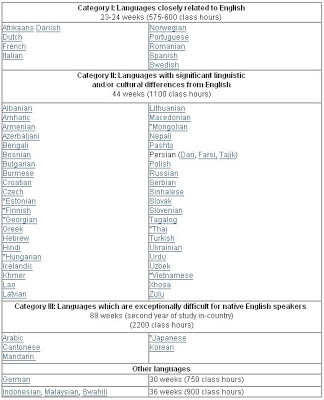
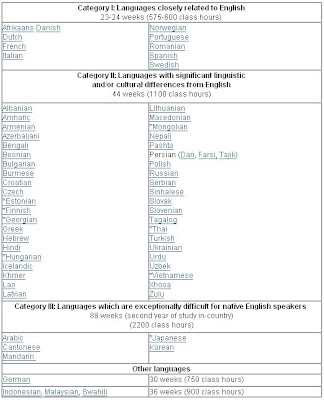
Here is the chart that a group of language faculty presented this fall as part of their ongoing discussions about curriculum review. Notice that for the Category I languages (like French) it takes 575-600 class hours to achieve basic fluency. For the Category III languages (like Cantonese) it takes 2200 class hours to achieve fluency. (Source, the National Virtual Translation Center which takes some information from the Foreign Service Institute.)
With time to fluency ticking away, an hour of library instruction (delivered in English) is just too costly. So the faculty and I have started coming up with solutions that don’t involve me jeopardizing their instructional goals. I sometimes come and give a 15 minute overview and a handout that prompts students to ask me questions. Then they come to visit me in my office, singly or in groups.

Sometimes that option would eat up all of my time, so I ask for two or three 15-minute chunks of time with the class spread out over several class periods. The end result is that I’ve taken more of their precious class minutes, but this way students don’t go for an entire session without hearing their foreign language of choice so it doesn’t seem to derail instruction as much. It’s always a balancing act: the relative worth of my time balanced against precious classroom minutes.

What Language Students Need from Me:

Depending on the assignment, this changes, but language students need a couple of tips that no other students need. For example, when searching in a given database, should you search in English or in the foreign language? If searching in the foreign language, does it matter if you use accent marks or other non-standard-for-American-writing characters, or will the system understand that e may mean é? Since search is basically character matching, these questions can make the difference between relevant results and no results at all, so I’ve started including them in the research guides I build for those students (example).

At a library the size of Carleton’s (good sized, but not like a large research university’s library), language students also need to know how to interlibrary loan materials. I always tell them that in these classes, they MUST search and order ILL items early. Once that’s done, then they can procrastinate as much as they like. Every term a few students don’t realize how very serious I am about this point and end up having no good sources to work with.

So that’s the big stuff

Other than that, I’ve learned from working with my language students how to give up the mouse and keyboard while doing searches. There’s nothing like trying to scan through a result list in German, or brainstorming for Chinese search terms to encourage me to say, “Here, you take over and tell me what you see. … Now, do you see anything on the page that looks like….”

I used to be completely intimidated when contemplating my work with language classes. I felt uncomfortable standing in front of a class and knowing full well I couldn’t speak the language or even pronounce the example search terms we were using. But after a couple of years, I think these experiences have taught me to be more comfortable with the idea that I can contribute to student learning without any grounding in the subjects their studying.

3 Comments

“Is It Okay To Call You a Librarian?”

Sitting at the reference desk yesterday, I started talking to the student worker next to me about this and that, and she mentioned that a librarian had come to talk to her class last term. Then she got a concerned expression on her face and asked, “Is it okay to call you a ‘librarian?’ Is that the right word?”

“Of course,” I said.

“Oh. Good. Well… see, I was confused because in high school we weren’t allowed to call one of the women who worked in the library a librarian. She’d get mad and say, ‘Don’t call me a librarian. I’m not a librarian. She is. I’m a media specialist.’ She made a really big deal about it.”

I explained that it might have been a big deal to those two library employees because probably one of them had a masters degree in library science and one of them didn’t. I tried to reassure her that she didn’t need to worry about offending people here unless she called them “block head” or something.

She seemed relieved and very interested, but the amount of relief that showed on her face worried me. In light of the recent blog drama having to do with who is and who isn’t a librarian, who deserves respect, and who deserves recognition, I’d like to ask that we keep our patrons in mind. I’m certainly not against helping people understand the difference when it’s appropriate, but making them worry about addressing us because they’re afraid of getting our titles wrong won’t accomplish anything.

Leave a Comment

It’s the Little Things

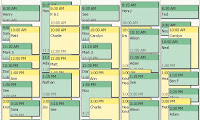
I’ve written before about our Research/IT desk, and how we sit elbow-to-elbow with student workers who don’t actually work for the library. These students work for the SCIC (Student Computing Information Center), but they’re in the library for almost all of its open hours to answer technological questions and keep the printers humming merrily along. (Have I mentioned how much I love this recently? It’s helped us concentrate on actually working with research related questions rather than spending most of our time filling printers with paper.) Well, I’ve never been good at learning names, and I’ve found it especially difficult to learn the names of the string of students who may sit beside me during any give week of reference shifts. So this fall I instituted the practice of getting their shift schedules from their supervisor and entering them into a calendar that I then shared with the rest of the reference staff. Now I can turn it on next to the reference librarian’s shift calendar, or my own calendar, and quickly “cheat” to find out who’s sitting next to me at any given time.

It always takes quite some time to build this calendar, since each shift requires between 14 and 18 clicks to enter… But it’s time well spent, in my opinion. It started as a way to cheat, but it’s actually helped me learn names over time. I feel like I’ve gotten to know students better this year and can carry on conversations with them much more easily, and I’ve drastically cut down on the mental shenanigans involved in trying to have conversations with people whose names you just cannot for the LIFE of you remember. You know the kind of conversations… “How can I talk about this without ever prompting the need to insert a name…” I hate those conversations, so I would often just sit there and not talk to the students, which contributed to the vicious cycle or awkwardness and lack of name recognition. Who would’a thought that a simple calendar would make such a difference in my ability not to look like a dork at the reference desk… oh, and have a great time with student workers?

Leave a Comment

On Trying New Things

I’ve been thinking a lot recently about an odd shift I’m seeing. It seems like a couple of years ago, there was a big push in my corner of libraryland to “try new things,” which was mostly code for “try a blog, try a wiki, try IM, try social bookmarking, try Flickr, try ANYTHING.! Please!!” It was pretty exciting to blog and read blogs during that time. I learned a lot from people who pointed to new extensions they were using, new social tools, new uses for “older” tools.

But recently I’ve felt (and I know others have felt) like there’s nothing more we can contribute to this discussion that’s really and truly new. We can go to conference sessions geared to introducing the newest of the new tools and already know about every single tool discussed and know a handful or even a fistful of libraries that are using them. We might even be using them ourselves.

The same can be said for “new” service models or collection changes or any number of other topics. Maybe it’s a function of my having been slightly too overextended in the last few months to have the energy to get excited about or imagine new implementations of the ideas I’ve heard about, but I know I’ve had the feeling recently that maybe there isn’t much more that’s new to learn about in my previous areas of interest right now. What’s more, I’ve heard a few other librarians say similar things. “I just can’t come up with anything that other libraries haven’t already tried. There’s just nothing actually new going on here.”

It’s almost like my whole corner of the library world took a collective sigh and realized we’re tired.

And maybe there’s truth in this feeling, though I doubt it. Maybe we’ve settled far enough into the social web or the fill-in-the-blank-new-Library2.0-service world that it’s no longer confusing enough to wonder about or new enough to get excited over. Or maybe we’re all just getting over the Long Winter (it’s snowing here today… seriously… maybe 8 inches by tomorrow morning). Or maybe there’s enough communication now that where we would previously have had a hard time knowing about what other libraries are up to, now it’s quite easy to skim a feed reader and get a quick run-down every single day. (If this is the case, I think it’s a wonderful development.)

But my hunch is that while we’re pretty much trained from college on upward that “original” is a synonym for “good,” and “derivative” is a synonym for “lazy,” it actually doesn’t work that way in real life. It doesn’t matter if 3/4 of the libraries you know about are implementing a new service or tool. Even if other libraries have tried whatever you’re trying, there’s still usually no way to adopt implementations wholesale. Almost always, you have to evaluate and tweak and shift and re-mix ideas to fit your own context and your own community.

And this leads me to believe that maybe the problem isn’t that there isn’t anything new happening; that the problem is with me. I’m the one sighing and acknowledging that I’m tired. I’m the one who’s been overextended just enough to shut off that creative part of me that used to read what people are doing and start scheming about how it would look at MY library. If this is the case, I sincerely hope that my trip to Computers in Libraries will jump start that portion of my brain and help me not just know but actually believe that it doesn’t matter that other people are doing cool things already. They’d still be new and cool to think about trying here. And these reports I’m reading and the others that I’m generating, and the lessons I’m learning from planning a conference, and the other lessons I’m learning from helping out with Print Management implementation?… Maybe these are still interesting and not just “the same thing that everyone else is doing, so why would they care.”

We’ll see. Here’s hoping.

Technorati tags:

6 Comments

Spring… un-Break

Spring term starts on Monday after two full weeks of what most people choose to call “Spring Break.” Clearly, I must not understand the meaning of the word “break,” or else it means something other than it has meant for the rest of my life. This was not a break. In fact, it was probably at least as tiring as peek weeks of the term. Here’s a sample of what I’ve been up to for the past two weeks:

  • Helping to plan a conference.
    (This has been quite a learning experience, I must say. It’s fun to watch people who’ve done this before thing through possible scenarios, brainstorming, and problem solving. I don’t have any expertise beyond knowing what kinds of sessions I’d want to attend, but I do have a network, which I have exploited to the best of my ability. Thanks Twitter People!!!)
  • Interviewing librarians
  • Presenting to our college InfoServices group
    (I presented on things to think about when inhabiting online social networks.)
  • Dealing with preparations for the impending implementation of print management in the library and in all campus labs.
    (Unfortunately, this became inextricably entwined with a project to implement ID card access to printing and copying as our coin-operated copiers left us and as we tried to figure out how non-Carleton-affiliated people would be able to print once print management went live, and this is the part of the project that has taken the most work recently. This has been by far the most stressful part of the last few weeks, but I’ve learned some valuable lessons about working on projects that have crucial components parts grounded in various offices on campus. I’ve also worked to create policy and procedure documents, handouts, brochures, and anything else that’ll help people feel like this will work smoothly and be successful.)
  • Fixing dead links on my research guides
    (and realizing that a few of them will need major over-hauling as soon as I have the time for it.
  • Drafting a proposal to acquire and implement federated search.
    (This has also become a major project beyond what I’d imagined possible. I’ve had to be in contact with vendors to see what goes into actual implementation and what timelines are possible and gaze into my crystal ball to figure out exactly how people might use the tool and how much time librarians will spend making it work well. I tell you, it’ll take me longer to draft my portion of this proposal than it’ll take for me to learn and implement the tool itself.)
  • Scheduling classes for early Spring term.
    (And feeling guilty about not prepping for them now, before students start invading my office on a regular basis.)
  • Work with professors on their copyright questions as they prepare reading lists for their upcoming classes.
  • Troubleshooting Moodle issues.
    (Which reminds me… I was supposed to talk to our web dev people about something. I guess that’ll have to happen on Monday.)
  • Driving home to visit my family for Easter
    (and [sniff] leave Pippin with them for the next month or so to simplify life just a bit. By all reports, Pippin is having the time of his life. There are birds to watch at several bird feeders, and there’s a big and gentle dog to torment.)

I’m sure there was more, but those are the biggies. Can you see why I don’t think “break” adequately describes the last two weeks? (Of course, we won’t even mention how un-spring-like it is, still…)

And now may I please have a spring break?

Leave a Comment

What are Reference Works Good for in the Google Age?

Over the last couple of years, my co-workers and I have noticed steady and possibly even increasing use of our reference collection by our students. And while I love this (I mean… obviously… cuz I’m a reference librarian), I’m also always just a little bit surprised by it. I mean, they’ve got Wikipedia and Google, and goodness knows they use them for everything. Hey, even I use them umpteen thousand times per day, so I certainly can’t fault anyone.

Well, we recently had a meeting of area librarians at which we discussed the future of reference collections. Will they go all electronic? Will they become obsolete altogether? And how will our physical spaces in the library change over time? And all this got me to thinking about what the actual value of a reference collection is these days.

With a few exceptions, I think the value of a reference collection is not in the ability to locate facts. That’s what it used to be good for, but unless I’m looking for pretty specialized facts that I don’t think would get published on the web, or that would be hard to digest on a screen, I generally go to my friend Google. And while I’m sure that reference collections were never just about finding facts, that was one of their key roles before, and continues to be their perceived function. But, for me the reference collection is valuable in a completely different way these days. It’s not about discrete facts; it’s about context. It’s not a place to find what you need; it’s a place to find a beginning and get help interpreting result lists.

Built in bibliographies
One of the things that seems to resonate well with students is that they don’t have to dive into topics and build initial bibliographies from scratch. Just like they can consult their professors for starting points, they can consult an expert by turning to a subject encyclopedia and gleaning citations from there. Scholarship is all about building on other people’s scholarship, so take advantage of it an jump in like the real scholars do.

Term harvesting
I’ve already talked about how terms are crucial to search. While encyclopedias and dictionaries can’t help every time, they can be treasure-troves of terms, and they can help students deploy new terms by providing some disciplinary context for each new concept.

Managing result lists
And this brings me to the way that reference works serve us in this online age: they provide context that can help students look at a database result list and pick out likely items to open and explore further. We’ve all seen students who get overwhelmed by massive result lists and either just scrap the whole effort, open random items, or start doggedly opening every single result. (We have growing numbers of students who simply will not search things like ProQuest or JSTOR because there are too many results.) Disciplinary experts, on the other hand, scan for likely looking results and only open those that are related or that they’re pretty sure will help them figure out how to tweak their search. And reference works can help students develop the capacity to inch toward a more intelligent interpretation of and navigation through result list.

What else? As we think about collections and information needs shifting, where do reference collections fit?

3 Comments

How Many Bagels?

How many bagels do you suppose it takes to stock a 2-hour study break in the library on the last day before finals at a college with just under 2000 students?

… Yes, I want you to guess…

…

… No really. Pick a number…

…

…Got one?…

Ok. Campus Activities bought 20 dozen, and it didn’t turn out to be way too many. TWENTY DOZEN.

Also, free massages, coffee, juice, and board games help make the event fun.

4 Comments

The Problem with Vocabulary

There are a couple of things I really like about being primarily a subject librarian, and about having subject librarians easily accessible in a college library. For one thing, it sure helps when those crazy-hard questions come to the desk and you can say something helpful-sounding like “I can get you started with some of the basics, and then you should go see so-and-so for more in-depth help.” Of course, then there are those crazy-hard questions that come to the desk and are in my area, so I can’t pass them off… but we’ll forget about those for the moment.

But one of the things that’s most valuable about this division of labor in an undergraduate environment is that each librarian can concentrate on developing discipline-relevant vocabulary. I’m not talking about vocabulary in the “how to talk to students” sense at the moment, though that’s certainly very important. After all, even “primary source” means something different to each discipline. No, I’m just talking about terms and vocabularies associated with topics of research. When a student of literature comes and talks to me about rhizomatic narratives or the relationship between metaphor and ideology, I have a whole thesaurus in my head that opens to the correct spot and starts coming up with alternate search terms. I know where these things fit into umpteen different literary theorists’ perspectives, I can recognize key works referenced in the titles of scholarly papers. Not only can I employ these terms and names directly by adding them to my search, but I can recognize articles in a result list that might be relevant simply by calling on this mental map of the topic. Then I can open those results and use vocabulary I find there to create new searches.

Since search is fundamentally a character-matching game, with people supplying characters in a row (i.e. words) and computers matching those characters to the characters in its index, lack of vocabulary renders search essentially useless. I don’t know or recognize the terms that are central to, for example, the IMF. So I’m basically stuck with ineffective searches and only limited options for refining my searches. And I can’t help steer students to refine their terms because I have no mental map of this topic beyond “something to do with money, and something that’s international.”

If we don’t have access to mental maps, how do we build our students’ mental maps? And how do we generate search examples that will help them learn?

And how do I develop mental maps of all the research topics my students need help with?

8 Comments

Calendars: Mostly the Bane of My Existence

I always used to think that calendars were simple affairs. You’d either write appointments and deadlines into a paper calendar, or you’d write them into an electronic calendar. What could be simpler? Well, apparently even the enigma that is The Research Process is easier to get right than a process for simultaneously keeping track of my affairs and advertising my availability for research consultations. Here’s how it’s worked for me for the years that I’ve been a librarian.

2005-2006: My palm kept me pretty much on track with my own schedule. I could sync it with my work desktop and my personal laptop, take it with me to meetings, and generally keep up with my life. To broadcast my availability to students, I’d make up a new printed calendar each week and hang it outside my office, just like my co-workers did. This was kind of annoying, and felt like duplication of effort, but it seemed like our best option at the time, even though they’d get out of date really quickly.

2006-2007: Weeeee!!! Google Calendars made it easy to feed a pretty looking calendar to an HTML page. At this point I retrained myself to keep track of my schedule on my palm, and then publish an “Availability Calendar” which, instead of saying when I was busy, said when I was available to meet. This took off almost immediately. Students who had been shy about adding to my full-looking (and full-feeling) days were now much more confident to ask for times that were clearly designated as being for them. They also grasped the analogy to faculty office hours much more readily. My co-workers and I noticed that the number of surprise drop-in appointments dropped as students started emailing us to reserve slots from the “available” periods, and this not only reduced our stress levels and helped us provide better service, but it also just gave us more control over our work days. Of course, the down-side was that we were each still maintaining two calendars: Google and Palm.

2007-early 2008: Enter Zimbra. We couldn’t sync Palms anymore, but if we wanted to be able to schedule meetings with each other we’d have to use Zimbra and not Palm. I sure wasn’t about to maintain THREE calendars, so something had to go. Clearly, the Google Calendars couldn’t go. They were our one best option for working out logistics with students. Therefore, we retired our Palms. This left us with no portable calendars, so a few of us actually bought paper calendars to take to meetings. I rather stubbornly refused to go that route, though. If I wasn’t prepared to maintain three electronic calendars, there was no way I’d maintain two electronic calendars and one paper calendar.

The rest of 2008: But today I finally sat down and put the latest upgrade of Zimbra to work for me. It’s finally able to publish calendars just like Google Calendar can. (Well, almost just like… but enough for my purposes.) I created a new calendar within Zimbra, designated my “Available” times, and published it to my web site. Today I’m officially down to one calendar for the first time since I’ve worked here. Of course… I still can’t take my calendar with me to meetings unless I shell out for some wireless device or other (or better yet, my library supplies us with them). So maybe it’s time to start thinking about that paper calendar…

2 Comments
css.php