Skip to content

Category: Libraries and Librarians

Information Architecture, from information about architecture

I’ve just started work with a team of people who are going to be redoing our library website’s information architecture. Maybe some design, but mostly the structure. So of course I do that thing that I do so often and try to figure out how to think about the problem at hand before actually diving into the problem at hand. And this time I seem to be doing that by reading about architecture.

I’m not the first one to do this, by any means. There’s a great talk by Dr. Molly Wright Steenson from this month’s MinneWebCon that lays out lineage of current artificial intelligence work, including the inheritance from architecture. And her talk reminded me that this is exactly what I needed to think about again in order to think about our website structure.

So I went down into the stacks and checked out Christopher Alexander’s two most famous works, A Pattern Language and The Timeless Way of Building. These are two very very large works of architectural philosophy, so there’s no way that I’ll be able to read and apply them thoroughly to my current project, but something is better than nothing, right?

And then, on page 55 of The Timeless Way of Building, the primary claim from Chapter Four jumped out at me:

We must begin by understanding that every place is given its character by certain patterns of events that keep on happening there.

This is “the user is not broken” stated a different way. Spaces are set up, and people will behave in relatively consistent ways in those spaces depending on the affordances of the environment. If they do things we think are wrong, and especially if they do them consistently, then we have clearly set up a space that invites those events. The user was not broken; our design was broken. But Alexander’s formlation works better as an aspiration to achieve rather than a resignation to past failures. If we can know these patterns that environments evoke, we can design environments that evoke patters we want. If we set up a space (physical or digital) that invites the kinds of events that our community wants and needs (actions, reactions, experiences), and invites these events consistently, then that is a space that has Alexander’s “quality that cannot be named” that animates every successful design. (He goes into detail about definitions of that quality in chapter 2, but I won’t do the same here. You can go puzzle over that chapter if you want to, but my big short-hand for it all is “it works beautifully.”)

He then usefully qualifies his thesis:

This does not mean that space creates events, or that it causes them.

For example, in a modern town, the concrete spatial pattern of a sidewalk does not ’cause’ the kinds of human behavior that happen there.

What happens in much more complex. The people on the sidewalk, being culture-bound, know that the space which they are part of is a sidewalk, and, as part of their culture, they have the pattern of a sidewalk in their minds. (72, emphasis original)

And, in the same way, the patterns of events which govern life… cannot be separated from the space where they occur. (73, emphasis original)

So what are similar structural digital elements that we could switch out for “sidewalk” here? Search box? Menu? Bullet point? We have to keep in mind that in our culture, these things call on a whole network of cultural-bound events. We cannot say “well, we know that search boxes you’re familiar with when doing research are boxes that search through the full text or at least a paragraph of text, but this particular search box searches through a list of library research tools instead.” (Incidentally, this is part of what makes the MLA International Bibliography so hard to use and teach.) People will fall into patterns and perform topic searches in that search box, and they will do so over and over again. And they will wonder why our search box is broken. These patterns are patterns that we can often predict, and good intentions won’t matter if you ignore these predictions.

That said, we can help shape the patterns that happen again and again. For example, we don’t have to blindly follow our novice patrons to their best-known patterns just because many of our patrons are novices. We have to know what they expect and their habitual patterns, and also the expectations and patterns of the experts on our campus, and we have to create systems that invite useful events for all. This may mean educational events that help the novices learn the patterns that are typical of the new culture they have entered. This may involve educational events that help experts navigate evolving systems and patterns and academic cultures. But these educational events can’t happen unless we build bridges for the inhabitants of our spaces (digital and physical) from the patterns they have known to the patterns they are developing.

Alexander, Christopher. 1977. A Pattern Language: Towns, Buildings, Construction. New York: Oxford University Press.

———. 1979. The Timeless Way of Building. New York: Oxford University Press.

Leave a Comment

The Library Society of the World: Origin Story

Eleven years ago, in a browser far, far away, a dedicated and creative public librarian named Josh Neff opened his ALA membership renewal notice and sighed as he looked at the dues he would owe. Librarians just don’t make a lot of money, and memberships are costly. Meanwhile, he and his buddy Steve Lawson, library blogger extraordinaire, were joking on Twitter (because they were awake and near computers), and out of this joking came the tweet that changed the world. Josh tweeted that he and Steve were starting the Library Society of the World, a society that would never charge any dues and where people could join simply by saying they were members. Josh’s friend from library school, your humble Pegasus Librarian, and several others heeded the call, pledged allegiance, selected association titles for themselves, and thus the LSW was born.


That same day, because this was the early 2000s, we started a wiki. One simply could not have a library organization and not have a wiki, after all. And of course we started coming up with our organization structure and policies. As you can see from our Policies page, this was a very serious effort involving much committee work and wordsmithing.

Within the first month or two we had opened up a Meebo Room where most of us spent most of our time. (For those of you who don’t remember Meebo, this was a free group chat platform.) Within the first year many of us had colonized FriendFeed, which ultimately became our main home. (For those of you who don’t remember FriendFeed, I’m still too grief-stricken over its closing to go into details.)

We introduced ourselves to the library world at large during a raucous presentation at Computers In Libraries, 2008, where the Meebo Room chat was projected live during the session so that all of us could participate simply by typing into our browsers. Then in 2010 Josh and Steve were named Movers and Shakers for their work creating this society, and in response they (and we) developed the Shovers and Makers list, nominating ourselves and writing down what we appreciated about each other. (There was a blog for that, but it has since gone dark.)

Between then and the day FriendFeed shut down in April of 2015, life continued. People got married, had babies, changed jobs, experienced loss, got divorced, struggled, triumphed, and committed daily acts of superior librarianship. Several left the profession and the group. Others stayed in the profession but stopped being active participants. Still others joined us to bring their fresh voices and perspectives from all corners of the world and librarianship.

In April 2015, FriendFeed shut down and we began nearly a year of diaspora before finally landing on Mokum.place/lsw in February of 2016. And we have lived in this peaceful place ever since, sharing ideas, asking each other for opinions and advice, and being together through the ebbs and flows of our careers and lives.

We’re a good society. You should join us. There are no application procedures and no dues. You don’t even have to be a librarian if you can put up with all the librarian-speak. Just say hi and you’re in.


1 Comment

What advanced researchers need to know about using the MLA International Bibliography

I live and breathe the MLA International Bibliography. I’m liaison to literature departments, language departments, and linguistics, so it’s pretty much home base for me. And using it is one of the reasons I’m very very grateful to have taken some cataloging/indexing courses while getting my library degree. I will never have the skills necessary to be a cataloger/indexer (those people are amazing!), but a few years into teaching the MLA-IB I realized that one of those pesky rules that I hadn’t quite grasped was completely ruling my chances of success in that database. This is still very much a librarians’ database, and it’s the only database where I find it important to explain its history to my upper level students so that they can have any chance of mining its treasures.

Three pieces of history matter a lot for this database:

  • indexing rules
  • the long legacy of the print index
  • and the almost complete lack of abstracts in the index.

Remember back in indexing class when people dozed off while the professor said something about “aboutness” and about balancing that with local policies about how many indexing terms to assign to any individual item? And remember how, back in the days of the print index, every item had to be listed under the subject headings it was assigned, resulting in increased use of paper directly proportional to the number of subjects it got? I don’t know the MLA’s internal policies on numbers of subjects, but I do know that indexers have it deeply ingrained that they are to assign the fewest number of terms that most completely describe the piece. Every term assigned should describe the full work (its “aboutness”) rather than just parts of the work, and there really shouldn’t be more than a few terms from the same term hierarchy level on any item. The reasoning being that if you need, say, 5 sub-terms from the hierarchy to describe the work, then really you should just use the next broader term because clearly that term is better at expressing the work’s aboutness. Historically, adding additional terms was a very real, practical matter of the physics and economics of publishing, and even now there’s a limit to how many terms it’s feasible to attach to any given record.

And sure, these things exist for most other indexes that have a long history, but the MLA-IB exacerbates all this by mostly not including abstracts. So people can’t kind of muddle through on keyword searching as much because there are just so many fewer words involved in the first place. Not much of a safety net. Not only that, but high end modern systems (like Google) have background thesauri so that if someone types in “heart attack” it’ll say, “Oh, that’s the same is myocardial infarction, so I’ll return those results, too, and maybe this person is confused about the exact cause of the heart attack, so let’s throw in some information about arterial sclerosis.” (They hire computational linguists for a reason! Also, sometimes I hate this “help” so very much, but that’s a rant for a different day — basically I want it to know when to do it and when not to do it.) So that’s even more safety nets. But back in the MLA-IB, lacking all these safety nets, people really have to pay attention to the indexing in a very literal way.

Here’s how you can see that playing out. Search for “Woolf, Virginia” as a subject in the MLA-IB. You’ll get several thousand results because scholars love to study her work. Now, the first thing to note is that (as we all know) works that simply mention her somewhere in the argument won’t list her as a Subject. She gets listed if the full work’s aboutness depends on her. So that’s already a caveat to note for future search strategies.

But let’s say you really want works that are really ABOUT Virginia Woolf, and you would like to explore the scope of what people have written about gender and her work. That’s pretty typical, right? She’s a cornerstone of feminist/queer literary criticism for a reason. But if you search for the Subject “Woolf, Virginia” and then AND in the keyword “gender” you get 250 results. So I tell students to use their critical thinking skills and think about this result list. Is it really likely that less than 4% of literary criticism addresses Virginia Woolf’s depictions of gender? No, it is not very likely. Not likely at all. So this is where those indexing rules kick in.

If the indexer decided that the work was about gender – nothing more specific than that – then the indexer would assign that subject heading. But scholars are usually much more specific than that. They narrow their topics. They write about Virginia Woolf’s depiction of women, men, boys, girls, masculinity, femininity, sex, sexuality, gender, misogyny, ….. So only if a work of scholarship dealt significantly with several of those narrower terms would the indexer move up the hierarchy to “gender.” Relatively rare, right? So the way to get around this is to search for narrower terms ORed together (I sometimes call this “teaching the computer what I mean by gender”). And remember to OR in some narrower terms that are the opposite of the main topic, too. So if I’m interested in the depiction of femininity, articles on masculinity can be almost equally useful, or they can point me to useful literature through their bibliographies.

One more thing to note: this applies to authors and their works as well. If you’re searching for a particular poem, you can OR together the poem and the name of the collection it was originally published with (if applicable) and the name of the poet if the previous two don’t pull in enough results, or OR together specific shakespeare tragedy play names if you’re interested in Shakespearean tragedy, or specific European country names plus “Europe.” You get the idea. The MLA-IB is not a database that functions in a post-boolean, single search box world.

Which brings us to taking notes about terms associated with your topic. This is just utterly and completely necessary if you’re going to spend time in the MLA-IB. As you’re reading and searching, keep adding to your list of words associated with your topic and play around with those in your searches. And watch bibliographies for useful new vocabulary, because unlike search (which is just matching letters-in-a-row in a very, very literal way), bibliographies are compiled by humans who know the field and can tell if a work is related by more than just pure letter-matching.

For really advanced students starting long-term research, this is where I teach them how to save searches and do advanced searches that link previous searches. So say you spent a really long time developing an extensive ORed together “definition” of what you mean by “gender.” Save that search. Then you can go into your search history and AND it together with other topics (searches for Mrs. Dalloway, maybe, or To the Lighthouse). That way you can pretty efficiently explore how your broad topic looks when applied to various literary works or genres or themes or whatever.

Three final mini-tips, especially for foreign language literature:

  1. The MLA-IB doesn’t parse accent marks well (they were entered in various encodings over the years, if entered at all), so you pretty much always get better results if you leave them out.
  2. Translated works are indexed under their translated name and their original name. Find that original name and do your subsequent searches using that original name as a subject. If things seem inconsistent, try ORing together both names.
  3. Don’t want just things that are ABOUT Virginia Woolf, but also anything that mentions her? That’s when you skip out of the MLA-IB into a full text search system like JSTOR or Project Muse. No one tool can do it all.

So there. That’s pretty much my one area of “expertise” as a librarian for literature. So now you know all my secrets.

3 Comments

Plagiarism as a construct

copypasteA student recently spent some time tearing his hair out in my office because he was really really worried about the possibility that he might inadvertently plagiarize his sources and therefore fail his course. Meanwhile, a group of faculty in a recent workshop worried that their students routinely failed to quote, summarize, synthesize, and cite in proper measure. And every year our Information Literacy in Student Writing assessment project reveals that our sophomores do a good but not great job of knowing when their readers could use some more clues about their sources.

And on the one hand, everyone kind of nods and says, “Yeah, students these days.” But I think that we’re at least as much of the problem.

Lots of academic librarians (and disciplinary faculty) deal heavily in the world of plagiarism detection and anti-plagiarism instruction, but I think long habit and acculturation has made a lot of us feel like plagiarism is an objective thing with rules that everyone agrees on. You don’t use passages in your writing that other people have already used; you don’t pass off other people’s ideas as your own. If you do these things you are either ignorant or bad, or both. Done.

While college policies make it sound like a concrete thing called plagiarism is forbidden, in real life there are a whole lot of circumstances where those rules just don’t seem to fit very well, or where they’re applied one way in one classroom and another way in another classroom. What do you do about writing that results from thoughts developed over the course of class discussion or long conversations? What about the world outside of academic writing, where sharing and re-purposing may be the rule rather than the crime? What about all the genres of writing assigned in classrooms that mimic genres outside of academia and that therefore don’t have the same norms built around them?

Similarly, librarians and faculty either “care about citation” or “don’t care about citation,” but we also tend to link plagiarism and citation as almost one-to-one topics when really citation is about so very much more than just the presence or absence of plagiarism. The complex interplay between what counts as evidence and what counts as proper community participation lead to different norms even within academia. For example, in Lit studies, individual words are the evidence, so quoting individual words is every bit like reporting the response rates on a survey in the social sciences. In other disciplines this kind of quoting is frowned on as “over-citation” and a lack of synthesis. In computer science, there’ll be different rules for your classroom work and your industry work because using other people’s code functions fundamentally differently in an individual competence environment than it does in a development team. Anthropologists tend not to cite each other very much, and historians tend to value rich tapestries of citation functioning as almost a parallel narrative to the author’s work. These rules are not self-evident or consistent, but they are vitally important in their own contexts. Is it any wonder that students are confused?

So my job as a Disciplinary Discourse Mediator is to figure out what the rules are in my departments, why they are that way, and then to help students see the norms that they will be expected to conform to. More than that, my job is to alert students to the importance of figuring out what the rules are for any community they participate in, because the community will value these norms deeply but may express them vaguely (if at all), and when they do talk about they they’ll probably do so as if these are self-evident practices or even a matter of basic human decency.

Right now my strategy has been pretty subtle for the most part, framing any conversations about citation or academic honesty in terms of community norms and (when the situation seems to call for it) explaining some aspect of the connection between the norm and its community. For the rare people who are actually interested, I point them toward the work of Ken Hyland and all the various studies he did on disciplinary practices of quotation and attribution. But I always wonder if there’s something better I could do to usefully problematize the monolithic definition of plagiarism and its strangle-hold on the topic of citation while at the same time actually improving students’ abilities to detect and mimic the practices of the communities they participate in.


Leave a Comment

Privacy and Caring: entanglements

Image licensed for reuse from Pexels.

There have been a few points lately where I’ve wished it didn’t feel like a violation of professional ethics to step out of my service character for a while and be a whole human with the person I’m helping. There are plenty of times when a research consultation turns into a something more personal, sure, but for me these have been times when the patron opens up voluntarily without me initiating that aspect of the conversation.

But I’ve also worked with people who were clearly not ok, who may have even wanted me to show that I’m not oblivious to their struggle and open that door. But I’ve felt that if I did so I’d be crossing a privacy line that’s there for a reason in libraries, and that I value deeply. Information seeking is a time of vulnerability already, and it’s drummed into us in library school that if we value intellectual freedom (and we do!) we must also value and fight for patron privacy protections — even protections from ourselves. Our professional organizations put a lot of thought into codes of professional ethics for exactly this reason. I don’t tell professors which of their students I’ve met with, I don’t share what I learn about people based on the questions they ask, I don’t pry into people’s motivations for studying what they study beyond what I need to know to help them find information, and I don’t ask “why do you come here all the time” to the guest patrons that come back over and over (even though I’m extremely curious).

Besides, what if I get it wrong and the person really doesn’t want me to say “You seem like you’re in a lot of pain right now. Are you ok?” What if stepping out of the professional and into the personal makes them wish they’d never asked for my help? What if opening that door makes the library seem less welcoming rather than more? Sometimes keeping things utterly professional is the best way to show that you care.

And maybe I’m over-thinking this. Re-reading the library Code of Ethics it says, “We protect each library user’s right to privacy and confidentiality with respect to information sought or received and resources consulted, borrowed, acquired or transmitted.” So that really doesn’t preclude me from being a whole human when my concern isn’t about the information sought or retrieved — when my concern is for the human behind the information need. So maybe outside of the actual information need, seeking, and retrieval, maybe this is just like any other interaction between two humans, where I have to figure out what you’re ok talking about, and vise versa.

‘Tis a conundrum.

Leave a Comment

Proving non-existence, and other impossible things

If someone knows something has been published, either a specific thing or a category of things on a topic, I’m pretty decent at pointing them toward that thing. I’ve had a whole lot of practice with this set of skills — I’ve been doing this day in and day out for twelve and a half years, now. I’ve done this more often than I’ve done nearly anything else in my life, including things like “go to bed at night” and “eat a meal.”

But for a whole category of things, all this experience simply means that I have a slightly better sense of when to give up and suggest that maybe the thing we’re looking for doesn’t exist. I’ve looked enough times for biographical information or for the personal papers of even relatively famous people to know that many, many people just don’t have much of a textual/audio/video/pictorial footprint after they die, even in relatively recent times and in pretty developed countries. Lots and lots of organizations don’t maintain extensive records/archives, especially not records we have access to. For that matter, many governments don’t share much information, or if they do it’s not guaranteed that it’ll be available online.

But this is such an uncomfortable outcome for a research question because how can I be sure that the thing doesn’t actually exist? How do I know I’m done searching? How do I know we’ve looked in the right places? It’s utterly nerve-wracking to be faced with potential non-existence, especially these days when we’ve grown so used to more and more and more being available. We’ve grown so used to living in a world where we have to deliberately keep personal information private that the world of our grandparents, let alone our great grandparents, is almost incomprehensible. Depending on particularly socially conscious family members to submit birth, wedding, and death announcements to local newspapers, or partnerships between families and archives to preserve select family papers — all of this simply doesn’t make sense to most of us in our current lives.

So I spent quality time last week trying to figure out if the blind reviewer on a faculty member’s manuscript simply mis-remembered the number of articles by a particular author in a particular publication, or if our lack of indexing for that publication was keeping some of this potential treasure trove of publications from surfacing. This week I’ve spent a few hours trying to figure out if a relatively famous Jesuit priest and Hiroshima A-bomb survivor left behind any letters or other writings before he died. In each case I found something, but nothing like the amount I had hoped for, which felt like failure, but also felt like the kind of failure I’ve experienced over and over in situations like these.

I wonder what other librarians’ criteria are for declaring a thing “likely not to exist.” I wonder how much subject knowledge vs how much knowledge of publication processes someone needs to do this well.

I know that for me there’s a weird circular logic involved in which if I can’t find the thing and I also can’t find people citing the thing, then I’m more likely to declare it non-existent. This is true even though I know that there are plenty of things that haven’t been cited but that do indeed exist. So I’ll start with the likely places (depending on the thing, this could be one or more research databases, or my good friend Google, or with a human expert). Then I’ll move to the less likely places and/or strip away anything in my searches that might have been mis-remembered or misspelled. (At this point there’s usually a whole bunch of paging through really weird result lists in hopes of finding anything that would point me in the right direction.) And I’ll search for anyone writing about whatever I’m hoping to find, hoping for clues about what they saw and where they saw it. And finally I’ll search through more context-less citations, first trying Web of Knowledge citation searching, but always also moving through Google Scholar, Google Books (you get different results if you go to Google Books rather than relying on just regular Google), and our free-text-search databases like JSTOR and Project Muse and the like. And at this point I always strip things down to just the author’s last name (if known – some citation styles don’t include first names) and other things that are less likely to be changed or abbreviated. This usually includes paging through tons of completely wonky results.

So basically, this mopping up of possible citations can take a whole ton of time, most of which is spent wondering whether you just have the wrong information about the thing, or if the thing actually doesn’t exist. And I haven’t figured out any way of speeding up this process or of predicting the outcome in less than several hours. So I guess in the absence of better strategies the only thing I can do is reframe the experience for myself. Maybe I can start thinking of the skill it takes to decide a thing isn’t findable rather than concentrating on the failure to find the thing.

What works for you, fellow searchers?

1 Comment

Microfilm Whimsy

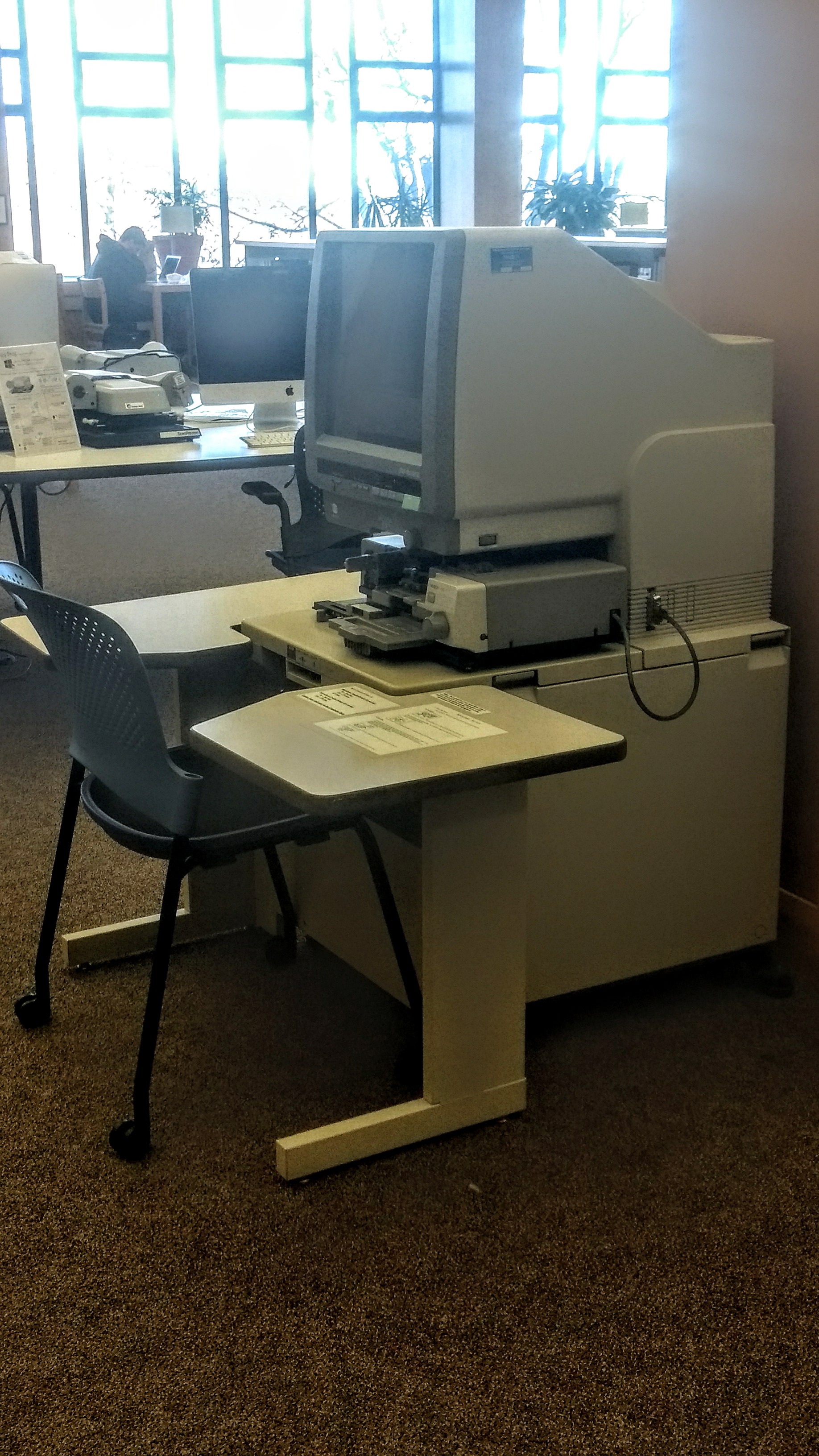
Last year one of our microfilm reader/scanners bit the dust, and we know that our ancient analog reader/printer is one service call away from the junk yard. And oddly enough, our microfilm gets fairly regular use here, so being down to one machine was going to be a pinch. So now, as of last week, we have a new machine.

Our dear old T-Rex
Gemini wasn’t exactly this, but it was a lot like this. (Image from here.

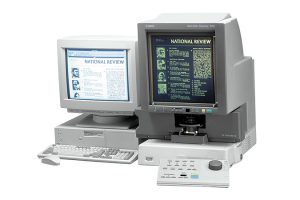
This means that we had to come up with a name for our machine, of course. We’ve been naming our machines for at least the last decade when a former colleague said that our first reader scanner should be called Gemini, because it looked like twins.

Then I said our ancient analog machine should be called T-Rex, because it’s ancient but powerful and a fan favorite.


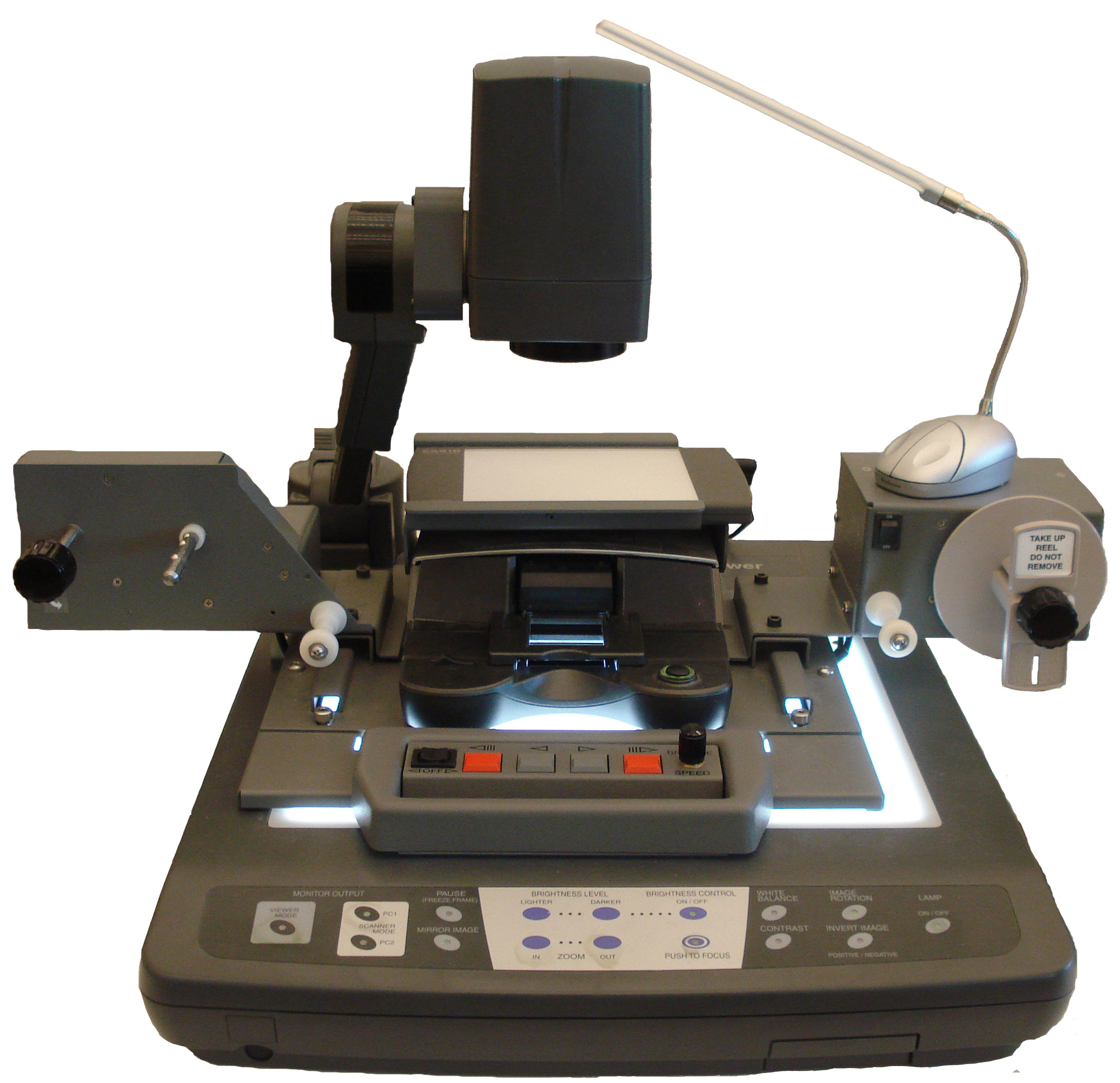
My first year here, we got a fancy new machine that had a silhouette that reminded me of Yoda meditating on a rock, so we called it Yoda. This machine was also mostly a mystery to all who tried to use it, not least because it had no less than 7 on/off switches. Plus a light made to look like a mouse, but wasn’t a mouse, and was actually completely unnecessary unless you were looking at opaque microcards. But nobody could ever remember that. So being simultaneously powerful and utterly mysterious also fit with its name.

You can see Yoda sitting on a rock, right? Right??

Time passed. At some point Gemini was beyond support. And eventually we got a new machine.

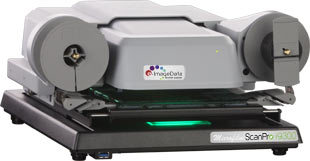
Our next machine reminded one of our campus IT folks of the character Crazy Frog, and the name stuck.

And now, as of last week, we have this new machine which looks almost exactly like Crazy Frog, but it isn’t Crazy Frog, and it will be taking over for both deceased Yoda and (eventually) T-Rex. So we spent some quality time this week naming it, and we ended up merging ideas from another campus IT person and from a librarian in my department. The new name? Yandu-Bot. It’s a robot version of a Yandusaurus. It merges the old and the new. It’s way more automated and powerful than our other machines. And as an added bonus, because it has the letters Y and D in that order in its name, the desktop systems administrator doesn’t have to make any changes to the computer and related systems it’s hooked up to, which all have the letters YD for Yoda.

2 Comments

Result lists as a genre of writing

Idea – by me

I’ve been having a bit of an up-and-down teaching term this Fall — some classes going really well and some falling flat — but one thing that I’ve really enjoyed is that so many of the classes I’m working with are in new subject areas for me, or are taking different approaches than I’ve taken before. It’s felt like everything is new, an experiment, and if I look at it in that light I feel just a little better about the term as a whole.

One recent experiment consisted of actually speaking words in a lower level class that I’ve been mulling over off and on for years but have only ever uttered once in an advanced seminar several years ago. And I think it was ok. I think it was worth the few minutes of time it took, and I’ll think about where I can work it into other teaching I do.

The words? “Result lists are a genre like any other genre of reading. They may look different from tool to tool, but they all conform to certain conventions, and you can read a result list like a type of document, applying genre-specific reading strategies just like you’d approach an article differently than a mystery novel.”

The class I was teaching was of a type that I generally really enjoy: teaching students how to read instrumentally in order to do better research. And we talk about different kinds of reading: skimming, deep reading, and reading instrumentally. In lower level classes this generally involves me passing out a short reading (usually a newspaper or magazine article) and having students work together to generate lists of topics, key terms, and names associated with those topics by reading the article carefully. Sometimes I have them do this with the aid of a worksheet and sometimes I just do it with them on the chalk board.

And this time I added reading result lists as a type of reading that has its own specific place in a research strategy. Result lists come in many forms, but they will all help reveal the range of questions authors seek to answer that involve the search terms you use, patterns in authors or publications that revolve around the terms you used, and clues about the vocabulary of your topic which you can then take note of and use to revise your searches. They are highly condensed, jargonized reference “entries” that teach you a lot about patterns of publication, about vocabulary, and about where you can go next with your searching.

In this particular class I didn’t elaborate on speech genres in general, or explain that they’re “relatively stable types of utterances” that operate within a particular context and reflect “specific conditions and goals” (Bahktin 60). I didn’t even indulge in a geeky digression into the ways that “secondary” speech genres “arise in more complex and comparatively highly developed and organized cultural communication” (Bahktin 61-62). Does this remind you of scholarly communication pathways and norms? Disciplinary discourse conventions? Yeah, me too. But in a 45 minute class with first year, first term students I thought maybe Bahktin was a bridge too far.

Even so, understanding result lists in this way has really helped me, over the years, to get away from the frustration of “failed searches” and become far more comfortable with the idea that spending time opening results here and there and quickly gathering vocabulary and a sense of publishing patterns is one of the quickest ways to arrive at useful results, even if it at first feels like taking detours through a swamp full of weeds. I hope it will help those students, too.

Bakhtin, Mikhail. 1987. “The Problem of Speech Genres.” Speech Genres and Other Late Essays. Edited by Caryl Emerson and Michael Holquist. Translated by Vern W. McGee. Slavic Series. Austin: University of Texas Press. pp. 60-102.

Leave a Comment

Updating URLs after transitioning to the new Primo interface

If you work at a library that has or soon will be transitioning to the new Primo interface, and if you have research guides or other web pages that link into content from the old interface, read on because you may want to consider doing a URL updating project even though there’s an automatic redirect.

First of all, if you link to searches done in regular Primo (not the journals a-z list), those apparently don’t redirect. If you link to items from regular Primo or to Journals list items or searches, there’s a redirect but it takes a long time to resolve — about 25 seconds in my library’s configurations. Long enough for me to click a link, get a drink of water from the fountain outside my office, come back, and still wait a bit for the screen to load. (Plus it flashes through a couple of weird pages including a “zero results” page that just isn’t true.) And finally, the old Journals list didn’t have an option to search by ISSN, so many results (like if you’re looking for the journal Science) were pretty messy. The new platform does have an ISSN search, which is far more accurate for direct linking.

Given all of this, I’m updating every URL from our libguides to our catalog, both to make it resolve directly to the new interface and to have journals resolve to an ISSN search whenever possible. If you want to do something similar you can follow (or improve upon) my process.

Learn how to distinguish between old an new URLs.

The main distinguishing features of my campus’ configuration is that the old URLs contain /primo_library/ and the new URLs contain /primo-explore/ instead. In addition, there are three sub-types of URLs that might be useful to know:

  1. Primo Query URLs (the ones that probably won’t redirect)
    1. Old: [your institution].com/primo_library/libweb/action/search.do?…
    2. New: [your institution].com/primo-explore/search?…
  2. Primo single record permalinks
    1. Old: [your institution].com/primo-explore/fulldisplay?…
    2. New: [your institution].com/primo_library/libweb/action/display.do?…
  3. Primo Journals A-Z list
    1. Old: [your institution].com/primo_library/libweb/action/dlSearch.do?…
    2. New: [your institution].com/primo-explore/jsearch?…

Pull your list of old URLs

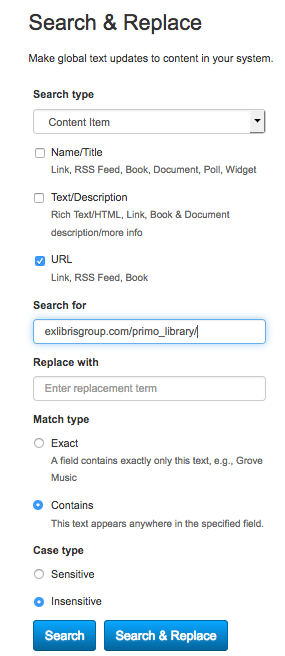
So now you can go into the Search/Replace feature of Libguides and do a search for all content items containing the URL snippet either for all of the old versions, or for each of the three sub-types of the old version, depending on your workflow.

NOTE: You cannot use the Replace feature built into Libguides because the old URLs put search terms at the end of the URL, but the new URLs put the search terms both into the middle and at the end.

So, do your search, and then select all the records Libguides pulls back for your search, and paste them into a spreadsheet. I then delete the messier/unnecessary columns so that I end up with a first column to indicate whether I’ve fixed that URL or not followed by three of the columns that Libguides generated: Asset ID, Asset Type, and Asset Title. (I used Google Sheets for this.)

If you’re like us, you’ll have several hundred links to update, all told. And obviously this will be a lot less painful if you do a project BEFORE starting this project to go through and consolidate multiple copies of links. And unfortunately there’s no automated option to do that consolidation project, either.

Updating Libguides assets

Now the fun part ends and the tedious part begins. Here’s a little screen cast of how I change each link. And if you prefer words, here’s the process:

  1. Have two tabs open: your new Journals A-Z search and the spreadsheet from Libguides.
  2. Click on the link to the Asset ID to open the Libguides record for that asset
  3. Open the asset for editing
  4. Collect the URL and open it in a new tab – you now have two tabs that are “temporary,” the Asset and the Redirected-and-Resolved Primo tab
  5. For journal records, open a record for the correct journal and collect its ISSN
  6. Back in the tab for the Journals search on the new platform, search for that ISSN
  7. Collect the URL from the new platform’s ISSN search and paste it into the Libguides asset’s URL field.
  8. Click “Save” and close the two “temporary” tabs.
  9. Mark the column in your spreadsheet so that you know that this asset has been updated.

For URLs that don’t need any special investigating (figuring out exactly which journal was intended or if there are special limiters invoked in the original Primo search that you need to recreate in the new search, etc) it takes nearly a minute per asset, so it’s definitely a good idea to listen to podcasts or audio books or something while you work your way through the spreadsheet.

Leave a Comment

Best Practices for Groups using Zotero

I was recently asked to write up some best practices for groups using Zotero, and I thought I’d share them here. While the language and specifics of these practices are all Zotero-centric, I’ve done very similar things with Mendeley and EndNote as well, though they don’t have standalone notes, so you have to make a well-named citation and use its notes fields to fulfill similar functions.

First off, it is worth it to pay for storage from Zotero. There are work-arounds using Box, but that adds a layer of complexity that I have seen go wrong when, for example, you have collaborators spread all over the place and not everyone is tech savvy or has library or IT support.

I’ve also seen people register a Zotero account and then share login credentials to that account with a group. This is not a good idea for a bunch of reasons. Everyone should have their own account and then be added to a group library.

With those two things as ground work, here are some things to consider as you launch a group project using Zotero. The larger your group or longer-term your project, the more these practices will matter.

Setting up the structure

  1. Create a space that serves as your “inbox” for new stuff, before it’s processed/corrected/tagged/whatever. That way you can go merrily along collecting collecting collecting, but not mess up the organizational structure or lose your unprocessed stuff in the giant pool of processed stuff. If it were me, I’d make my own personal zotero library into my inbox area, and only move things to the Group library once it had its PDF associated, metadata cleaned up, etc. Alternatively, you could have a tag that you associate with new stuff so that you can gather it all together and process it.
  2. In the main Group library, have a standalone note that describes the workflow of the group and defines how you are using tags, folders, and “related” items in this group. For example, some people use folders for procedural steps and tags for topic categorization, some people do the opposite, and some people do something else entirely. But this note will make it clear to the whole group how folders, tags, and “related” items function in this space.
  3. In the main Group library, have a standalone note for tag definitions. Name it something that will guarantee it’s at the top of an alphabetical list (like _TagDefs). Apply every tag to this note (so that it comes up whenever any tag is selected). In that note, list each of your tags and a brief definition so that everyone on the project knows what it means and how to apply it. Whenever you create a new tag, be sure to update this tag definitions note and then add that tag to the note as well.
  4. In each sub-folder in the Group Library, have a standalone note that describes what that folder is meant for.
  5. If you’re going to use tags systematically, I suggest UNCHECKING the preference that automatically gathers subject headings from databases, because these are all over the place and will clutter up your tag list. All the other check boxes on that main screen of the preferences help, but this one doesn’t unless you really only use one database/catalog and it has good set of subject terms.
  6. Plan on not having too many tags/folders. “Too many” is subjective, of course, but once you get scores of them they become very difficult to scan through and select. They should hit that sweet spot of functioning to gather together useful chunks of items rather than having only 1 or 2 items per tag/folder or having nearly all your items in a tag/folder. Novices to tagging tend to come up with too many, and constantly add new ones, which really doesn’t help with organizing a group library.
  7. It can be useful to have a way of tracking procedures, either using tags or folders. These would be like “needs ILL” or “follow up” (which I use for things where there’s a gold mine of a bibliography that I know I’m going to want to go back to and start looking up and saving relevant items from the references).

Saving/organizing items

  1. Save into your “inbox” space, however you’ve set that up. (Be aware that whatever folder is selected in Zotero, that’s where all your new saved items will go, so check this before going on a saving spree.)
  2. Check all the metadata Zotero pulled in when you save an item. Frequently there are capitalization/spelling/data errors that need to be corrected manually.
  3. If Zotero wasn’t able to pull in the PDF automatically, download and then drag the PDF in (and having the OpenURL resolver set up in preferences can help you with this — and if that didn’t sound like English to you, check out the instructions under “Making the “Library Lookup” option work like the library’s “Find It” button” in the top left-hand box on this guide for an example, though of course Carleton’s URL won’t work for other colleges).
  4. Once you’ve saved and cleaned up your item information, open the list of sub-items (the little triangle next to the item citation in Zotero) and right-click on the PDF, and then select “Rename File from Parent Metadata.” That way the PDF itself will have citation information in its file name, which saves headaches if you download it later on and end up with a million “out.pdf” or “1957ty3593.pdf” files on your computer.
  5. A single item can be saved to more than one sub-folder, which is far better than having multiple copies/versions of a single item.
  6. An often-overlooked function is the “related” function. This can link together versions of the same work, or an item with items it cites/is cited by, etc. In group work this helps other people see the connections that you’ve found between works. (It can be helpful to have a written definition of how people think of “related” so that, for example, someone doesn’t put all the books on cats together as “related” rather than just tagging them with the subject “cats.”)

So basically, the theme of all of this is to make it so that there’s explicit shared understanding of how to use the various functions, and then give every new item the TLC it needs in order to coexist with all the other items.

Have a favorite tip or practice? Leave it in the comments here!

1 Comment
css.php