Skip to content

Pegasus Librarian* Posts

Useful Library Maps

I always forget to use some of the most useful resources at the reference desk. So here’s a reminder to me: maps are useful things, they’re also handily next to the reference desk computer, so remember to use them when appropriate.


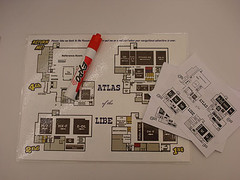
One of my co-workers came up with the brilliant idea of shrinking down our library maps to two sizes. There’s an 8.5×11 laminated size (on which we can write with dry-erase markers), and the note-pad size (on which we can write with anything we want).

These are most useful when you’re deep in a complicated question and another student has a “where is this call number” question, though it’s probably prudent to figure out if the second student understands how to read call numbers in the first place or if it’s simply a matter of figuring out where in the building that call number range might be.

One of my co-workers also put an “x” over the spot where a particular microfilm collection lives in the library and then handed out this annotated version of the notepads to each student in a class that was learning to use that particular collection.

But somehow I always forget about these handy things until just after the student leaves the desk having heard my verbal directions. No longer. I pledge to remember that these maps exist and to use them when appropriate. However, I also pledge not to use them when it seems that the student might benefit with a bit of company down into the stacks. That tramp down the stairs is a wonderful excuse to do a little bit of an extra reference interviewing.

Leave a Comment

It Shouldn’t Have Been This Hard

So, I ordered my iPod, but then FedEx couldn’t find my apartment. After a night spent on the phone trying to explain where I live, and that you can find me on ANY mapping software, they finally delivered my incredibly tiny gadget. Meanwhile I’ve learned that FedEx customer service will hang up on you when they think they have what they need (even when they don’t). I’ve also learned that even if they don’t believe you that the address you gave them is your correct address, they won’t let you change it to something easier unless you contact the sender and get them to send through a re-direct order (which could take a day or two). What’s more, I’ve learned that Apple (which has very kind and helpful customer service people who do not hang up on you) can’t change your delivery address either unless that address is listed as an alternate shipping address with the credit card you used to purchase the item. And finally, I’ve learned that you can’t get “alternate” addresses added to your credit card unless you actually, physically call the card company. And online form would be too easy…

And now, long, long after I would have been in bed after any other 10-hour day, I’m sitting here waiting for iTunes to convert and index all my music. I’ve been at it for hours, but I can’t stop it in the middle of it’s process. (I had no idea I had so much music on my computer! So far I could listen for almost 2 days and nights without hearing the same thing twice.)

So is it worth it? YES! I was able to listen to the first bit of a wonderfully funny book as I worked out today, and the whole getting-fit experience was quite a bit less torturous than usual. I almost can’t wait for tomorrow when I’ll be taking a walk in seriously cold temperatures just so I can hear the next installment of the book.

2 Comments

Anti-Open Access Propaganda: An Institution Under Siege

Could this be a good sign? According to an article by Jim Giles and published by Nature* a “group of big scientific publishers” (yes, you guessed it, Elsevier and Wiley are two of them) and the AAP have decided that they need to actively spread the word that open access publishing is evil. Giles says that emails provided to Nature show a consultant advising the publishers on how best to cast OA as the ultimate destruction of scholarship.

The consultant advised them to focus on simple messages, such as “Public access equals government censorship”. He hinted that the publishers should attempt to equate traditional publishing models with peer review, and “paint a picture of what the world would look like without peer-reviewed articles”.

First of all, public access equals government censorship? What? I get it that traditional publishing models are the backbone of peer review. That’s historically accurate, and I can understand the easy logical sidestep that would move this from “historically accurate” to “state of being.” Latching on to that argument is tactically smart because that’s already what people worry about.

But pros and cons of the argument aside, I’m a little bit optimistic even in the face of this dirty move. If these big companies feel the need to sink money into a consulting firm to help them evade the growing threat of open access, then that means that OA is finally big enough to look like a threat.

The Nature article quotes Barbara Meredith of AAP as saying, “We’re like any firm under siege. It’s common to hire a PR firm when you’re under siege.”

Well, you can’t be sieged by a guy with a knife. It takes lots of pretty dangerous guys make and effective siege. So here’s to those dangerous guys. Siege away.

[Update: The Chronicle of Higher Education has now reported on this issue (subscriber’s link**). In this article Susan Brown reports on a statement issued by the AAP yesterday afternoon that said, “Private-sector nonprofit and commercial publishers serve researchers and scientists by managing and funding the peer-review process.” This statement also mentioned that there “are proposals under consideration” (which wasn’t named) by the government that would “mandate more government involvement” in the scholarly publishing process.

I’ve been unable to find the actual statement to which the Chronicle refers, but it looks like the AAP is doing exactly what their consultant suggested.

I agree with the quote at the end of the Chronicle piece: Heather Joseph of the Scholarly Publishing and Academic Resources Coalition said, “To go from open accessibility to censorship requires a leap of logic.” No Kidding!]

[Update 2: You can subscribe to a feed for the library chatter about this news. Via LibWorm.]

[Yet another update: A response from AAP can be found here. But the heart of the matter is here:

STATEMENT OF THE ASSOCIATION OF AMERICAN PUBLISHERS (AAP) PROFESSIONAL/SCHOLARLY PUBLISHING (PSP) DIVISION

Some commentators have expressed surprise that the publishing industry is making its case about an important issue that could affect the future of research and science. We believe it’s important to be clear about serious unintended consequences of government mandated open access.

Private sector non-profit and commercial publishers serve researchers and scientists by managing and funding the peer review process, disseminating authors’ work, investing in technology and preserving millions of peer-reviewed articles as part of the permanent record of science. Peer review is the complex and expensive system that provides the checks and balances necessary to ensure that what is made publicly available has been verified by experts. Peer review helps keep science independent of politics or ideology. Thanks to publishers, scientists today have more access to more peer-reviewed articles than ever before. We don’t believe there is a credible substitute that can provide the same level of contribution and support to science.

There are proposals under consideration that would mandate more government involvement and put this system at risk. Legislation that would undermine the quality, sustainability and independence of science would have consequences on all those who rely on sound science.

The AAP/PSP will continue to ensure that all sides of the debate are heard.

With that, I think I’m officially done updating this oft-updated post.]

* Giles, Jim. “PR’s ‘pit bull’ takes on open access: Journal publishers lock horns with free-information movement.” Nature. Published online January 24th, 2007. [http://www.nature.com/news/2007/070122/full/445347a.html]

** Brown, Susan. “Publishers’ Group Reportedly Hires P.R. Firm to Counter Push for Free Access to Research Results.” Chronicle of Higher Education. Online. Today’s News. January 26th, 2007. [subscription required: http://chronicle.com/daily/2007/01/2007012601n.htm]
Leave a Comment

Being on the Other Side of Chat Reference

Yesterday I was asked if I could help someone find the first known translation of a Russian short story (from the early 17th century) into German. In no time flat I’d found a bibliography and was composing my email response when I realized she’d asked for first translation into German… not English, and no bibliographies we have would record such a date.

Scrapping that email I wrote another one about using WorldCat to find bibliographies of this author’s works, and then limiting the language to German, because a German bibliography might just record the date she needed. (I don’t think she quite understood my response, though, but that’s another story.)

Anyway, then one of my co-workers pointed out that the University of Illinois has a whole library devoted to modern languages, and they might have such a bibliography. And sure enough, their catalog returned a record for something that looked promising, if only I could read the German. But I didn’t really want to ILL the enter book on the off chance that it contained the date I needed, so I hopped onto their As A Librarian page and, on a whim, chose the chat option. I’ve never been on this end of chat reference, so I was curious to see it in action.

I explained who I was and what I needed, and the librarian was very friendly and helpful, but in the end had me email my request so that she could give it to someone with an actual command of the languages in question.

This more specialized librarian found what I needed in a Russian-language bibliography, even scanning the page from the bibliography (which I still can’t read) so that my patron could see all the information.

What helpful people! And I’ve got to say, I really enjoyed starting out my quest via chat so that I could clarify myself when the librarian didn’t understand what I needed without having to play email tag. By the time I composed the email I was much more confident that I’d be able to write a question that the librarian on the other end would understand.

I’ve always been hesitant to ask for help from people I don’t know. Before library school I had never in my life asked a librarian for help. But every time I have an interaction like this a little more of that old hesitancy dies. World, beware.

4 Comments

“But I’m Not Eating It….”

I just turned away a pizza from the library. We have a “no food in the library” policy, and here was this kid standing 5 feet from the reference desk holding a pizza box that gave off the (heavenly) smell of a hot pizza.

He looked at me looking at him and winced.

I smiled and shook my head at him. He knew better.

His eyes got big… bambi-ish, almost. “But I’m not eating it. I’m just holding it.”

“I’m sorry,” I answered, “But there’s no food allowed IN the library. And that’s in the library whether your eating it or holding it.”

“Aw c’mon….It’s just a box, and I’m just holding it.”

“How about holding it in the entry-way?”

Grudgingly he and his friend proceeded to walk as slowly as I’ve ever seen a student move (and in my experience college students can move very slowly) toward the main doors. Inch by inch they conversed their way farther from me. Half way there they checked back to see if I was still watching them.

I just smiled at them with my cheeriest “thank you” smile.

Utterly defeated, they turned and walked to the entry way. Now they’re sitting there eating pizza.

That’s one more student who will never voluntarily ask me a question…

Related post: Food and Beverage Policy

Leave a Comment

Continuing My Entry to the Late 20th Century

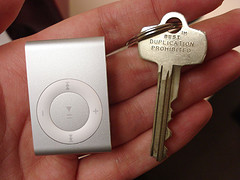
Last summer I finally got myself a digital camera (which has revolutionized the way I document my life and communicate with my family). Today I finally caved to another of my secret desires and ordered an iPod Shuffle. I am now the proud owner of a receipt, which will hopefully morph into an MP3 player by the end of the week. Amazing how that happens.

I’m having trouble keeping in shape during these dark, cold, long Minnesota winters, and I thought that if I could listen to audio books, podcasts, or music I might stick to my exercise routine a little better. At least, that’s the justification I’m using.

I don’t like it that the Shuffle doesn’t have a screen of any kind, but since this is primarily for my exercise schedule I decided that the size and clip design outweighed the lack of a screen. It’s also more affordable.

My only regret is that I didn’t spring for faster shipping…

2 Comments

I Knew It!

Remember last year when I wondered what letter would become popular next? Remember I said it would be “s” for “social?” Looks like there’s a possibility I was right. John Blyberg is working on the SOPAC — the social -er- catalog. And man, oh man, does it look good. And you don’t even have to be a library card holder to participate!

But that’s not even the good part. No, the good part is that he’s made his code public.

So let me be among the first to say, “Me too! Me too! I like this idea too!”

[Update: As I suspected, this is getting major buzz in the biblioblogosphere, so I’ve created two ways to keep up with it. You can see (and subscribe to) the posts I’ve read on the topic here. And you can see (and subscribe to) a libworm search for the topic here.]

1 Comment

Know Your Results Before You Search

Imagine going, money in hand, to a storefront that gives no clue as to it’s merchandise. Will this store sell shoes, food, antiques, or pets? Lined up next this blank storefront are about 50 others, each with a more or less obtuse name, and each with a microphone protruding from it’s door, ready to receive you requests. What would you do?

This is what students face when they first delve into online searching. From long familiarity, most students have a pretty good idea that they’re searching the author’s text of web sites when they choose to request information from Google. Some might even know that authors can supply metadata, but many do not. And most are familiar with the result list as it is presented, and what they can expect to see when they click into a result.

But what about library databases? Some allow full-text searching, some only include citation, abstract, and controlled vocabulary. As the librarian for languages and literature, my primary tool is the MLA International Bibliography (Chadwyck Healey), and this database doesn’t even include an abstract, and the controlled vocabulary is not very evenly applied. (What I would give for MeSH-like terms!) But my students also need to know how to manipulate catalogs and several other databases, including JSTOR, which replaces MLA’s subjects with fully searchable full text. There is almost nothing similar about searching these two databases because everything inside the storefront is fundamentally different. The words you choose, the care with which you construct searches, the results you get… everything changes.

So I’ve begun teaching databases backwards. I start with a record and get the students to understand what’s there and what’s being searched. Then we move back to the result lists and figure out how to leverage a “messy” keyword search by analyzing the results, quickly opening anything that looks remotely relevant, and gleaning search terms that way. Then and only then do we move back to the search interface and I’ve found it takes very little time for the students to understand what’s going on now that they know what they’re searching and what they can conceivably expect to see when they click “Go.”

My favorite question from a student came part way through one of these backwards searching experiences. “Can I use these same ideas in ProQuest?” I answered that she could use exactly this technique to learn at least the basics of any of our databases. But I knew she still had more to ask… “Can I use these same ideas in Google?” She asked. Yes — yes you can.

I need to plant that kid in all my classes.

[Update: Thanks to Mark for pointing out that as I’ve laid this scheme out here, it works best in class situations. But with a little tweaking it also works in “real life” when you confront a new database. See the comments section beginning here for that exchange.]

10 Comments

Possibly Impossible Idea

Walking in to work this morning, musing on staffing and service models for liaison librarians and fumbling for my keys with mitten-encased hands, I decided that our liaison model is doing just about precisely half of what it could do (time, money, and staffing aside). Currently, there is a liaison for each major on campus. Freshmen and Sophomores are encouraged to meet with the liaisons as well, but before they declare a major they may have to figure out new people for every class they take.

Now I’m not saying that it’s bad for students to go to the person most suited to answer their questions. Far from it. But I remember being too intimidated to figure out who the people were who could answer my basic questions when I was a pre-major, let alone re-figure for each class.

But what if each freshman were assigned a librarian at the same time that they’re assigned a faculty adviser. This librarian could be “their” librarian who could do anything from answer basic questions to directing them (and personally introducing them) to the liaison most suited to answer specific questions.

Here’s the major hitch in my plan: 500 freshmen… 7 librarians… Not a good ratio, especially if any of them still needed their personal library adviser by the time they got to sophomore year. We could end up with as many as 1000 students per librarian, plus our students who have already declared majors.

Of course, many students wouldn’t sit down with us more than once (and they’d only come that once if we required it). So it might not be that much more work. And it might be a nice way to personalize the library.

I just don’t know. It was an interesting thought, if nothing else.

Leave a Comment

Blogger Line Breaks Broken

At least now I’ve learned… If I ever include a blockquote, list, or picture in my posts I have to switch over to the HTML editor and insert nice little paragraph tags around all subsequent paragraphs before publishing. That stinks.

Leave a Comment
css.php