Two students have come to me in the last week saying that they listened and understood while taught how to navigate the MLA International Bibliography, but then when they tried it themselves, nothing seemed to work.
This tells me two things. First, MLA is hard. Second, I’m teaching it wrong.
There are caveats, of course. One of them being that my “research for compsing seniors” instruction session is rapid-fire review of things they’ve hopefully learned in lower level courses, plus advanced techniques they’ll need now more than every before. This is the one class where covering a bunch of stuff quickly matters to me (rather than experimenting and playing with a thing or two in class).
On the one hand, perhaps these and similar caveats really do mean that I should be doing lecture/demo, having them do the “workshop” portion of a hands-on class outside of class, and then wrap up with me one-on-one, just as they’re doing. On the other hand, maybe I’m using this as permission to rely on the less difficult instruction format of lecture/demo when really I should be working at finding an efficient hands-on approach to that session. Or maybe I need to rethink the approach of my lecture/demo.
So many options, so little clarity. All I know is that these students didn’t learn what I wanted them to learn, and that’s got to be at least partly my fault.
It’s been an emotionally tumultuous month in my professional life. My profession is all about making information accessible and about encouraging the responsible use of that information. Most of the time this feels like an uncomplicated position to take. Some of the time, it feels impossible or even dangerous. Here are three vignettes that come to mind.
Libraryland is currently wrestling with news of Joe Murphy’s 1.25 million dollar defamation lawsuit against two librarians who spoke publicly about his (long-standing) reputation as a womanizer. Barbara Fister, Meredith Farkas, and Laura Crossett have all written excellent, thoughtful pieces about this issue, so I won’t even try to recreate that here. What I will point out is that they make it clear that sharing information about sexual harassment seems to be off limits in our society. If nobody can speak out, it’s no wonder that harassment continues to run rampant through our society, but speaking out is hard. And right now we’re coming to grips with exactly how hard it can be.
Yesterday I was pointed to a change.org petition from one of my institution’s now-former students. Her claim is that she is being punished with expulsion as an indirect result of calling for help and thus sharing the information of her roommate’s drug overdose. I don’t know any of the students involved, or any information beyond what’s in the petition and in this morning’s student newspaper report, but it’s clear that this incident is sitting right in the center of issues about the relative social benefits and perils of sharing compromising information.
Finally, and on a much less dire scale, my own blog is a continuous example of decisions to share and not to share. I write less often than I once did in a large part because I’m in many more leadership positions than I was before, leaving me feeling uncomfortable sharing some kinds of information for fear of losing the trust of people I work with, not because I have bad things to say but simply because I don’t own these groups’ ideas so they may not be mine to share, and people may not share ideas with me if they feel like I might report things prematurely.
Responsible transparency is hard. It has always been hard. And while the three examples that are bouncing around in my head right now have very little else in common, they’re reminding me pretty forcefully of how unendingly difficult it is to manage appropriate balances of transparency and secrecy. There are very real dangers associated with NOT speaking out. (Well, there’s nothing life-threatening about me deciding not to blog about some committee I’m running, but it might be a slight disadvantage to other people who will then reinvent the same wheels.) I only wish there weren’t also real dangers associated with speaking out. I wish our professional mantra about information wanting to be free weren’t so fraught in real life. Give me a straight up copyright or licensing conundrum any day. This other stuff is far more society-shaping, and there is so much at stake.
Last week was Chronic Illnesses week. Last week was also the first week of classes at my institution, so time and energy for reflective blogging was at a pretty low ebb. But perhaps it’s in keeping with the theme of that week that posts like this happen when the poster is able rather than by some goal written on a calendar.
Morning, noon, and night. I can swallow each set in a single gulp! How’s THAT for a super power.
Like many people I know, I live and work while dealing with a chronic illness. These illnesses come in many flavors — mine happens to be Chronic Fatigue Syndrome. A few years ago, my CFS was so debilitating that I seriously contemplated quitting my job and moving in with my parents to be an invalid on their couch for the remainder of my days, and I honestly hoped that those days would be few in number. I had no realistic hope for improvement and no energy to live. Basic things like chewing were often too tiring to contemplate. Breathing was a chore. Work? I was doing my best, but students were beginning to comment that I looked mostly dead, my supervisor kindly removed me from every project and committee I was on in one fell swoop, and my poor colleagues took up more of my slack than was fair (and did so without complaint, for which I will be forever grateful).
Thankfully, things have improved since then. I can’t work the 60- and 70-hour weeks I worked years ago, but I can put in a full, enthusiastic day at work as long as I don’t do anything else that day. I can’t keep a spotless house, but I can keep a functional one if I work carefully and efficiently. I can’t do a lot of galavanting with friends, but I can make some plans and even keep most of them. And for the first time in 7 years, I have hope that I’ll be able to keep up with life and with work.
Because of the amazing support I’ve received from family, friends, and colleagues, and because of the creativity of my medical team (which includes my unbelievably helpful mom), I’m doing ok.
It’s almost guaranteed that you have someone you work with who is living with a chronic illness of some kind or another, and many of these illnesses are invisible to the casual observer. It’s likely that this person is at the end of his or her rope most of the time, desperately hanging on to some semblance of normalcy. It’s likely that this person is scared and feels like a failure a lot of the time, simultaneously worried about receiving accommodations and about not receiving them, constantly rewriting their sense of self.
You really can make a difference in that person’s life just by being patient, gentle, and kind. I don’t have words to thank the many people in my life who have been and continue to be vital supports for my fragile body and battered psyche. Thank you, from the bottom of my heart. You have made my life possible in the most real sense imaginable.
Every fall, the helpdesk student supervisor and I lead “refresher training” for the IT helpdesk student workers who have shifts at the Research/IT desk in the library. Usually this consists of the two of us talking to the student workers about responsibilities and rules and then helping them figure out the ever-vexing microfilm reader/scanners. Again.
Needless to say, this always goes over super well, especially from 5-6 during the first week of classes. A couple students engage and the rest try not to fall asleep.
For some reason, I’ve had this mental block where I think of “training” as that boring thing that has to be done but that I try never to do when I’m “teaching.” Training is “here is how,” and teaching is something much more engaged and interesting. Turns out? I was wrong.
This year the helpdesk supervisor said “I want to change it up. We should make it interactive.” And I said, “I’ve been wanting to experiment with Poll Everywhere.” And so we ran an almost entirely poll-based training session, followed by a “microfilm race” (each group had to complete one task on one of the three reader/scanners) and it was good. The only thing that we didn’t cover was having every student touch every reader/scanner, and the students got to engage while also participating in their irreverant cohort culture via free-text responses here and there in the poll. Oh, and they still got paid for being there. So while it was definitely still training, I think it was definitely better.
Not being a systems librarian, I hadn’t heard about this change until today. If you are a systems librarian, you’ve probably known about this for a while, but it was news to me so I’m passing it along just in case. Also, the usual disclaimers apply about me not actually speaking Server but working with people who do, so I hope I’m not garbling things in translation.
There are three facts that are coming into convergence soon that will affect people using Innovative Interface’s OPAC but who have not signed on for their upgrade to Sierra.
There is a major transition going on in the web security world from an old version of security (SHA-1) to a new version (SHA-256).
III’s OPAC runs on servers using an ancient operating system (Red Hat 4) that does not support SHA-256.
Beginning near the end of November, Google Chrome will start displaying warnings to users telling them that sites on the old system are not secure. In spring of 2015, Chrome will stop displaying those sites. In 2016 all major browsers will stop displaying those sites.
For III’s old OPAC, users will still be able to use the search interface and see results, but if they try to log in to save records, that functionality will fail.
At my library, we have a discovery layer between most users and the OPAC (we use VuFind), and the functionality there will not be affected.
Luckily, at my library we’re also in the market for a new Library Management System.
We don’t do a lot of collection development in my department, but every once in a while I’m glad we still get choice cards. Otherwise how would my colleague have learned about this exciting new resource!
This summer will be a summer of upheaval in my physical spaces around me. We still have 4 weeks of classes before summer starts here, but the upheaval isn’t waiting for such things as academia.
The academic support center is moving into the library (so exciting! so many possibilities for closer collaboration!). All but 3 Reference & Instruction librarians are moving offices (some into offices that will be newly constructed because of the academic support center moving in and using space that currently has some of our offices in it). Our technical services department (which is having space carved out of it for the displaced reference librarians) is being completely torn up and redesigned. All the lab computers in the library are up for replacement. The stone on the outside of the reference area half of the building has to be torn off and replaced. The stairwell in the reference area has a crack in the wall and needs repair. We’re putting in some new moveable shelves. An area just in front of the library needs to be torn up and rebuilt.
Meanwhile at home, the city is tearing up my street and replacing water and sewer lines and such (and it has become clear that the city doesn’t quite know how any given house gets its water and sewer connection, so confusion abounds).
Any one of these things would make for an adventure, but all of it together? I’ve decided to choose to find everything related to all of this both exciting and hilarious.
Also, if there are any more potential disruptions, this summer is definitely the time to squeeze them in while we’re all helter skelter anyway. Strike while the iron is confused!
At the end of most of my instruction sessions now I ask students to do a combination Metacognitive Exercise and assessment form that consists of three questions: What is one thing you learned that was new and/or helpful? What is one thing that is still confusing or that you would still like to know about? Overall, how satisfied were you with the instruction session (scale of 1-5)?
For my last instruction session I got this response in the “What is one thing you would still like to know” category:
Does researching get easier over time? With practice? Depending on the subject?
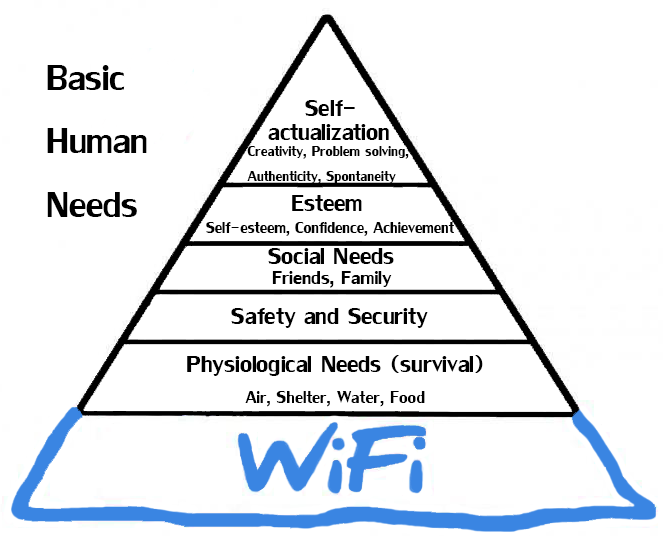
Wifi is like oxygen for so many of us these days. I expect to be able to hop on the internet in public spaces even though I don’t have a smartphone. If I’m in a library, coffee shop, conference hall, hotel, or my house and there’s no wifi, I can hardly concentrate on anything else even if I really wasn’t doing anything on the wifi anyway. And for libraries, as we move more and more of our collections towards e-content, having robust wifi is like having robust shelving for our physical collections — it’s absolutely essential.
But here’s the thing. Robust wifi for people wandering around with laptops in large spaces is technologically really really hard to accomplish, especially given the history and assumptions behind current wifi protocols. Carleton’s network architect (a networking genius and also amazing at explaining things in words I understand), recently attended a conference where he learned the very latest in how to set up more robust wifi networks, and he invited me to attend the debrief presentation he then gave to his IT colleagues. This presentation went over the main points from a talk by Peter Thornycroft of Aruba Networks, apparently one of the great thinkers on this topic.*Here are some of the salient points that you might want to know when talking to your IT folks about wifi in your libraries.
—
Philosophically, network architects have so far been far more concerned about coverage than about speed. When push comes to shove, they say, “Well, nobody will be working at their very fastest, but there’s plenty of wifi for all.” As it turns out, this has been the wrong decision. The nature of network communication is very “bursty.” Each device gets a time slice out of the access point’s attention and then waits while the attention turns to other devices or to the routine housekeeping it has to get done. If the network optimizes for speed, then more happens in each time-slice — more bursty bits of communication or housekeeping happen each cycle — and therefore more devices get along merrily while sharing the access point. The fast devices will get their work done and out of the way faster and leave some time and attention for the slower devices that would otherwise get crowded out.
On the device side, all the decisions are made by the manufacturers, and faster wifi rarely makes it on the priority list. Apple, cell phone companies, etc prefer to put their money into other parts of their products to keep the over all device price point lower. What’s more, when they list their device specs, they list the results of tests that were done in ideal environments (no other devices in range, access point ideally placed, etc). In the real world, devices almost never operate in such a clean network environment. The result: optimizing the network for speed will help get signal to all of these slow devices, and there will never be enough incentive for the solution to come from the device side of the market.
A word about institution- and library-type networks. They are very different from home wifi setups. Your access point at home is made for a stable environment in which it either can or can’t reach your device. It doesn’t know anything about other access points and it doesn’t communicate much about the environment with your client devices. On the other hand, WLANs (wireless local area networks, like those at most of our institutions) are made up of many access points that talk to each other, adjust themselves to maximize their signals as the environment changes, and communicate a lot with the various devices in the area. We’re talking about WLANs here.
When a device moves, a new access point takes over where the old access point’s signal peters out. However, this process is plagued by three issues.
Device manufacturers market their products based on battery life. It costs (slightly) less battery power to lock onto a single wifi signal. Therefore the devices are made to prefer staying in contact with a favorite access point rather than move from access point to access point throughout the day.
Networking, in bygone times, was assumed to be useful in an environment where things didn’t move around. Hence the “sticky client” issue I wrote about previously.
Early on, it was assumed that the client device would be the smartest about its network needs, so the device should choose a favorite access point rather than have the access points choose devices.
How do these issues play out in a WLAN environment?
The 2.4GHz signal carries farther than the 5GHz signal, so as you approach a building your device may glom onto a far-away 2.4GHz signal. Meanwhile, in all but the fanciest access points, having a device access at 2.4GHz will slow down the entire access point for everyone else.
Your computer may not want to let go of a particularly satisfying relationship with an old access point that is no longer in range. This means that you may enter a room and find that you have no signal even though other people there are internetting along quite happily. Your device is refusing to try out a new relationship in hopes of remaining faithful to its lost love.
A well-behaved device would take the access point’s report “you’re getting a little far away from me, so please transfer to this other access point over here” and would do exactly that. What usually happens, though, is that the device hangs on until things get dire and then probes every access point in the area (a lot of wasted time slices and energy) and then chooses a new access point often based on previous familiarity rather than optimal signal. Meanwhile this whole process bogs down the entire network.
How to improve performance given all these issues?
One solution is denser signals (visualized to the right, where each dot is the number of ones and zeros the network can process at a time). If we do the exponential bump-up from a 4×4 network to an awesome 8×8 network more things can happen at once. If Jack has a 3×3 laptop and Jill has both a 1×1 smartphone and a 2×2 tablet, our awesome 8×8 access point could serve both of them in a single time-slice rather than cycling through them one by one. The problem here is that you need more and more signal strength to decode the denser signals, so we’ll need more access points with higher signals strength and greater speed. The problem, of course, is that more access points means that each access point has more neighbors, and neighbors interfere with each others’ signal. So this will be a delicate balancing game.
Another solution is to use software to force clingy devices to allow a handoff to a new access point. In this scenario the network tells a device “Look, you should really move to that access point over there for best results.” If the device doesn’t do as it’s told, the current access point will actually shut off communication, forcing the device to choose a new access point. Carleton’s network has been running this upgrade for a few months now and all indications are that it has helped with performance.
A third solution is to upgrade access points. Older ones simply don’t have the memory or CPU power to handle all the stuff they need to do these days. Also, older access points are only able to handle 1/3 to 1/2 the number of connected devices as newer ones, and people come into our areas these days with a laptop and a phone and maybe a tablet… That’s a lot of devices for a single person. Also newer access points can emit both fast and slow signals so that the entire area doesn’t slow down when one slow device connects.
So those are the main points that I understood from the presentation. There is clearly not enough here for you or me to start improving our WLANs, but hopefully there is enough here that if you’re in conversations with your network folks you may have some context and even some concrete suggestions to offer.
In case you haven’t heard (as I hadn’t) the deadline for submitting feedback on the ACRL Draft Framework for Information Literacy in Higher Education (part 1 and part 2) has been extended. Submit feedback (via SurveyMonkey) by Monday, April 21st at 5pm Central Time.
This document will set the tone for our work for the next several years, so it behooves us to make sure it accurately reflects our work and our learning goals for our students. (In other words: GIVE THEM FEEDBACK because we care about this stuff.)