Skip to content

Category: Services

Wrestling with Reference

In the last few weeks I’ve been part of several conversations with other librarians about reference services. And now that I’m at an academic librarian conference (Hello ACRL!), I’m having even more of these conversations. Some people talk about moving away from the reference desk model entirely, others are conflicted, or shifting the service in various ways. All have very good reasons for making the decisions they’re making.

Like so many things in life, though, I find that there are a lot of unstated assumptions and values at play in these conversations. This morning I attended a great talk about navigating change, and one of the biggest assertions in that presentation was that we have to unpack the words we use when we state our values because our working definitions and the behaviors associated with those working definitions can vary significantly. People may think they’re talking about the same thing because they both say “Openness” or “Respect,” but they’re actually not. And if people think that there are gaps between their experience of your stated values and your working, behavioral definitions of those values, that’s when trust erodes.

This connected in my connection-seeking brain with all the librarian conversations where people decide what kind of librarian you are based on your stance on staffing models for reference desks. Are you That Kind of Librarian who wants to staff the desk “just in case” there are questions, or are you That Kind Of Librarian who “doesn’t value reference?” Whole identities can be decided in a moment on this one issue.

But here’s the thing, if we start to unpack what we actually mean when we talk about “the desk” — just like we use the reference interview to unpack patron needs — I think it uncovers a much more fundamental set of values. These values may or may not be served by a reference service at any given institution, but where a reference desk is not the option, these values still need to be enacted by some other service model somehow.

So here are three of the things that have bubbled to the surface during these conversations I’ve been having in the last few weeks. None of these were true 100% of the time at desks, of course, and none of them will be true 100% of the time in any model. But they are values that I think are key to building and sustaining a research/reference service.

Visible Demonstration of Function (Especially Interest)

Even if patrons aren’t actively seeking out the service or actively learning about support options, they should be able to see you being kind and welcoming and helpful and engaged and excited about other patrons’ information needs. Maybe your patrons will walk past you a million times on the way to and from the printers, or the bathrooms, or whatever, but they become passively aware of the service and its function. And they become passively aware that librarians love the act of information seeking, love the hunt, love the puzzle, and love more than anything else the opportunity to engage with people who are curious or confused and who will have their lives made easier by access to some information or a more nuanced ability to evaluate and use what they have found.

We’re nerds at heart, and pathologically helpful, and we find our reason for existing in the ability to both help people and geek out at the same time. But our “brand” on campus is often much blander than this – much more tied to the mechanics of access. And the only way to help people see that we’re good for more than “My professor said I needed 3 peer reviewed articles…” is for people to see that we’re broadly interested in information seeking and use, information-based rhetoric, and information structures. Without this, we run the real risk of having ever fewer questions, and then cutting services back further, and then having fewer questions… in a vicious cycle to oblivion. And all this not because we’re no longer relevant or whatever, but because people can’t see what we actually do and care about.

Low Barriers to Use

Barriers come in all shapes and sizes, of course, and different people find different things to be barriers. This is one reason to have multiple methods of getting and receiving help.

At least one of these methods should allow people to somewhat randomly get drop-in help without doing a lot of information seeking to find out how to get help or to formally schedule things. Predictable drop-in hours and locations (physical or virtual) that are well matched with people’s existing habits help tremendously with this. So does shared language and modes of engagement that match existing cultures and contexts.

For the librarians: Access to a broad cross-section of questions – especially “basic” questions

We know better what’s working and what’s not, what instruction worked and what didn’t, what tools work and what tools are confusing, etc, by being exposed to as many questions as possible from as broad a cross-section of a community as possible. The questions from just the people who know you already or just the people who specialize in the same things you do are good and important and useful, but more than that is even better.

In a lot of ways, the “easy” questions are more telling than the complex ones if your goal is to keep tabs on what your population finds easy or hard. These “basic” questions may be accommodated by a variety of service models, but they are decidedly not unimportant questions. If anything, they may be the most important questions — the questions that tell us valuable things about tools or services that we haven’t set up right. It’s not the patron’s fault for asking the “wrong” questions — The User Is Not Broken. It’s on us to make it so that, wherever possible, “easy” things are easy for our users, too. Or if we make the decision to opt for a set-up that isn’t strictly the easiest option, we should have well-considered reasons for this choice. In academic libraries, for example, there are times when the better solution is one that helps our students learn things even if it means an extra click or two. But these decisions should be weighed carefully, and monitoring the tenor of these most basic questions is one way of figuring out if you’ve struck the right balance for your context.


These are some of the things that I think lurk beneath the surface for people who “value the desk.” And for people who have moved away from the desk, these are some of things that they have to recreate in their new service models.

What else is lurking? What else do we value in a reference service, no matter that service’s model? What are effective modes of enacting those values so that they are apparent and transparent to our communities? Let’s build an actually articulated definition, and then test our services against that definition.

1 Comment
Updating URLs after transitioning to the new Primo interface

If you work at a library that has or soon will be transitioning to the new Primo interface, and if you have research guides or other web pages that link into content from the old interface, read on because you may want to consider doing a URL updating project even though there’s an automatic redirect.

First of all, if you link to searches done in regular Primo (not the journals a-z list), those apparently don’t redirect. If you link to items from regular Primo or to Journals list items or searches, there’s a redirect but it takes a long time to resolve — about 25 seconds in my library’s configurations. Long enough for me to click a link, get a drink of water from the fountain outside my office, come back, and still wait a bit for the screen to load. (Plus it flashes through a couple of weird pages including a “zero results” page that just isn’t true.) And finally, the old Journals list didn’t have an option to search by ISSN, so many results (like if you’re looking for the journal Science) were pretty messy. The new platform does have an ISSN search, which is far more accurate for direct linking.

Given all of this, I’m updating every URL from our libguides to our catalog, both to make it resolve directly to the new interface and to have journals resolve to an ISSN search whenever possible. If you want to do something similar you can follow (or improve upon) my process.

Learn how to distinguish between old an new URLs.

The main distinguishing features of my campus’ configuration is that the old URLs contain /primo_library/ and the new URLs contain /primo-explore/ instead. In addition, there are three sub-types of URLs that might be useful to know:

  1. Primo Query URLs (the ones that probably won’t redirect)
    1. Old: [your institution].com/primo_library/libweb/action/search.do?…
    2. New: [your institution].com/primo-explore/search?…
  2. Primo single record permalinks
    1. Old: [your institution].com/primo-explore/fulldisplay?…
    2. New: [your institution].com/primo_library/libweb/action/display.do?…
  3. Primo Journals A-Z list
    1. Old: [your institution].com/primo_library/libweb/action/dlSearch.do?…
    2. New: [your institution].com/primo-explore/jsearch?…

Pull your list of old URLs

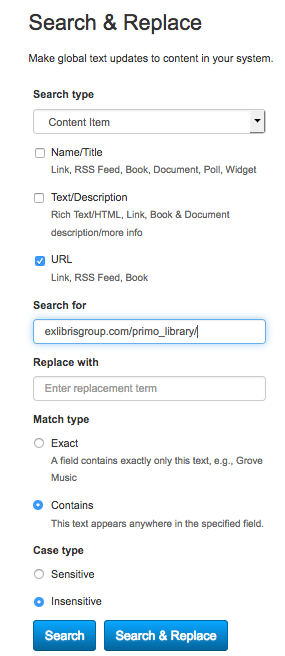
So now you can go into the Search/Replace feature of Libguides and do a search for all content items containing the URL snippet either for all of the old versions, or for each of the three sub-types of the old version, depending on your workflow.

NOTE: You cannot use the Replace feature built into Libguides because the old URLs put search terms at the end of the URL, but the new URLs put the search terms both into the middle and at the end.

So, do your search, and then select all the records Libguides pulls back for your search, and paste them into a spreadsheet. I then delete the messier/unnecessary columns so that I end up with a first column to indicate whether I’ve fixed that URL or not followed by three of the columns that Libguides generated: Asset ID, Asset Type, and Asset Title. (I used Google Sheets for this.)

If you’re like us, you’ll have several hundred links to update, all told. And obviously this will be a lot less painful if you do a project BEFORE starting this project to go through and consolidate multiple copies of links. And unfortunately there’s no automated option to do that consolidation project, either.

Updating Libguides assets

Now the fun part ends and the tedious part begins. Here’s a little screen cast of how I change each link. And if you prefer words, here’s the process:

  1. Have two tabs open: your new Journals A-Z search and the spreadsheet from Libguides.
  2. Click on the link to the Asset ID to open the Libguides record for that asset
  3. Open the asset for editing
  4. Collect the URL and open it in a new tab – you now have two tabs that are “temporary,” the Asset and the Redirected-and-Resolved Primo tab
  5. For journal records, open a record for the correct journal and collect its ISSN
  6. Back in the tab for the Journals search on the new platform, search for that ISSN
  7. Collect the URL from the new platform’s ISSN search and paste it into the Libguides asset’s URL field.
  8. Click “Save” and close the two “temporary” tabs.
  9. Mark the column in your spreadsheet so that you know that this asset has been updated.

For URLs that don’t need any special investigating (figuring out exactly which journal was intended or if there are special limiters invoked in the original Primo search that you need to recreate in the new search, etc) it takes nearly a minute per asset, so it’s definitely a good idea to listen to podcasts or audio books or something while you work your way through the spreadsheet.

Leave a Comment

Boats and Ferries and Bridges, Oh My!: Digital Humanities support models

This morning my coworker Sarah Calhoun and I presented again at the Oberlin Digital Scholarship conference, “Building a Distributed Collaborative Model for Digital Scholarship Support at Liberal Arts Institutions: A Mixed Metaphor Salad.” Our other co-presenter, Austin Mason, couldn’t make it to the session, but he gets the credit for finding and bringing to us the metaphor that drove the session. He’d attended a session by Liz Milewicz of Duke University and gotten permission to reuse her metaphor. And the metaphor in question? Various methods of crossing water from one shore to another. Here’s how we used it.

“Automobile crossing rope bridge. 1923.” Photograph made accessible by the Field Museum Library. http://www.flickr.com/photos/field_museum_library/4462494439/

On occasion, supporting the digital humanities can feel an awful lot like trying to drive a car across a rope bridge. Either the infrastructure is inadequate for the project, or the project chose the wrong infrastructure to use to get across the river.

In an attempt to avoid this unfortunately pairing of project and infrastructure as much as possible, we propose thinking carefully about the infrastructure we put into place, and also about how to communicate clearly with researchers and with ourselves. We want researchers to find and use the right resources for the job, and we want to prevent siloed services that may duplicate effort or cause turf wars. And one way to think through these issues is to map out what’s happening on your campus.

Most campuses will have brave DIY-ers, who cross the river in daring ways using found objects (fallen logs) or special skill/access (base jumpers). These are important parts of creative research on our campuses, but they are not very repeatable or scaleable. They are not a great plan for a support model.

"Simple cable ferry, Gee's Bend, Alabama, 1939" by Marion Post Wolcott.
“Simple cable ferry, Gee’s Bend, Alabama, 1939” by Marion Post Wolcott. https://en.wikipedia.org/wiki/Cable_ferry#/media/File:Marion_Post_Wolcott_- _Old_cable_ferry_between_Camden_and_Gees_Bend,_Alabama.jpg

One of the low-barrier, low-overhead, repeatable methods of crossing might be a rope ferry. These work quite well either solo or with a ferryman, but they may not be terribly stable over time. Perhaps various semi-ephemeral things like free blogs or social media fit here, where researchers can get information up online, but it may not be stable over time if the researcher or the service move in new directions.

"Venezia - Ferry-boat Lido di Venezia"
“Venezia – Ferry-boat Lido di Venezia” https://commons.wikimedia.org/wiki/File:Venezia_-_Ferry-boat_Lido_di_Venezia.jpg

Or perhaps there are more modern ferries available. These are larger, more powerful, and require less effort on the part of the researcher. Maybe something like an institutional subscription to Omeka or WordPress fit here. They were for a lot of people interested in doing a lot of different kinds of things, and support can be pretty standard on campus.

"Brooklyn Bridge Manhattan"
“Brooklyn Bridge Manhattan” https://commons.wikimedia.org/wiki/File:Brooklyn_Bridge_Manhattan.jpg

But if you have a ferry running the same route over and over and over, and if you also have some money and staff for new construction, maybe it’s time to build a bridge. Some schools, for example, have a whole unit or a Center dedicated to supporting digital humanities. Some of these Centers are even iconic, like the Brooklyn Bridge. And I think that depending on the school, a massive, multi-lane bridge with tons of on-ramps and off-ramps might be a wonderful thing.

However, bridges really do require upkeep, they can become bottlenecks, they often have height and weight restrictions, and they may not serve all needs. Researchers are creative beings who may need to start in a different spot, end in a different spot, or get across in unusual ways. So at this point it becomes a matter of project portfolio management.

Vinopal, Jennifer, and Monica McCormick. 'Supporting Digital Scholarship in Research Libraries: Scalability and Sustainability.' Journal of Library Administration 53, no.1 (January 1, 2013): 27-42. doi:10.1080/01930826.2013.756689.
Vinopal, Jennifer, and Monica McCormick. ‘Supporting Digital Scholarship
in Research Libraries: Scalability and Sustainability.’ Journal of
Library Administration 53, no.1 (January 1, 2013): 27-42. doi:10.1080/01930826.2013.756689.

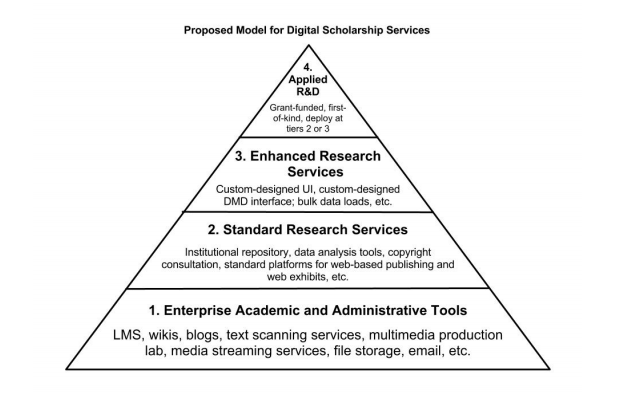
Jennifer Vinopal (who was also this conference’s keynote speaker, though we’d planned to site her even before we knew that), and her colleague Monica McCormick wrote a fantastic piece on “Supporting Digital Scholarship  in Research Libraries: Scalability and Sustainability” in the Journal of Library Administration. In it they recommend having an infrastructure such that the majority of project can use standardized tools that are well-supported on campus. Then allow for creativity by building in support for projects that can mostly use those standard tools but with some standardized consultation services, or with a bit of custom tweaking. But reserve some capacity for a few truly custom projects that will require a lot of support (and try to make sure that these project can be “first of a kind” rather than truly one-off projects).  So perhaps you have a couple of docks for some ferries not far from your bridge, or a landing area for your base jumpers, but there’s communication and vetting involved in committing resources to these special projects.

And no matter your solution, close communication between support and coordination folks will prevent boating collisions, or the building of duplicate bridges. To mix metaphors quite wildly, at Carleton we think of our coordinating folks as a three-legged stool: Library, Humanities Center, and Academic Technology. Representatives from these areas try to make sure that things move forward in a coordinated fashion even when the actual support and work of digital scholarship happens in all kinds of places on campus. We’re calling it a “coordinated distributed model,” and it is still in its infancy. We are currently tackling the question of what infrastructure to build and for whom, which tools will be our standard and which will we cut loose, who will be involved and to what extent, and how will we make sure that people who need us will find us?

Exploring these questions, we handed out blank maps to participants and asked them to depict their campus’ current models, talking in small groups about how things work on their campuses, and comparing with others to find trends and themes.

Feel free to use or make your own. I just drew this sketch of a map on my iPad.
Feel free to use this map or make your own. I just drew this sketch of a map on my iPad. https://drive.google.com/a/carleton.edu/file/d/0B1hW_xoemoVvSklzYmJTNnFzWTA/view

One fascinating thing was that there were three participants from one college, and all three drew different maps. Others drew people drowning in the river, or people standing on one shore and gazing longingly at the distant shore. But one thing that became clear was that whatever infrastructure an institution adopts, it has to fit the local context. There’s no sense sinking a ton of money in a massive bridge if there’s no demand, or just because another school did it. And on the other hand there’s no sense leaving researchers to fend for themselves on campuses where lots of people have a similar need.

Then we handed out new blank maps and asked participants to think about an ideal infrastructure for their campuses over the next 5-ish years. There were so many interesting and useful responses. One person drew a crew of happy inner-tubers (beer implied), and someone at a different table drew one big inner tube. Most had more than one method of getting across. Others had thought about setting up villages or resorts on one side or the other to show the community that would be important, or close communication, or the bringing together of units that are currently separate. The creativity and thoughtfulness in the room was so inspiring!

At the end we asked participants what one thing they wanted to take back or change first at their institutions. My own answer was that I want to hand out blank maps to the people I work with on campus and see what we each think the current model looks like, and where we each hope it might go.

Leave a Comment

Data Management and the Humanities

Humanities Data: Document fragments from church archives in Cuba

This morning my colleagues Kristin Partlo and Sarah Calhoun presented with me on data management plans (DMPs). The session itself was mostly a conversation about some example DMPs from the collection of successful DMPs that was recently released by the National Endowment for the Humanities followed by conversations about how we might talk to faculty (using this DMP template as food for thought). But from this conversation a few themes crystalized for me.

Why would humanists care?

I think we often hear that “sharing the stuff of my research with the world” isn’t a huge motivator in the humanities. I’m not sure how broadly true that is, but it’s true enough with enough people that it bears thinking about. And I have heard skepticism, usually in the form of “nobody else will care about this stuff I’ve collected,” so how do we address that?

Sometimes I think maybe it’s a matter of vocabulary, so talking about creating “an archive” or “a digital collection” might capture imaginations where “manage/share your data” won’t. Even talking about how a bibliography is a described dataset can be useful because humanists are very familiar with practices of collecting, organizing, and sharing bibliographic information, usually at the ends of articles, books, and syllabi, but sometimes independently. Humanists have actually been doing data management since forever when you think about bibliographies. In this context, we care about versions (editions), standardized and encoded “data fields” (so that other researchers know if you’re referring to a title of a chapter, article, or book, for example), durable URLs whenever possible… Bibliographies are rich with descriptive and preservationist practices that can help inform management and sharing of files and information more broadly.

I think another aspect of why Humanists might care involves thinking about sharing with the sympathetic collaborator that is your future self. Your future self will forget the ins and outs of where you put or how you named your image files, or what the columns on your spreadsheet actually mean. Our computers are chalk full of the stuff of our research — PDFs, draft versions, images, audio, video. Knowing where all of those things are requires management of all of that data just so that you can find things again later.

Learn through analogy with the known

Kristin talks about how the monograph is largely self-describing. It has title, author, and publisher information in predictable spaces. There’s the table of contents, often an index and bibliography, and things like introductions and conclusions that describe the book for you.

Then there are style guides and formal or informal glossaries that people adopt, and these serve to help make your data (“data” writ large) understandable and consistent for other readers.

These are things that are familiar, so it’s easier to point to these things and remind ourselves that we’ve already seen the usefulness of self-describing units of scholarship and of somewhat standardized best practices. Now we just need to apply it to the digital stuff we’re working with more and more these days.

And in the past, libraries and archives were the main places that managed the sharing of shareable humanities data (primary and secondary sources), but the sharing involved researchers traveling to those collections (humanities “datasets”) to use them. Now individual researchers can create collections, or use collections without physically traveling from dataset to dataset. But this also means that researchers now have more responsibility to do some of the description and standardization that libraries, archives, and publishers formerly did a lot of. So yes, the work feels different, but it’s built on the same principles that humanists already value.

Formal vs informal data management

One of the interesting themes of our session and all the other data-related sessions I attended is that people talk a lot about the data management requirements of grant-funded projects. Meanwhile, I haven’t supported that work at all, but I have helped quite a few people manage their own individual or collaborative non-grant-funded projects. And I really think that data management becomes much more alive and broadly useful if I think about how the best practices identified and codified by grant funding agencies help us think about best practices for regular, every-day digital life, right down to the daily action of naming and putting a file into a folder on my computer. For me and for the people I’ve worked with so far, formal DMPs are alien things that don’t intersect with my life and research. But the spirit and practices reflected in those DMPs? THOSE I care deeply about. So perhaps shifting language from compliance to best practices, and shifting focus from grants to every day organizational practices, perhaps these things can help make data management less of an alien object that only scientists and social scientists ever touch.

Leave a Comment

Big fun with small data

While I’m on shift this Sunday (during the most glorious fall day we’ve had, on a day that combines Family Weekend and Homecoming Weekend), I played around a bit with our chat reference statistics.

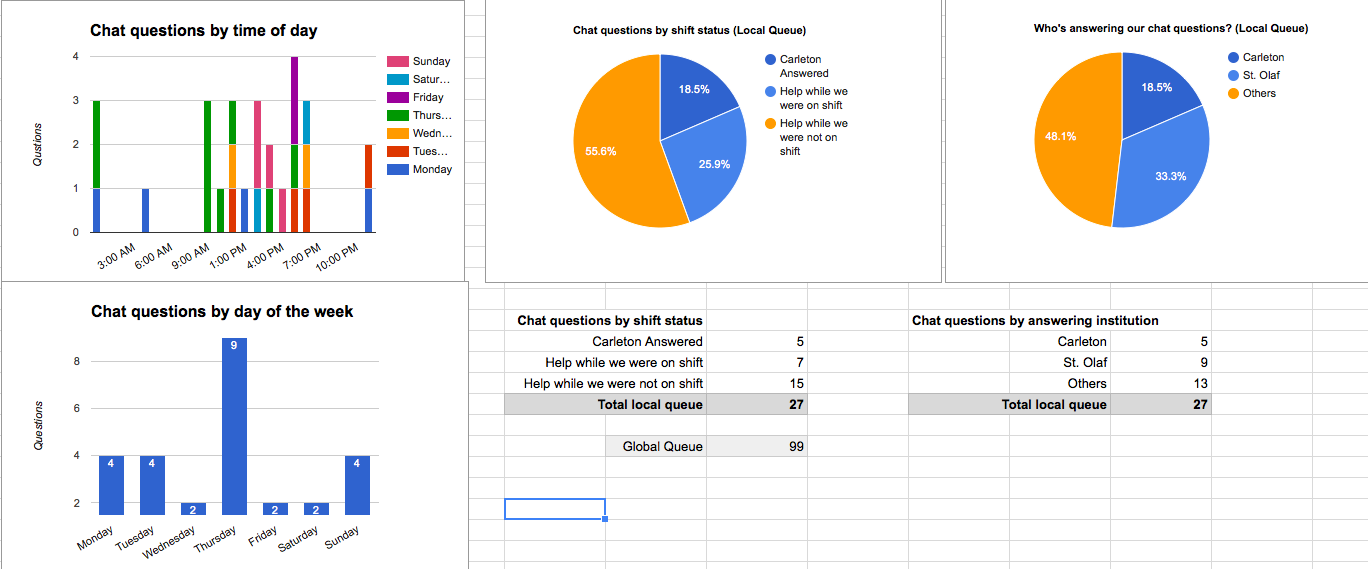
Our students have never really used chat reference much. In part this was our fault (we didn’t have a very friendly chat widget and we didn’t have the unlimited funds needed to have 24/7 reference service) and in part this was because on a small residential campus, the majority of the people who wanted help while we were on staff were already in the library. (That’s what students told us when we asked, and the data from this year bears it out by a slim margin.)  So last year we’d fielded three whole chat reference questions in the first four weeks of school.

This year we’ve switched to QuestionPoint, which means we have 24/7 reference and access to a chat widget that looks a lot more like chat widgets people are used to seeing. Now here’s where the big fun with small data comes in. Because last year’s n was so small, I can say that this year we’ve had a 800% increase in chat questions. Woo!

If we’d changed nothing but the interface, we would likely have answered just the 5 questions that we have answered while on shift this term (66% increase), but the change in librarian coverage has made a huge difference. 15 of this year’s 27 questions were answered while we weren’t on staff, and another 7 question were answered while we were on staff but otherwise occupied. So that’s pretty cool. Usability and coverage FTW!

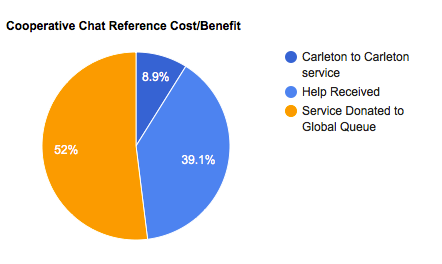
Updated to add: I was curious to see how the service is working from a cost/benefit perspective. We donate a specific number of hours per week based on our FTE, and it looks like the formula is working ok. We have answered 29 questions for other institutions, and between the help the collective has given us us and our own efforts, our patrons have gotten 27 questions answered.

2015-10-11_2246

Leave a Comment

Leveling Up on Chat Reference

Our library recently joined AskMN, the Minnesota cooperative of OCLC’s global QuestionPoint service. On the one hand, this is extremely exciting. We get to donate a few hours per week to the “global queue,” answering questions that people at other academic institutions ask but whose own librarians are either busy or gone for the day. In return, we get 24/7 chat reference service for our patrons provided by the cooperative. Pretty sweet deal!

On the other hand, the experience of providing chat reference services to people I can’t see at institutions I don’t know has been a nerve-wracking and humbling one for me so far. The institutions in the cooperative leave us a cheat sheet of sorts, so we know their link resolver information, their loan rules, etc, so we’re not totally flying blind, but some schools provide more information than others, and some schools have very few resources available in the first place. So every time I hear that “ding” that tells me there’s a new patron waiting in the queue my heart races a little bit, my hands get a bit sweaty, and I’m thrown right back to my very first days staffing reference desks where every approaching patron was simultaneously a thrill and a terror. Will I be able to figure this out with the patron? Will they lose all respect for me if I take a wrong step along the way? The chances of failure seem so very high. Each success is its own day-making victory. And no matter how many successes I have in a week, they all seem to get categorized in my brain as the exception to the rule that I’ll probably fail the next person.

I’ve tried various strategies during my shifts. “I’ll pick up questions that I pretty much know I’ll be able to answer without trouble” didn’t last long. There aren’t many of those, and I don’t want to be a bad colleague and leave everyone else to answer all the questions while I sit on the side being scared. Also, if you take too much time to read and think about the answer before picking up the question, another librarian will swoop in and get it. Or rather, they’ll pick up the ones you wish you could have picked up while the super convoluted questions sit there and sit there, taunting you, explaining your guilt and fear to you in minute detail.

“I’ll pick up any question, without even looking to see what the question is first” also didn’t last long. Basically, I couldn’t make myself do it more than a couple of times because frankly, I’m not a terrific data librarian and that happened to be the subject of one of the first questions I got under this new resolution. Luckily “refer to patron’s institution” exists in QuestionPoint!

Today as I took what I know about databases in general and how they interact with EndNote and slowly, slowly walked a patron in Connecticut through importing references from a database I don’t have and can’t see into an EndNote installation I also can’t see (we did it! Victory!), I realized three things:

  1. The bedrock basics of reference work is the same — even though I feel more like I’m working alone than I do when I’m at our physical reference desk, and therefore more pressure to get the question answered thoroughly all in one shot, I’m actually still conducting the same pattern of work: “Let me get you started, at least, and then set you up with an expert afterwards if needed.” I need to remember that.
  2. Just like in face-to-face reference, a lot of customer service has to do with being good natured and generally cheerful, even if you have NO idea what’s going on (and it turns out that the patron has been secretly clicking on something you didn’t realize he would click on, especially since you said to click on something else, and THAT’S why he keeps saying he doesn’t see what you’re seeing). I always say my job is about 90% bluff (“SURE I can help you find that thing I’ve never heard of…”). The same is true online. I need to remember that.
  3. I really love face-to-face reference in a library I know well. But I can do it other ways too. I need to remember that.
6 Comments

ILL2.0

So, in the bad old days, we shuttled books and articles back and forth between libraries.

Now, in the days of ILL2.0, where much of our collection is electronic and governed by license agreements, we shuttle people back and forth between libraries. “We’re sorry, you’ll have to actually go to St. Olaf to read that. No, we can’t have them print and send a copy. Yes, I know it’s sitting there online, and we have access to the internet from here, too. And yes, I know we’re a consortium with cooperative borrowing privileges. Even so…”

Awesome.

2 Comments

Holy paper reams, Batman

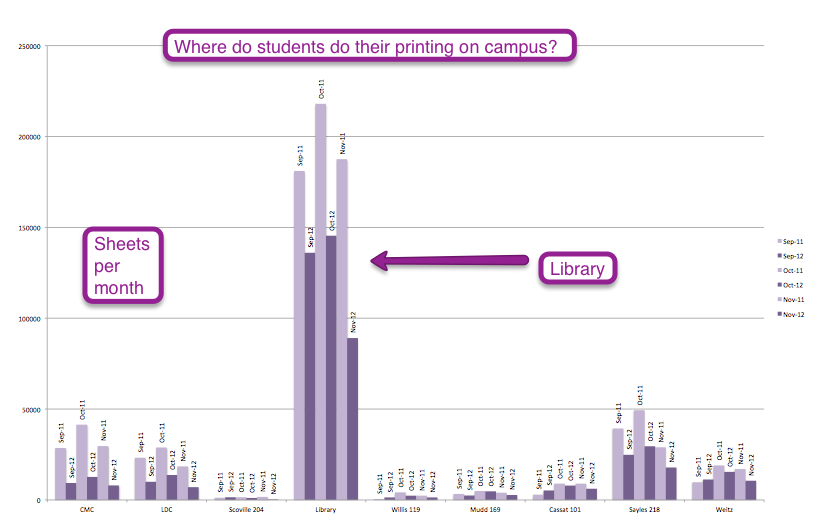
The care and feeding of the library’s public printers takes a lot of our time, both in the library and in ITS. We have a special load-balancing set-up designed to keep individual printers from melting or going up in smoke. We have students who devote the bulk of their time to watching over the printers and emptying case after case of paper into them. A good portion of the meetings I attend and lead have printing somewhere on the agenda. Basically, printing is a big deal.

And now there are graphs to prove it.

libeprinting

There’s a lot of extraneous information in that chart for my purposes since it’s lifted from another report on Fall term printing. But I think the GIGANTIC MOUNTAIN OF PRINTED SHEETS in the middle pretty much speaks for itself.

Where do students print on campus? In the library, that’s where

(p.s. If you’re curious, that’s about 5,300 pages every day of the term, or about 7 pages every minute the library is open, which was a 36% reduction over last year.)

5 Comments

Shooting ourselves in the foot? Again?

It boggles my mind a little that loss of interlibrary loan services is so detrimental to academic library services that it can be cited over and over in an anti-trust complaint as a means of coercing business, and yet we haven’t made more of a stink about the non-lendable nature of the digital collections we’re all building with abandon. At my library well over 90% of our journals are electronic, as are a smaller but growing percentage of our books, and most of these things are not lendable. And we haven’t even gone as digital as a lot of libraries have.

What gives? Is it just because this is all so cool and future-y that we bend over and take our lashes like good little co-dependent gate-keepers? I guess we haven’t learned our lessons yet.

1 Comment

Negotiating Intersecting Worlds

The librarians here at Carleton (and I’m sure at many other institutions) live right on the border between the world of faculty and students and the world of the other staff on campus. Especially here, where librarians are not faculty but tag along to many faculty functions, and where class schedules are not paced to start at the top of the hour, and where we’re involved with many other campus and library staff, we find ourselves having to juggle everything from vocabularies to schedules multiple times per day.

This term we’re trying something a little new. It’ll probably be a little trickier for us, but we’re hoping that it works better for faculty and students. This term we’re reorganizing our reference desk shifts to match up with the class schedule. This means that some shifts start at odd times (like 12:20 or 1:40), which will be at odds with meetings we have with other staff both here and at St. Olaf but which might make it easier for students and faculty to look at our schedules and see where our free time matches with theirs, and it might make it easier for us to visit classes without finding desk subs for 20 minutes or half an hour of our shifts.

Or it could end up just being a pain in the neck. But figuring that out is what pilot projects are all about, right?

3 Comments
css.php