Skip to content

Author: admin

Hello World

You wouldn’t know it to look at this blog, but I’ve really wanted to write more here lately. When I started writing this thing, I could never have predicted how much I’d grow to love the act of writing (I typically hate writing and am embarrassed by it, which you’d probably never know seeing as you mostly only know me through writing, which seems like the biggest oxymoron to me and makes me giggle a little inside every time I think of it). But then, I kind of stopped writing very much here in recent months.

It’s not for lack of things happening or anything like that. As far as I can tell, it started with a sudden surge in readership (which made me suddenly quite shy), coupled with extra-crazy-busy schedules, all of which coincided with my starting to work on projects with people that I didn’t think would be comfortable with their work being blogged. I also had a 6-month slump in energy, which didn’t help any of this stuff.

But I don’t think that’s all of what’s changed for me. I think that fundamentally, this space has changed. For one thing, I’m not a brand new librarian any more, no matter how much I know that I still have a world of expertise to acquire. I’m not constantly figuring out what my place is in this profession like I was when I started writing here. But more than that, like Dorothea I’m finding that changing context is changing everything, and that I’m trying to figure out either how to make this back into my living room or how to come to terms with the fact that it’s not my living room. All of which means that I’m kind of inventing a new purpose and context for this space as I go along. It’s turned far more essay-ish than it was before, with far fewer links, and I’ve felt more compelled to have “complete thoughts” than I used to. And I’m not sure if that’s good or bad or just different, or if I like it or not, but that’s what’s happened.

I’m hoping to step back into this blog and fit it to myself again. I really do miss the burning desire to get home every night and write something. And while I’ll probably never write every day, I think there’s hope that I’ll figure out my contexts, especially now that I’ve taken some time off this summer and have started to feel a little more energetic.

2 Comments

Busy Busy Busy

I don’t know what’s up, but this summer has been crazy busy at work. We’ve had projects and deadlines and research questions and emails and lots of Plan A’s that turned into Plan B’s and then some more projects. I’ve been at work late nearly every night for the past two weeks AND THERE ARE NO STUDENTS ON CAMPUS.

I know I always think that summer will be slower than it is. I always see two an a half months with no classes and think “Ah… I’ll have plenty of time to do all of that and maybe write an article.” I also know that I’m usually wrong. As evidence of this, note my modest (by academic librarian standards) publication count. It’s not for lack of things to say, that’s for sure.

But this summer has felt even more hectic. For a taste, here’s what we’ve done in this first half of the week.

  • We revamped our guidelines on how and what to record and count about our various interactions with students and faculty (reference desk, consultations, and classes). As our services evolved to meet the needs of our campus community, distinctions and practices we used to find uncomplicated now seem a little more confusing, so it was time to discuss some of these trickier scenarios and write down our conclusions so we don’t have to waste time making as many decisions about our statistical collection. In the process, we had to decide what we want to be able to investigate about our services, and how to collect information as accurately as possible and in a way that wouldn’t mess up our ACRL reporting.
  • I took all our discussion notes and actually drafted those guidelines. That took quite a lot of time.
  • We planned and began the planning phase of a pretty big assessment project. (That’s right, we planned to plan. Believe me, this was necessary.) We’re trying to figure out what we can learn about sophomore-level information literacy by reading a subset of the sophomore writing portfolios. This project has monopolized at least half of each day this week, and we have hours and hours more to do this week. If I weren’t deeply intrigued by the project, committed to making it a success, and so so so excited to see what that success looks like, I’d probably resent the amount of time it’s consumed already, before we’ve even gotten off the ground. But instead, it’s become one of those time-intensive projects that seems to energize rather than tire. This is Interesting Stuff, and there’s very little I’d rather be doing.
  • We’re planning to host a librarian from Cornell University, so a couple of us have spent time putting together an agenda for that day.
  • I’ve reorganized the way I keep my calendar (just a little, not a whole lot) so that I’ll be sure to have everything working the way I need it to work when Fall term hits.
  • Research questions don’t stop over the summer, they just get harder. This is when people ask the really hard-to-figure-out stuff. It’s also when I am not forced to find the best I can and then move on with my day, so I find myself obsessing just a little and not letting go of questions that maybe I should.
  • We drafted our departmental goals for the next year. That’s just about as fun as it sounds, but important. We’re getting pulled in many directions these days, so it helps to name our priorities.

And that’s just the stuff I can remember. Meanwhile, at home…

  • My cat spent Monday at the vet. The details are not for the squeamish and involve the words “necrotic” and “abscess” and one very sore paw. Now, twice a day, we get to struggle to decide the questions “Will those antibiotics make it into that stomach? And will the resulting blood on the carpet be yours or mine?”
  • But on the up-side, I’ve gotten completely sucked up in a couple of books, and I try to spend time every morning and every evening on my porch reading and sipping tea. I wouldn’t trade these hours for anything, but they sure do cut into time for things like, for example, sleeping. And eating. Oh, and doing my dishes.
  • I’ve felt like I have my old energy back for the first time in, well, months. I don’t know what was up between January and now, but whatever it was, I hope it’s gone for good.

But since I’ve already been teased for the length of my emails by three people in the last two weeks, I think I’ll stop now. Suffice it to say (which is a coy way to say “that looked like a lot but it wasn’t much, really”), it’s been incredibly busy but mostly in a good way, so I’m pleased.

Leave a Comment

The iPod Touch, One Work Week In

Well, I’ve had a full work week to bond with my new toy, and let me tell you, we are now attached at the hip. It does everything I need it to do and more (unless I’m out of wireless network range, but even then I can see my calendar thanks to the 2.0 version of the firmware). Since people asked me for my impressions, I thought I’d write up this list of pros and cons, and then throw in a my current list of things I had to figure out in order to make it do what I needed.

Pros:

  • pretty much everything
    It’s faster to check my calendar on that than it is on Zimbra, since Zimbra is kind of a slow-loading web app, so I end up using it when I just need to quickly check up on my appointments for the day. And since mobile calendaring was the primary goal of the purchase, I’d call the purchase a grand success. Everything else is gravy. And boy is there a lot of gravy. Email and contacts sync, too, and having web access is so handy. I can imagine taking this down into the stacks and checking call numbers and locations right there with students.
  • Apps
    I loving having Pandora Radio, Evernote, and Twitter apps with me all the time.
  • Lunch break listening
    I like the option of having music and books-on-iPod with me even at work. Sometimes you just need to get away at lunch, plug in, and forget about work.
  • Event notification
    I’ve turned off the sound effects so that it won’t let everyone in the room know when I receive an email or have an appointment coming up, but the screen still lights up and displays allerts about upcoming appointments, which I love.
  • Intuitive, mostly
    Except for the little trick about scrolling with two thumbs if you have to be on a web page that contains a scrolling text box, I never had to think about how to move around and zooming in and out of pages.

Cons (mostly minor… did I mention I love the lil thing?):

  • Battery life
    This is so far the only little electronic thing that I have to charge every day, and I don’t listen to music on it for more than 20 minutes a day.
  • Sounds without granular control
    I’d love to turn off the sounds that tell me I’ve gotten email while keeping the sounds that tell me I’ve clicked something, or that I have an event coming up. Right now, it’s all or nothing with the sounds.
  • Browser flips sideways (easier typing) but most apps don’t
    Typing while the keyboard is squished into the portrait version of the screen can be quite an exercise in precision and aim. It’s much easier when you can flip the screen to landscape orientation, but most apps don’t allow for that.
  • Can’t get to any but my main calendar in Zimbra (UPDATE: see comments)
    This may be just for Zimbra users, but there’s no way to get to calendars other than your default calendar. The web interface won’t let me leave the mobile version, which only shows the default calendar, and the calendar app only syncs with the default calendar. I’ve been in the habit of printing my default calendar to hang on my office door, but if I have to put things like doctor’s appointments in that calendar, I won’t be printing that stuff out to hang on my door. But I think that’s ok. Students and co-workers are much more accustomed to finding schedules online now, so I doubt anyone will miss it.

Things to know to make it work right (from my perspective)

  • Zimbra connection is achieved by setting up the Microsoft Exchange account options (as I noted in my previous post). Using these settings, I can let it sync wirelessly!
  • Two-thumbed scrolling gets you around on web pages that have scroll boxes in them.
  • You can uncheck “open iTunes when you plug this iPod in” for easier work re-charging (since an iPod can only sync with one installation of iTunes, and I regularly work with three to four different computers).
  • You can reorganize the icons on your main screen (as pointed out in the guide that comes with the iPod).
  • Searching google for instructions or apps or anything will go better if you search for iPhone and just realize you don’t have the phone or camera functions. Fewer people are writing about the iPhone’s lesser cousin, the iPod Touch.
  • The little plastic hook thingy that comes with the iPod is a stand. This was not obvious to any of us.
  • Bookmarking things (like google or the library catalog or google reader) is great. Placing icons on the main screen is even better.
11 Comments

Learning about Instruction from Subject Librarians

The past week has served as a clear and present reminder of the value of having subject librarians who are committed to helping students in their disciplines engage with and even contribute to the scholarly work of their chosen areas of study. Partially prompted by a desire to train our new librarian, and partially driven by our constant refrain of “wouldn’t it be nice if we could meet and tell each other about what we each do with our students,” my department met three times between last Thursday and today to do a little show and tell. Over the course of those 6 hours, we showed each other key resources in our areas, walked through pieces of lessons that we’ve developed, talked about common challenges and triumphs, and even did mock instruction sessions for each other. I learned so much.

I had never considered the value of surgical videos in the life of a materials scientist. I love the idea that when you read anything from a record in an index to an article or a book, you have to think about reading instrumentally as well as reading for comprehension. There are always clues to new research topics or subtopics, new search terms, and even information about how the search tool or topic or disciplinary discourse is structured. Reading instrumentally involves paying attention to all these things. I had no idea that we’d just acquired an archive of opera videos and another of dance videos, each of which let you search through rich metadata, create playlists of clips, and turn on a variety of subtitles. I learned a metric brainload about ICPSR, WDI (both online and off), and other key data sources, and how these get used in our curriculum. For example, did you know that Earth Trends is useful for way more than environmental research? I didn’t. But it turns out that in order to study the environment you have to study a bunch of other things, too, so Earth Trends ends up being a kind of statistical compendium. And it cites its sources, so you can figure out who’s publishing data on your topic. And I learned a lot by listening to our History librarian talk about the role of book reviews in research, and how teaching book reviews is a great way to introduce students to concepts like scholarly disagreement or how individual works fit into the broader universe of disciplinary conversation.

I showed a few things, too. I showed my “subversive handout” and my work on teaching scholarly attribution, the problem of controlled vocabulary for my students (since they have to work with the MLA International Bibliography, which relies so heavily on it’s thesaurus), and my lower-level work with students who need to learn about combining terms when performing searches.

Beyond learning really interesting and cool things, though, I was struck by the fact that even though we spend so much time working together, talking together, and sharing strategies with each other, that doesn’t even begin to scratch the surface of our individual stores of subject expertise. We rely on this structure of shared general knowledge backed up by deep subject expertise all the time. For example, I can sit at the reference desk and know that I can help a student get started with research in an unfamiliar area, but that I can (and frequently do) refer that student to the subject librarian for more in-depth help if we have to go beyond my own ability to be of any use. And in instruction sessions, the librarian that deals primarily with upper level social science students relies on the fact that I tend to work with a lot of lower level students, and that I give those students a grounding in some of the basics. We absolutely rely on the fact that we don’t each have to know everything and teach everything, and that our colleagues will be there for us when we get in over our heads with unfamiliar research areas. So our differences really do serve the student population as a whole.

And I feel like I’ve become a better librarian simply by being surrounded by subject specialists. I know more about how to find data and statistics than I did before because I’ve been able to watch our data librarian at work. I’ve learned (and stolen shamelessly from) our History librarian and the way she guides students through the process of finding and using primary sources. And the similar things could be said about any one of the other librarians I work with.

4 Comments

New Toy


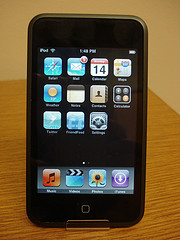
New iPod Touch
Originally uploaded by Pegasus Librarian.

I’m SO excited!!! For the last year my co-workers and I have had no mobile calendars (as I’ve written about at some length). Well, after letting us test both the iPod Touch and the newer wireless Palm, my work decided to let us choose our favorite toy… er… device. I chose the iPod Touch, and today IT CAME. I spent a few hours getting it set up with updated software, registering it with the campus wireless network, and then figuring out how to sync it with my calendar, mail, and contacts. What fun!!!!

By the way, in case anyone else is wondering how to sync Zimbra with an iPod Touch or iPhone and can’t find any documentation from either Zimbra or Apple, no, you’re not insane. The instructions just aren’t out there. What you do is:

  • make sure you have the 2.0 version of the iPod software and the latest Zimbra upgrade
  • set up a new mail/calendar/contacts account
  • select “Microsoft Exchange”
  • and then enter your Zimbra account information

After that, things should work beautifully.

4 Comments

Feeling Like a Celebrity

Everyone should be lucky enough to know a graphic artist! Just hours after I mentioned that my ultimate dream was to have a Pegasus image for my blog header, the amazing Tim Keneipp emailed me an image. I fell in love with that statue Pegasus instantly.

Of course, then came hours and hours of fighting with Blogger to make it sit right on the page (I’m sorry, Tim. I didn’t know it’d be such a hassle). But now each time I look at my blog I think about how talented and generous Tim is.

9 Comments

Doing Something Well

We’ve all heard the phrase “victims of their own success.” An instruction program takes off and suddenly librarians run ragged trying to meet the demand. A web app gets so popular it crumbles under the weight of it’s adoring fans. A person becomes known as Someone Who Gets Things Done Well and suddenly ends up on every committee known to man. These things happen all the time, and they usually throw the person or service into a state of frantic instability followed by an uncertain period where it looks like they won’t be able to escape with their good name intact.

A fair number have seen this happen with Twitter lately. Things got so unstable that finally, last week, a bunch of librarians fled to FriendFeed. I don’t often post about this kind of site, mainly because I’m really not in the market for more followers, but last week this whole saga got me to thinking about what it was we liked about Twitter, what it is that I don’t like about FriendFeed, and how this resonates with similar sagas I’m witnessing elsewhere in my life (namely, the Impending Moodle Bloat, and the Continuing Adventure of the Library Catalog).

Since nobody needs to know everything I think about Twitter and FriendFeed, here’s the key difference as they apply to my needs and my preferences. Twitter does a small set of functions and (when it’s functioning properly) does them well. It concentrates on reverse-chronological order, brevity (which forces a certain kind of creativity), and makes its other features slave to those two governing laws. FriendFeed is intended to aggregate stuff and allow conversations to spring up around that stuff. If I wanted, I could share all my bookmarks and photos and blogs and twitter stream and, and, and… basically anything with a feed and a few things without feeds. It’s kind of like the Facebook of microblogging. You can add all kinds of things to it and it does it’s best to present all that stuff in a way that makes sense. And for me, this overabundance of features diluted the site’s effectiveness (though I know others who love it). It ended up eating up more of my time than I wanted (even after I “hid” pretty much everything that people added to their lifestreams) because I had no good way to mentally mark a conversation as “read” since there might be new comments on it, and while I was reading things the screen might reorganize itself so I’d have to go back and figure out what was new and what was old all over again. Non-static reverse chronological order takes more mental energy than I would have thought.

Well, all of this reminded me of some of the worries I have for Moodle. As people come up with all kinds of new things that it could do and new ways to feed information into and out of it and new roles it could fill, will it lose focus enough to hamper its ability to do core functions well? What are it’s core functions, anyway? As it moves from being a “course” management system to a “learning” management system, will it go through Twitter-ish frantic instability?

And, of course, when I think of systems that try to do too many things and therefore fail to do any one thing well, I immediately think of library catalogs and the ILSs of which they are a part.

So after I’d convinced myself that every application should strive to do one thing or a small set of things, and do those things really well, I realized it’s not that simple. The tricky bit is that not everyone’s workflow and preferences are the same. So how do you build a system with mass appeal that only does a few things?

And since I have no answers for these questions, I’ll leave you to answer them for me while I ponder the temptation to do all things for all people after learning that you do one thing really well.
4 Comments

Toby


Toby
Originally uploaded by Pegasus Librarian.

My family’s dog died suddenly today. I’ve never known another dog like him, and I’m sure I never will again. Until he came along, I thought the stories about dogs who understand full sentences and spend all their time trying to be good were myths. Well, I was wrong. And now I can’t stop crying.

17 Comments

Relaxing


I’m well and truly on vacation and have been all week. And, for the first time ever, I’m taking two weeks of vacation in a row. That’s right. I was on vacation this week, and I’ll also be on vacation next week. Hard to fathom, I know, but it’s true.

It’s not a vacation where I’m doing anything special. I’m mostly sitting on the couch, reading (I have a supply of fiction and a whole stack of New Yorker magazines to read), petting the kitty, watching episodes of Rosemary & Thyme on DVD, and generally being a slug. Today I even took a nap (not one of my talents, and not something I’d planned on doing, but something that ended up being really nice). And you know what? After a full work week spent not working, I’m starting to feel a little bit more like myself again! Maybe this means that next week I’ll have my brains back enough to start my Japanese lessons back up.

Oh! And I’m really excited to learn that we’ll be getting clickers for our library classroom! I’ll have to read up on Knowledge Surveys and see if I can combine what I’ve learned about clicker pedagogy with that kind of assessment. The ideas are bubbling!

Which reminds me, I still need to write about Knowledge Surveys, which I heard discussed very compellingly at the NITLE Moodle meeting I went to earlier this month. Hmmm…. and that reminds me that I still haven’t written much about Moodle and the crossroads I think it’s reached, and there are one or two other topics I haven’t covered yet from last month’s conferences. Maybe next week will be a week of blogging as well as Japanese lessons. Maybe. If I’m not too busy being a slug.

(Image credit: “Hammock” by Listen Missy shared under Creative Commons)

2 Comments
css.php