People tend to see libraries as houses for collections. Sometimes they also see that we’re full of other things, too. People often see librarians as people who know how to navigate the various systems associated with the library. Sometimes they also see that we navigate other things, too.
I see librarians as people primarily attuned to the gossamer threads that connect people, connect information, connect artifacts. What makes those connections vibrant? What kills them? We cultivate our awareness of various kinds of connections, and we study how to pull on the right threads at the right time to foster new connections. We see that these connections mean more than the information bits themselves.
Discrete bits of information are worthless, but they come alive when connected to other information and to a person’s curiosity or need. I don’t want to say that a person without information or social connection is worthless, but I’m also not sure what that existence would actually look like. I can’t imagine it, so I can’t say anything useful about it.
I’ve been thinking a lot about these gossamer threads — where I see them, what they mean — and the more I think about it the more I see the care and feeding of these connections as the foundation of all that we do in libraries. Sure, I connect patrons with books, articles, and artifacts of various kinds, but I also encourage them to see the connections between that work and other works, that author and other authors, that system and other systems. And when I read an article, it turns out that I read it primarily for the ways in which it maps out its connections for me: which words are in the “dialect” of this community of practice? which mechanisms help us name and follow established connections (keywords, subjects, bibliographies, etc)? which works/creators (credited or assumed) form the work’s foundations? which works carried on the conversation afterwards, does this creator know these other creators personally? do they go out for drinks together? do they subtweet about each other? which connections build up the authority of this thing? which connections are ossified into fact or convention and which vibrate with potential for new exploration or embodiment?
And what happens when you put this undulating set of connections next to another set of connections? What gets remapped? What blossoms? What fades?
As a librarian, I know a lot about our search systems, our collections, collections available elsewhere, information flow in an academic context, my community…. But what I really see and tend and navigate all day every day are these gossamer threads. The connections that give everything meaning.
Edited to Add: If you’ve ever supported legal citation, you’ll know why Friend of the Blog, Pete Smith of Sheffield Hallan University, suggested this addition, which I have added to the alignment chart:
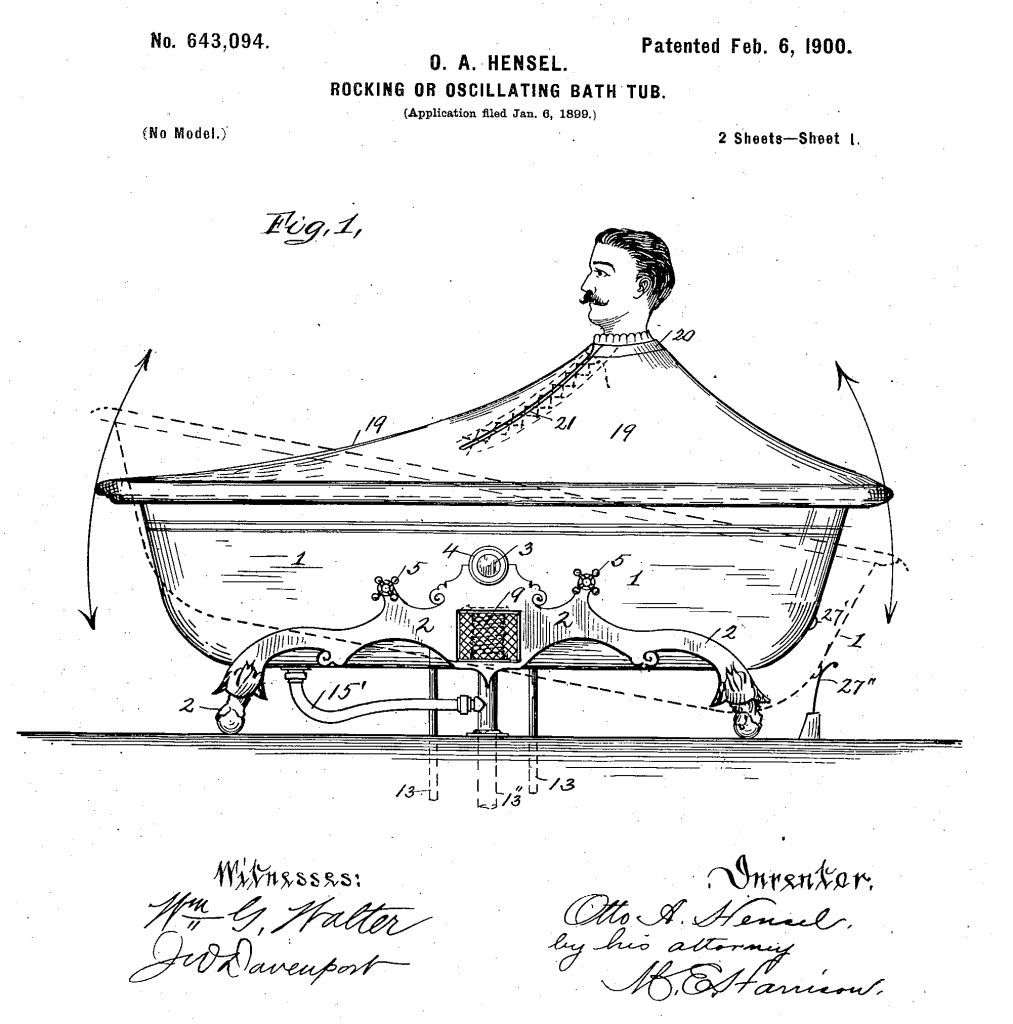
After yesterday’s post I had a fascinating discussion with someone who codes for a living about whether patents were a viable research resource in CS. First off, they’re extremely hard to understand. And yes, I definitely agree, and it’s a good reminder that when I talk about this with students I also talk explicitly about what I expect they’ll be able to learn from the exercise.
Hensel, Otto A. 1900. Rocking or oscillating bath-tub. United States US643094A, filed January 6, 1899, and issued February 6, 1900.
If you find a patent that you think is related to your topic, look at other similarly classified patents to see what problems people are tackling in the field and who is tackling them.
As you look through similarly classified patents, collect vocabulary that you can use in future searches. After all, most search systems simply match letters in a row rather than semantics, so if people are talking about the same thing but using different words to do so, you won’t find that whole side of the conversation.
While reading in order to understand the patented process is probably not feasible for most people, reading instrumentally has been super useful for me when exploring CS topics.
So far so good, but what really set me thinking was this industry coder’s take on the disadvantages of reading patents. Apparently he’s told not to read patents because knowingly infringing on someone else’s IP brings worse penalties than unknowingly infringing. In order to mitigate penalties, they don’t look at patents. So now I’m wondering how to guide students as they prepare for a world in which, at least some of the time, lack of information has value. And how do I square that with the idea of the very real costs involved in having a bunch of people reinventing wheels and falling into the same pitfalls, all so that if they get sued it won’t be quite so bad? And how do I square that with how this upends the progress narrative of the sciences in general, a set of disciplines which so carefully finds gaps in knowledge and then fills them, or finds the limits of current knowledge and then pushes those limits back bit by bit?
I wonder if it matters what sector you’re in, or even what specific companies you’re working for. And I wonder how liberal arts students might engage with this conundrum in a way that prepares them for life after graduation, whether that life involves CS careers or not.
For 14 years, I’ve been a librarian for a pretty cohesive set of language and literature departments. My BA and MA are both in literary criticism, and I studied a few languages (not fluent in any of them any more, sadly), so my core departments have felt very much like home to me.
As you probably know, I also love computer stuff. I’ve never been formally trained in any of it, but I’m a huge fan and an intrepid experimenter. Plus the CS faculty here are awesome and many of them were friends of mine already, so when the chance came for me to be their liaison I said YES. Besides, I could draw parallels from some of the strategies of language research to the strategies of CS research.
But there’s also a lot that’s very very new to me, starting with exactly how information literacy works in CS… You know, just a small thing. Where does information literacy fit into a curriculum that’s full of coding and not a whole lot of traditional literature searching?
Thankfully the faculty here and the absolutely outstanding CS and STEM librarians at the Library Society of the World have been great partners and resources for me in my first year of being the CS librarian. I’ve also made a point of attending as many presentations and functions in that department as I can, listening for how information literacy works in CS. Here’s what I’ve found so far.
Information literacy in CS – Early observations
You’re going to need a good, well-evaluated corpus to train your AI. You kind of have to know what gets included in a corpus, and how, and where that stuff originated from in order to understand what your AI can or should do with the stuff, or to interpret what it spits out. Misunderstanding your corpus can result in wonky AI results. Luckily, librarians happen to have a long history of working with the kinds of things that get included in large text or metadata corpus-type-thingies — finding, evaluating, and using them!
You’re going to need good data to develop your visualizations. I’m learning a lot from our data librarian here. The one thing I found most interesting this past year is that CS students here have high confidence that they can knit datasets together to get what they want, but they have low levels of experience in determining if the datasets in question are built on compatible methodologies and variables. Next year I’ll spend a lot more time emphasizing that I’m not cautioning against combining datasets because the combining is hard — I’m cautioning against it because the thing you create might be the worst kind of chimera.
You’re going to need to think about license agreements and copyright if you’re using stuff that other people built, including APIs. Luckily, librarians have a long history of working with intellectual property topics!
You’re probably going to need to find libraries (the code kind, not the institution kind) or algorithms or code bases to work with. I haven’t really dipped my toes into this water yet, but what I have noticed is that students talk about this process differently than faculty do. Students talk about “looking online” and evaluating for speed, memory needs, and functions. Faculty talk about finding something that will be stable over time, with good documentation and a track record. There are undertones of publisher/author credibility, reliability, and stability threaded throughout. Definitely something for me to think about.
If you want to build something new, you’ll have to know the state of the art, past and present. This is where I’m learning more… and it needs more than a sentence or two, so I’ll give it a couple whole sections.
Finding The Current State of the Art
How do you know that what you’re building is new? And how do you make sure you’re building constructively on what’s already known? Translated into library-speak: What’s the conversation on this topic, and how does this project move that conversation forward? The information need is familiar to me, but the places to find that information are … not. CS has traditional scholarly publication venues, sure, but unlike my other fields, CS draws heavily on conference papers, research and technical reports, and patents. Not only that, but a bunch of stuff is proprietary — decidedly not the case for the latest interpretations of Hamlet.
So I’ve been trying to build up my skills in the grey literature area. Current strategies include using more familiar library databases to find out the names of people, associations, or institutions that are active in an area, and taking that knowledge over to Google for some advanced googling. I’m curious to see if Inspec Analytics turns out to be helpful with this, too, to help me figure out which institutions are active in an area and might have repositories of research and technical reports.
Patents are playing a larger and larger role in my work because that’s one of the only ways I’ve found of peeking into the proprietary research. That’s where company secrets comes right up against the desire to protect IP for future profit. So I’ve been exploring ways of navigating patents and analyzing publication and citation patterns to help me figure out the past and present of a process or topic. Are there key people or companies at play in a particular area? Do those people or companies have other reports available to the public?
Delving into the past to improve the future
There was a fascinating talk here last spring by an engineer working on Non-Volatile Memory. One of her many useful insights during the talk was that back in the 1960s people were working on Mmap, and in the 1980s “Bubble Memory” was set to be the memory of the future. It didn’t become the memory of the future, so most people now don’t know the term or remember the concept, but there are a lot of things about Bubble Memory that are the same as NVM. There’s also a nearly 40-year conversation about developing persistent languages (apparently called “persistent foo,” which is awesome) vs persistent databases. One of the speaker’s points was that finding out these kinds of histories can save people from reinventing wheels, falling into the old pitfalls, and basically repeating history in the worst way.
Of course this set me to wondering how a librarian could coach students in a research strategy to find things that are the similar but not necessarily the same, and that don’t share a lot of keywords. And how would you map out and synthesize what you find in meaningful ways, but as efficiently as possible? So next I think I’ll explore the literature around persistent memory, starting with the specifics this speaker mentioned in her talk, and see which search tools give students a good way to discover this kind of overlap with historical avenues of research. Strategy suggestions welcome!
So much more to learn
Soon we’ll launch into my second school year as the CS liaison, and I have a long way to go before I’ll feel like I really know how information works in this field. What do YOU think I should know in order to be the best librarian I can be for this field?
Things have been pretty intense around here for mumble-mumble years, and for most of the last 3-4 years I’ve been doing more than just my own job while we cover for open positions and run searches and stuff. (There was a lovely 6 months in there while we were fully staffed, but that didn’t last.) But now that my department is fully staffed again I find that my brain isn’t braining very well. Even after a lovely long visit to my family, apparently my brain has more resting to do before it’ll kick back into gear after such a marathon.
While I can’t seem to grapple with programs and ideas and other “big” things, I’m irresistibly drawn to the mundane, the minutia, the system code, and yes, the spreadsheet. Goodbye forest; hello trees.
I find myself looking for things to do that involve spreadsheets or CSS — big things, tiny things, it doesn’t matter. That’s all I want to do these days. Can I make you a pretty button to go around your website link? Please? (Ironically, my own blog is still looking pretty 2012… maybe sometime I should turn my attention to modernizing things around here… and get an SSL certificate.)
Maybe I’m so drawn to these projects because unlike my normal work you can always see change and/or progress while working on CSS or a spreadsheet. Or maybe it’s just that I don’t do a ton with these kinds of things during the school year, so it’s just a chance to change up what I’m thinking about. Whatever it is, I’m basically useless for normal stuff right now, but I have a whole lot of patience and energy for spreadsheets.
If you like to be able to re-use assets easily, you have to be pretty careful not to develop dozens and dozens of nearly identical assets in the Libguides Asset database. Otherwise it’s basically impossible to know which one is THE one you want to reuse. Plus, if a website changes, and therefore the instructions you write into a description here or there changes, it pays to be able to update that kind of thing all in once in one place rather than go through every version of the asset and see if it needs to be updated individually.
Unfortunately, the Libguides system makes it very very easy for duplicate assets to multiply like rabbits. If you copy a box or start from another guide as a template, any asset in that box or guide that you don’t own will automatically duplicate itself. And sure, there are some good reasons to have that as an option, but you don’t have an option in this case — it just happens. Plus as people make guides for last-minute classes or in the middle of working on 16 other things, mistakes happen and people make new assets when they could probably have re-used one. Life happens.
Anyway, all of this means that every summer for the last several years I’ve gone through and done a database clean-up project. I figure out which assets are possibly duplicates of each other, and then I knit the actual duplicates back together into a single “parent” asset. And every summer this means that we go from about 7-8000 assets in our system down to about 6000 assets. And every Fall term we start out with a nice clean database, and sharing is super easy, and it’s a veritable asset utopia… for about 30 seconds. But imagine what it would be like without that reset? The messier the assets get, the harder it is to reuse, and so the messier the assets get.
A few people have expressed interest in replicating or building on what I do, so here are some documents to look over if you’re interested: Our Asset clean-up process, an example of this year’s working spreadsheet, and the rules we’ve made for ourselves in a large part to keep the assets as clean as possible throughout the year. (The Local Practices rules are linked from the main editor interface in Libguides so that they’re handy whenever people are editing.)
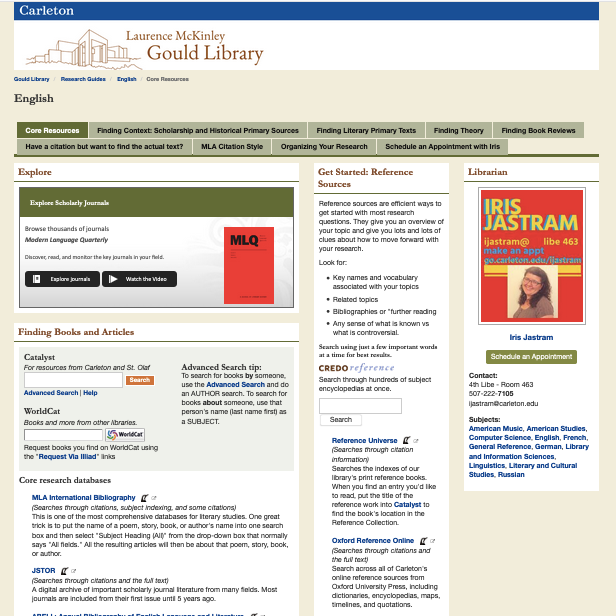
Exciting times here in our local libguides world! Our old look and feel was starting to feel extremely dated to us, not least because it was designed to coordinate with the library website as it looked 2 updates ago. So over the last 2 months we worked through design iterations (and, as always with big projects like this, I leveled up my css skills a bit), and this week our new look and feel went live!
Here’s how things looked for the last few years:
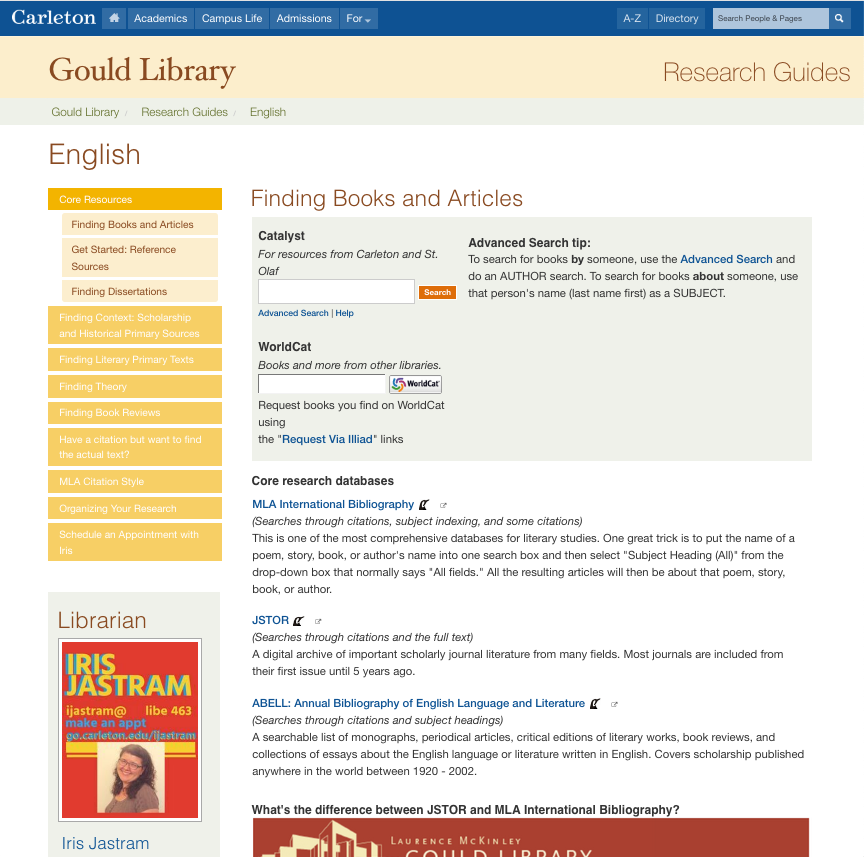
And here’s how things look now:
We’re still fiddling with minor things here and there. For example, I’m still not 100% sold on white text in the side navigation, and there seem to be an unending set of “exceptions to the rule” elements that we keep finding and tweaking. But it was great to go through an accessibility validation and have things come out looking good. And it’s also great to get a lot more design consistency with the college’s website (including a fully functional version of their ubiquitous “Blue Bar” at the top).
I also really enjoyed digging into responsive design a lot more than I have before, so the locally coded elements of our new interface are now fully compatible with all kinds of screen sizes.
As always, if you want me to provide my code, or if you notice something I should improve, please get in touch!
I’ve gotta admit. I love a good spreadsheet now and again. Maybe it’s because they aren’t the only thing I work with day in and day out, but I’m very much a fan of computers doing my grunt work for me, and spreadsheets are very much a part of that picture for me (right along with most of the other light-weight coding I’ve dabbled in).
I’m NOT a fan of using a spreadsheet just because it has columns and rows. Call me a software snob, but if all you need is a table in a document to keep a bunch of text in order, that’s not a spreadsheet. No sense using an extra tool. But if it can automate processes or do your error-checking for you — that my friends is workplace GOLD.
I’ve used spreadsheets to take conference session information as submitted by presenters and wrap each bit up in html, string the html together, and then paste the resulting html into a web page (hundreds of sessions processed in minimal time with minimal human error). I’ve used it to reconfigure 14 years of reference, instruction, and consultation statistics to make the data from various systems from our past match the needs of our new system, flipping people’s names, combining, splitting, reshuffling, and reformatting. The list goes on. If you can teach a computer a pattern, you can probably teach it to do your fiddly work for you.
Case in point: Libguides asset management.
Most of us librarians at this point use Libguides. One of its great strengths is that you can reuse “assets” (links, books, etc) from one guide to another. But over time, duplicate assets multiply like rabbits, and old unused assets clutter up your search results for that one asset you really want to reuse. So over time it becomes easier to make new assets rather than see if that asset already exists in the system. And then you end up in a vicious cycle the spirals your assets out of control and makes one of the great features of Libguides functionally useless.
So every summer I do a big ol’ asset clean-up project. I ask Springshare to delete our unused assets for me (we mere mortals can’t do bulk deletions), and then I work to knit back together all the unnecessarily duplicated assets that have spawned in the system when the librarians either make a new one that already exists or copy boxes or guides to new guides (which duplicates all the assets in the box or guide — asset management hell).
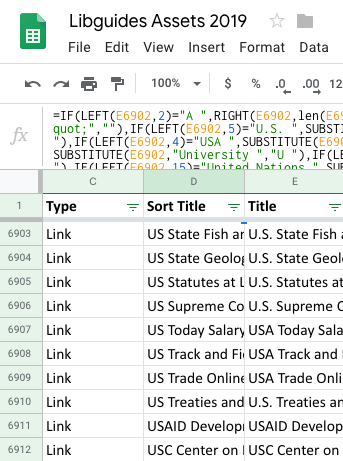
This is where the massive spreadsheet comes in. I need to find all the assets that are actually the same thing, and then map them back together so that they ARE the same thing. And the first part of this is to sort them by name. So I download a spreadsheet of all assets, plunk it into Google Sheets (easier to work on from multiple computers or share with others in the department), and alphabetize by title. But as you may know, neither Libguides nor any spreadsheet software I’m aware of is smart enough to alphabetize by the first “real” word, or to know that “US,” “USA,” “U.S.,” U. S.,” and “United States” are all the same thing. And anything with a quotation mark in front of it will go up into the non-alphabet part of the sort. And the list goes on. Alphabetizing just doesn’t cut it.
So in my google sheet, I add a column for Sort Title, and in the first cell of that column I use a formal to teach it all of the patterns that I know will be a problem with the titles in my asset list. Then I drag that formula down through all 7-9,000 asset records, and Ta-Da! Alphabetizable titles!
I’m a little nervous about sharing my formula for this because I’m a rank amateur and probably used a million IF statements where a simpler solution is possible. But hey, I’m also a rank amateur, so if you’ve never done this you can join me and then improve on what I’ve found! So… if you want to try this out, the basic pattern is “If at the left of the string in the title column you see x string, substitute x string with y string.” The other basic pattern is “If at the left of the string in the title column you see x string, delete it.” If your Title column is in column E, and you’re starting on row 2 (because row 2 is your header row). My current formula, which accounts for the patterns I’m currently seeing in my title list, looks like this:
So, it’s IF(logical statement, result if true, result if false), and in the “result if false” section, that’s where I put the next IF statement. The very last “result if false” is just “show me the full title from the title column” because by that time the title is probably just fine without alteration. Each logical statement here tests the characters at the left of the title column, since that’s what I’ll be alphabetizing on. Then each “result if true” section tells it how to transform those left-hand characters so that they’ll alphabetize properly.
So that’s my spreadsheet love story of the week! I can’t believe that last year I sat there and used successive “find/replace” searches and thought I was being efficient. Live and learn!
I went to a bunch of sessions at ACRL having to do with creating a welcoming space for all patrons, and a couple things stood out to me that are prompting me to change my everyday practice, particularly at the reference desk. The session reported preliminary findings of a qualitative research study of students of color and their experience with libraries and librarians prior to coming to college (conference paper here).
Over the years I’ve unconsciously developed a practice that, if I sat down and thought about it, I would say balances my twin goals of appearing welcoming while also not making patrons feel like I’m surveilling them. I know, for example, that it creeps me out when I’m buying groceries or whatever and the check-out person comments on my purchases, or especially if they mention remembering what I purchased last week. So at work I keep track of how people like me to interact with them, but I don’t notice or remember what they’re studying or checking out or looking at unless they open that conversational door themselves. Sometimes I joke that one of my superpowers is being able to help people with the copier without actually seeing what they’re copying.
And I realized while I was sitting in this session that I’ve adopted a similar practice when it comes to acknowledging people when they walk past me at the desk. If they make eye contact in a way that seems to invite interaction, I’ll smile and greet them. If they don’t, I assume they don’t want overt interaction for whatever reason, so I let them proceed on their way without interruption. Again, I didn’t shape this habit consciously — it just developed over time in response to my cumulative experiences on both sides of a service desk.
This approach comes from a genuine desire to put people at ease on their own terms, but the conference session made me realize that I’ve created another of those situations where good intentions can seriously backfire. There was a theme in the responses from the students of color that “the librarian smiled and greeted the white kid in front of me, but didn’t smile and greet me.” Thinking back to my own practice, I realized that of course if someone is unsure if they belong in the library they won’t initiate interaction with me. Duh. They’ll have their neutral face on, or possibly even a “don’t notice me too much” face on, and in response I’ll put my neutral face on. But here I’ll be valiantly “engaging with people on their own terms,” and they’ll be experiencing me disapproving of their presence in the library.
Clearly I’ve got to adjust my practice — a practice I didn’t even fully know I had until confronted with this mismatch in experiences. And of course there are ways to make people feel welcome without making them feel surveilled. Of course there are ways to be engage proactively without forcing similar engagement from the other person. So now my project is to make this new way of being as habitual as my old way of being was.
It occurred to me recently that we in higher education talk about the curriculum and the co-curriculum, and there are departments and offices and structures involved in making those parallel structures work (hopefully) to the benefit of our students. But there’s another curriculum at play as well — a curriculum that is every bit as fundamental to our institutional learning outcomes as the formal curriculum but that isn’t “owned” by any department and isn’t administered in any systematic way across the institution. I’ve started thinking of this as the “interstitial curriculum.”
The interstitial curriculum is where students learn the intellectual habits and skills that cut across curricular and co-curricular lines. It doesn’t have a home in the formal curriculum, and it can’t happen exclusively in the co-curriculum, either. Instead, it lives in the multiple and cumulative experiences that individual students have as they live out their college experiences through, among, and between the intertwinings of the curriculum and the co-curriculum. Depending on the institution, these are probably things like writing (never something that any single department can teach fully), metacognition, project management, time management, interpersonal “soft” skills, and yes, information literacy.
These are things that might even be named in mission statements or in institutional and departmental learning objectives, or that tons of faculty say are critical … but there’s often no course or formal home for them in the institutional structures that ensure other learning objectives. Everyone relies on students building these intellectual muscles by working with someone else somewhere else in the institution. They may not be sure who or where or when this work happens or should happen, but they really hope that does happen because otherwise their own goals for students in their courses or majors can’t happen, or can’t happen well.
In my own work, I live in the tension between the deeply rewarding, mission-critical work that I get to do with students every day, and the dismissal of some who assume that the work I want to do with their students has surely already been done by someone else at some other time — probably in their first year seminar. I live in a liminal space, where literally dozens of departments on campus list learning outcomes directly related to information literacy, the campus mission and learning goals invoke information literacy, and yet no department has a formal plan to ensure that their students get intentional, scaffolded practice with the intellectual habits of information literacy. And I’m not saying that this is a bad place to be! There are many good reasons at play in this state of affairs. But it does mean that my entire existence feels similar to the work of the fascia in the human body: necessary, often invisible, existing between the better-known structures of the body, not well understood, but instrumental in encouraging and even allowing the intellectual work of the disciplines. I live in the spaces between.
It’s a very, very interesting space to inhabit. Not easy, but interesting.